

Accrual automation is the use of your eBilling platform to send law firms their monthly requests for unbilled work estimates, route each request to the right person, chase late replies, and capture the estimates against the right matters without manual data entry. It replaces the month-end routine of individual emails, returned spreadsheets, and retyping, and it is the accrual step that legal spend management depends on most each month.
The request is the part of the accrual cycle that consumes the most staff time and fails most often. A request sent to a departed associate, a reply that arrives as an unreadable attachment, or a firm that never answers each turns into an afternoon of chasing. This guide covers what can be automated, who requests should go to, how firms respond, the exceptions automation still needs a person for, and how to test it, using SimpleLegal as the worked example.
What is accrual automation in legal operations?
Accrual automation in legal operations is the configuration of your ELM or eBilling platform so that monthly accrual requests are generated, sent, tracked, and captured by the system, with people stepping in only for exceptions. The goal is a cycle where most firms respond on time and their estimates land on the right matters without anyone retyping them.
In SimpleLegal, firms enrolled in accruals receive a monthly email asking for estimates of unbilled work, and they respond through a submission form. Requests stop on a set date, because accrual notifications continue only until the Invoices Accepted Prior To date on the matter record. Estimates are stored against each matter, and the matter’s accruals view shows what each assigned firm submitted over recent periods, ready for accrual data validation before the figures reach finance. Onit’s Counsel Exchange portal can also give firms a spreadsheet template to fill and upload; confirm which approach your environment uses.
Which parts of the accrual request can be automated?
Most of the accrual request can be automated: sending it, routing it, reminding firms, capturing the response, and recording the estimate on the matter. The parts that stay manual are judgment calls about missing, late, or implausible estimates.
- Dispatch. The platform sends requests to every enrolled firm on a set date, covering the matters whose accrual cadence is due.
- Routing. Each request goes to the firm contact designated for accruals, with a fallback when none is set.
- Reminders. Firms that have not responded receive follow-up messages before the deadline.
- Capture. Submitted estimates are recorded against the right matter and firm, ready for review and reporting.
Who should automated accrual requests go to?
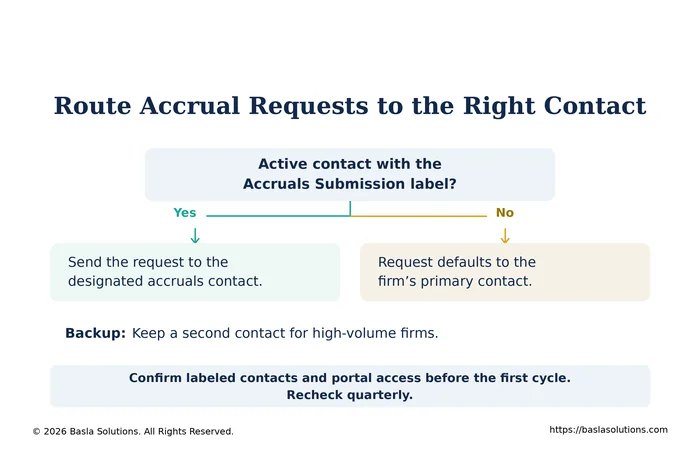
Automated accrual requests should go to a named person at each firm who knows the matter’s unbilled time and is responsible for responding. In SimpleLegal, now upgraded to Onit Unity, that person is the contact carrying the Accruals Submission label, set on the vendor’s Roles tab alongside Counsel Exchange access.
- Designated accruals contact. Usually a billing coordinator who can see work in progress across the firm’s matters.
- Fallback. If no contact carries the label, requests go to the firm’s primary contact, which is often a partner who may not act on it.
- Backup. For high-volume firms, keep a second contact who can respond when the first is unavailable.
Most automation failures start here. Confirm every enrolled firm has a labeled, active contact before the first automated cycle, and recheck each quarter. The firm side of access runs through the portal, and Counsel Exchange, which replaced CounselGO, is where firms submit invoices and respond to requests.
Should firms respond through a form or a returned spreadsheet?
Firms should respond through the platform’s submission form where possible, because it records each estimate directly against the matter with no file to read or reformat. Returned spreadsheets work for firms with many matters, provided the platform reads the file automatically and the firm does not change its layout.
The form suits most firms, especially those with a handful of matters each. A spreadsheet listing all of a firm’s open matters is faster for a firm with 50 or more, since its billing team can fill it from its own systems in one pass. If you offer both, lock the spreadsheet layout and test what happens when a firm adds a column, renames a matter, or returns the file as a PDF. Each of those turns an automated step back into manual work.
How should accrual reminders and deadlines be automated?
Accrual reminders and deadlines should be automated on a fixed schedule tied to your close calendar, with the last reminder landing early enough for your team to chase before review. Firms respond more reliably to a consistent rhythm than to occasional urgent emails.
- First request. Sent well before period end. Unity’s default schedule sends it 27 days before the period end date, with a link to the form.
- Two reminders. Sent only to firms that have not yet submitted, by default 17 and 10 days before period end.
- Escalation list. A report of non-responders at the deadline, so legal operations can call or email the firm directly.
Admins can change those day counts for future periods. Keep the deadline the same business day every month, because changing it from cycle to cycle undoes much of the benefit.
What exceptions do automated accrual requests need to handle?
Automated accrual requests need defined handling for zero estimates, undeliverable requests, partial responses, and late submissions, because these are the cases the system cannot resolve on its own. Each needs a rule your team applies the same way every month.
- Zero estimates. Firms can submit a zero where no unbilled work exists, and a zero should count as a response.
- Undeliverable requests. Bounced emails and departed contacts need a same-day fix to the firm’s billing contacts and a resend.
- Partial responses. A firm that submits for some matters and not others needs a follow-up for the gaps, with a fallback estimate if none arrives.
- Late submissions. Estimates received after review closes should be recorded for accuracy tracking and carried into the next cycle.
Write these rules down and give one person ownership of the exception list each month. Track how often each exception occurs by firm, because the same few firms usually account for most of them, and a short call with their billing team often fixes the pattern for good.
How do you test automated accrual requests before go-live?
You test automated accrual requests before go-live by running a full cycle in a test environment with real contact setups, including the failure cases, and confirming every request, reminder, and estimate behaves as designed. A test cycle with five to eight firms usually covers the main paths.
- Routing tests. Confirm requests reach the labeled contact, and that a firm with no label routes to its primary contact.
- Response tests. Submit estimates through the form, a zero estimate, and, if used, a returned spreadsheet with a layout error.
- Reminder tests. Leave one firm unresponsive and confirm each reminder and the escalation report fire on schedule.
Promote the configuration only once every path behaves as expected, following the same discipline as sandbox to production deployment testing.
Which metrics show whether accrual automation is working?
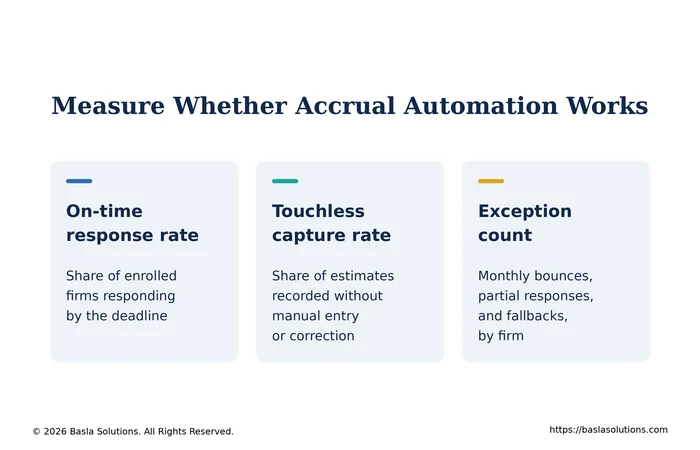
The metrics that show whether accrual automation is working are the share of firms responding by the deadline, the share of estimates captured without manual handling, and the number of exceptions your team resolves each month. Together they show whether the automation is doing the routine work.
- On-time response rate. Aim for more than 90 percent of enrolled firms by the deadline.
- Touchless capture rate. The share of estimates that reach the matter with no manual entry or correction.
- Exception count. Bounces, partial responses, and fallbacks each month, by firm.
Review these monthly for the first six months, then quarterly.
How much manual effort do automated accrual requests remove?
Automated accrual requests remove most of the clerical effort in the monthly cycle, typically the hours spent sending individual requests, chasing replies, and retyping estimates. The effort that remains moves to exception handling and review, which is where your team adds value.
For a department collecting estimates from 30 to 50 firms, manual solicitation often takes one or two people several days each month. Finance cannot wait that long, since a 2025 survey of 100 finance professionals found half of finance teams take six or more business days to close the month. With accurate contacts and a stable schedule, the same cycle can run with a few hours of exception handling. The saving depends on contact accuracy more than on any platform feature.
Conclusion
Accrual automation turns the monthly accrual request from a manual chase into a routine the platform runs on its own. Route requests to a labeled contact with the right access, give firms a simple way to respond, automate reminders on a fixed schedule, define how exceptions are handled, and test the full cycle before go-live. Measure response and touchless capture each month, and keep firm contacts current, because that is what keeps the automation working.
How Basla can help
Basla provides delivery teams for enterprise legal management and eBilling software implementation, covering legal technology consulting, business analysis, accrual and contact configuration, reminder and exception design, test cycle execution, reporting, documentation, and post-go-live support. For automated accruals, that means setting up accruals contacts and access for every firm, configuring requests and reminders, and running a full test cycle including the failure cases.
Basla has delivered matter management and eBilling across more than 10 global jurisdictions, and its delivery bench takes the weight off your team while firms are enrolled and the first automated cycles run.
Frequently asked questions
What is accrual automation?
Accrual automation is the use of an eBilling platform to send law firms monthly accrual requests, route them to the right contact, send reminders, and capture estimates against matters without manual entry. People handle only the exceptions.
Who receives automated accrual requests in SimpleLegal?
Automated accrual requests in SimpleLegal, now Onit Unity, go to the firm contact with the Accruals Submission label and Counsel Exchange access. If no contact has the label, requests go to the firm’s primary contact.
Can law firms submit a zero accrual?
Law firms can submit a zero accrual when no unbilled work exists on a matter. A zero counts as a response and saves your team from chasing a blank.
When should accrual reminders be sent?
Accrual reminders go only to firms that have not yet submitted. Onit Unity’s default schedule sends reminders 17 and 10 days before period end, and non-responders then go on an escalation list.
What should happen when an accrual request bounces?
When an accrual request bounces, fix the contact record the same day and resend the request. Recheck that the firm has an active, labeled accruals contact.
How do you know automated accrual requests are working?
You know automated accrual requests are working when more than 90 percent of firms respond by the deadline and most estimates reach the matter with no manual handling. Track exceptions by firm each month.
*This article is provided for general information only and does not constitute legal advice. Basla Solutions provides legal technology implementation and support services and does not practice law.*