


Managing billing contacts means keeping an accurate, role-based record of the people at each outside counsel firm who receive matter notices, submit invoices, and respond to accrual requests. When those records are current, eBilling runs quietly. When they drift, invoices stall, accrual estimates go missing at month end, and nobody notices until a finance close or a firm complaint exposes the gap.
This guide uses SimpleLegal, now upgraded to Onit Unity, and its Counsel Exchange portal as the worked example, because both expose the contact, label, and access settings that decide where firm communication goes.
What does managing billing contacts involve?
Managing billing contacts involves four tasks: recording the right people at each firm, assigning each person a functional role, granting them the platform access that role needs, and testing that notifications actually arrive. It starts at vendor onboarding and continues for as long as the firm stays on your panel.
The work is small per firm and large across a panel. A department with 40 active firms may hold 120 or more external contacts, and several of them will change every month as associates leave, billing coordinators move, and firms restructure their finance teams.
Why do billing contact gaps cause missed invoices and accruals?
Billing contact gaps cause missed invoices and accruals because every automated request in an eBilling platform is addressed to a stored person, and the platform cannot tell that the person has left. An accrual request sent to a departed associate produces no estimate, and your month-end figure quietly understates outside counsel liability.
The same failure shows up in other places. A matter assignment notice reaches someone who has no Counsel Exchange login, so the firm cannot see the matter. An invoice rejection lands in an unmonitored inbox, so the firm resubmits the same error two weeks later. Each of these looks like a firm performance problem. Most of them trace back to the contact record.
Which billing contacts should every law firm record hold?
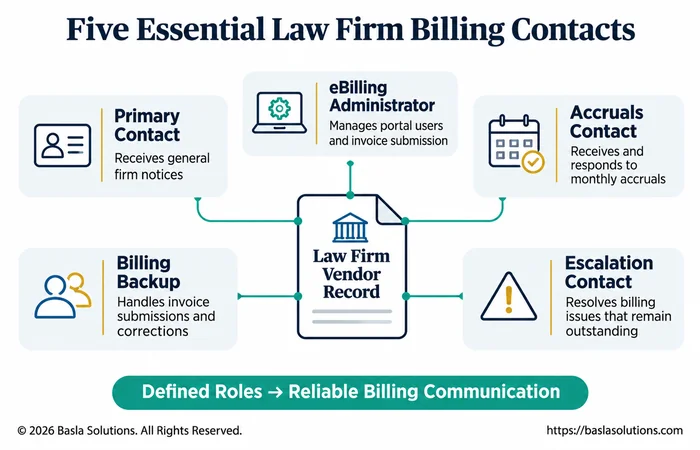
Every law firm record should hold a primary contact plus named contacts for each billing function, so no single departure stops the flow of invoices or accrual estimates. Strategic and high-volume firms need at least one backup for each critical role.
- Primary contact. The firm’s central point of contact, stored on the vendor record at onboarding and used as the default recipient for most notices.
- eBilling administrator. The person who manages the firm’s Counsel Exchange users and owns invoice submission on the firm side.
- Accruals contact. The person who receives monthly requests for unbilled work estimates and submits them on time.
- Billing backup. A second billing coordinator who can submit or correct invoices when the main contact is out.
- Escalation contact. A relationship partner or practice lead you contact when billing issues stay unresolved for more than one cycle.
One person can hold several of these roles at a small firm. The record should still show each role separately, so a single change updates the right function.
How are vendor contacts stored in SimpleLegal?
Vendor contacts in SimpleLegal, now Onit Unity, are stored on the vendor master record. When a vendor is added, the record captures a contact who serves as the firm’s central point of contact.
Additional firm contacts are created on the vendor’s Roles tab, which holds each person’s name, email, Counsel Exchange access, admin status, and labels. Only Unity admins can add Counsel Exchange users, and each person should have an individual email address, since shared role mailboxes weaken security and the audit trail. Contact records are also a fraud target, and business email compromise caused close to $2.8 billion in losses reported to the FBI in 2024. Keeping every contact on the vendor record gives you one place to update when someone leaves.
How do contact labels route accrual requests in SimpleLegal?
Contact labels route accrual requests in SimpleLegal by marking which firm contact should receive the monthly request for unbilled work estimates. A contact receives these requests when it carries the Accruals Submission label and has Counsel Exchange access.
- Accruals Submission label. Applied on the vendor’s Roles tab, when the contact is created or later through Edit, it designates the person who receives the monthly estimate request.
- Required access. The labeled contact needs Counsel Exchange access, or the label alone does nothing useful.
- Fallback routing. If no contact carries the label, the request goes to the vendor’s primary or default contact.
The fallback is a safety net and a hidden risk at once. Firms expect fast payment, and billing data from about 400 law firms shows average payment times fell from 62 to 50 days in 2025, so a request lost in the wrong inbox stands out. A primary contact who is a partner may receive accrual requests for months and ignore them. The accrual side of this setup is covered in accrual automation for monthly requests and reminders.
What Counsel Exchange access do billing contacts need to submit invoices?
Billing contacts need Counsel Exchange access to submit invoices, check invoice status, and view the matters your department has assigned to the firm. Before the first billing cycle, confirm invoice submission is enabled for the vendor and grant Counsel Exchange Admin to at least one firm contact.
- Invoice submission enabled. Confirm the vendor is set up to submit through the portal before go-live, whatever access its users hold.
- At least one Counsel Exchange Admin. The admin manages the firm’s own users, so your team stops fielding every login request.
- Agreed submission format. Counsel Exchange accepts LEDES files, PDF invoices, and manual entry, so agree the format with each firm and confirm the billing contact can produce it.
Readers newer to the portal can start with how Counsel Exchange replaced CounselGO as Onit’s outside counsel portal. The file requirement matters too: LEDES is the standard file format for law firm electronic invoices, and some smaller firms need help producing it.
How should matter assignment notices reach the right firm contact?
Matter assignment notices should reach the firm contact who will staff or bill the matter, which means checking the recipient each time a vendor is assigned. When you assign a vendor to a matter in Unity, you choose the assigned vendor and a vendor lead, and the matter becomes visible to the firm in Counsel Exchange. Check who the assignment notice reaches in your environment, since it often defaults to the vendor record’s main contact.
For larger firms, the primary contact may sit in a central office that forwards slowly or not at all. Add the responsible partner and the billing coordinator as extra recipients, and include internal matter contacts so your own team sees the same message. Build the recipient check into your assignment procedure.
How do you test billing contact routing before go-live?
You test billing contact routing before go-live by triggering each notification type for a sample of real firms and confirming the right person received it and could act on it. A sample of five to ten firms, including your largest and one small firm, covers most routing patterns.
- Matter notification test. Assign a test matter, send the notice, and confirm the firm can open the matter in Counsel Exchange.
- Accrual request test. Confirm the labeled accruals contact receives the request and can submit an estimate.
- Fallback test. Remove the label from one test firm and confirm the request reaches the primary contact.
- Invoice submission test. Have the firm submit a test invoice in its agreed format and confirm it appears for review.
How do you keep billing contacts accurate after go-live?
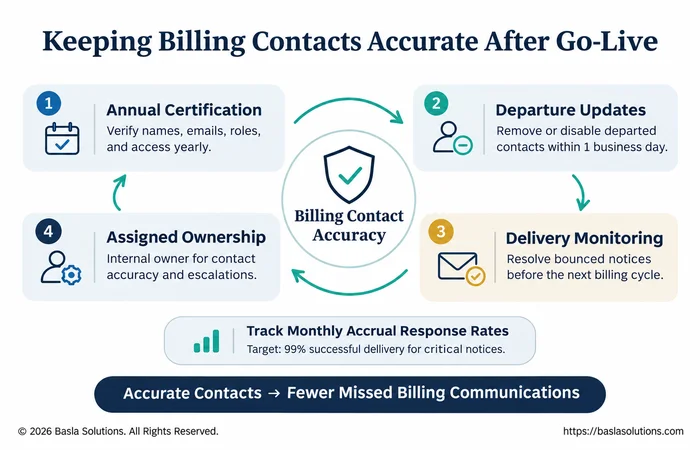
Billing contacts stay accurate after go-live through scheduled certification, fast removal of departed contacts, and an owner who watches for failed deliveries. A contact list that is right at go-live will be measurably wrong within six months unless someone maintains it.
- Annual certification. Ask every active firm to confirm names, emails, roles, and access at least once a year and after any major staffing change.
- Same-day departures. Remove or disable a departed contact within one business day of notice, and reassign their labels before the next billing cycle.
- Bounce resolution. Resolve every bounced billing or accrual notice before the next monthly cycle, and target 99 percent successful delivery for critical notices.
- Named internal owner. Give one person on your team responsibility for contact accuracy, with an escalation path when a firm stops responding.
Track the monthly accrual response rate by firm. A sudden drop is usually the first visible sign of a contact problem.
Conclusion
Managing billing contacts is an operational discipline that decides whether your eBilling platform actually reaches the people it depends on. The settings themselves are simple: a primary contact, functional labels, Counsel Exchange access, and invoice submission enabled. The value comes from testing every route before go-live and keeping the records current afterward. Firms experience your eBilling program through the messages they receive, and accurate contacts make that experience predictable for both sides.
How Basla can help
Basla provides delivery teams for enterprise legal management and eBilling software implementation, covering legal technology consulting, business analysis, vendor and contact configuration, accrual and invoice submission setup, notification testing, documentation, and post-go-live support. For billing contacts, that means building the contact and label model, enabling Counsel Exchange access firm by firm, and testing every routing path before your first billing cycle.
Basla has delivered matter management and eBilling across more than 10 global jurisdictions, and its delivery bench takes the weight off your team during firm onboarding, when contact work peaks.
Frequently asked questions
What does managing billing contacts involve?
Managing billing contacts involves recording the right people at each law firm, assigning each a functional role, granting the platform access that role needs, and testing that notifications arrive. It continues for as long as the firm stays on your panel.
Who receives accrual requests in SimpleLegal?
Accrual requests in SimpleLegal, now Onit Unity, go to the firm contact with the Accruals Submission label and Counsel Exchange access. If no contact carries that label, the request goes to the vendor’s primary or default contact.
How often do accruals contacts receive requests?
Accruals contacts receive email requests for unbilled work estimates every month. Each request needs a response before your finance close, so track the response rate by firm.
What do law firms need to submit invoices through Counsel Exchange?
Law firms need invoice submission enabled for their vendor and at least one firm contact with Counsel Exchange Admin access. Counsel Exchange accepts LEDES files, PDF invoices, and manual entry.
How often should law firm billing contacts be verified?
Law firm billing contacts should be verified at onboarding, at least once a year, and after any major staffing change at the firm. Departed contacts should be removed within one business day of notice.
What happens when a billing contact leaves a law firm?
When a billing contact leaves a law firm, requests sent to them go unanswered until the record is updated. Remove the contact, reassign their labels and access, and confirm the replacement receives the next request.
*This article is provided for general information only and does not constitute legal advice. Basla Solutions provides legal technology implementation and support services and does not practice law.*