


Legal budgeting software gives a legal department one place to set matter budgets, collect law firm estimates of unbilled work, and report spend against plan in a form finance can use at month end. Onit handles all of that inside its ELM as part of Onit legal spend management, on the same records that hold your matters, firms, and invoices. A 2024 survey of 669 chief legal officers found 52 percent of legal departments had received a cost-cutting mandate, and a mandate is hard to meet when you cannot see where the budget stands.
How do you manage legal budgets and accruals in Onit?
Onit works as legal budgeting software by managing budgets and accruals on the record that links a law firm to a matter, called the Vendor Assignment to Matter, so every budget and every monthly estimate belongs to one firm on one matter. That level of detail is what lets you see which firm is over plan and what each one owes you in unbilled work.
In our implementations, we set budgets and accruals at this matter and firm level on every build. A matter with two firms then shows two budgets and two accrual lines, and finance can trace a liability to the firm that created it.
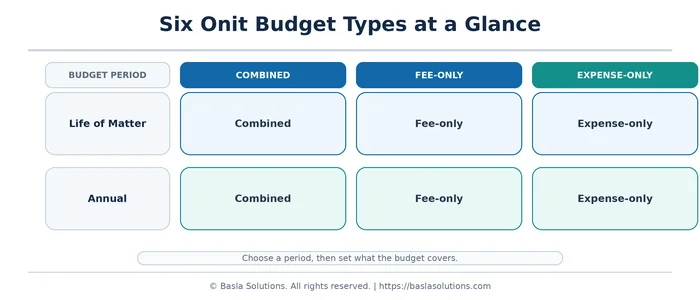
Onit offers six budget types, built from two periods and three scopes:
- Life of Matter. One budget for the whole engagement.
- Annual. One budget for each fiscal year.
- Scope. Each period comes as a combined, fee-only, or expense-only budget.
Accruals are switched on with a Require Accruals checkbox on the vendor record or on the individual firm assignment. When it is on, Onit runs a monthly accrual process for that firm automatically, per its accrual configuration.
How are budgets set on a matter or by phase in Onit?
Budgets are set on a matter in Onit either by an internal manager entering the figure directly, or by requesting a budget from the law firm and approving what it proposes. Phase budgets use budget templates, so a litigation matter can carry separate figures for each stage of the case.
- Client budgets. A legal manager uses Add Budget on the firm assignment, picks the budget type, and enters the amount.
- Collaborative budgets. The manager uses Request Budget from Vendor, or answers yes during firm assignment, and Onit emails the firm’s billing contact a secure link to propose fee and expense figures.
- Phase budgets. Templates split the budget by litigation or transaction phase, and the UTBMS task codes on each invoice line track actual spend against each phase.
We required Matter Manager approval on every firm-proposed budget. If a proposal comes in high, the manager rejects it with a comment and the firm receives an automatic email explaining why. We also had firms submit budgets before billing authorization was issued, so the estimate is agreed before work starts.
Firm budgets submitted in a different currency from the matter failed auto-approval, so we limited collaborative submissions to the matter’s own currency. Phase tracking broke when firms used non-standard task codes, which we fixed by enforcing standard UTBMS code validation on upload. The choice between formats is set out in collaborative legal budgeting, which compares life-of-matter and annual budgets.
How do law firms submit budgets and accruals through CounselGO?
Law firms submitted budgets through CounselGO or BillingPoint and secure email links, and they submit monthly accruals by returning a spreadsheet that Onit emails to them. In our implementations the firm portal was BillingPoint, and since September 2026 Counsel Exchange has replaced BillingPoint and CounselGO as the portal firms use, so confirm with Onit where your firms now enter budgets. The email routes we used work with any portal:
- Budgets. The firm’s billing contact receives an email with a secure link to a budget form, enters fee and expense figures, and the submission routes to the Matter Manager for approval.
- Accruals. Onit generates a spreadsheet listing the firm’s open matters, emails it to the firm, and the firm replies with unbilled fees and expenses filled in.
- Approvals. Every firm-proposed budget waits for the Matter Manager, and a rejection emails the firm the reason.
A firm with 30 open matters reports them all in one file, without logging in to 30 records. The catch was edited headers: firms renamed columns, and the automated import failed. Locking the header cells and adding a manual upload button for administrators solved it.
How is budget variance tracked and reported?
Budget variance is tracked in Onit’s legal budgeting software with calculated fields on the matter page that compare each budget with approved invoices and show the remaining balance in real time. The same figures roll up into Onit reporting dashboards, so you can see variance by practice area, department, and law firm.
In our implementations, the matter header showed the total budget against the invoice total, the external budget against externally budgeted invoices, and the budget remaining, which is the total budget minus approved invoices. Dashboards in the GC, matter, and vendor analytics suites then reported spend against budget across the portfolio.
Multi-currency matters caused the hardest problem. Approved invoices in a second currency were subtracted from the budget without conversion, and the header showed negative balances on healthy matters. We fixed it by converting every invoice to the matter currency at the spot rate before the subtraction, using currency functions in Onit’s Liquid templates.
- Make remaining budget visible. Put the budget remaining field on executive dashboards, so high-variance matters surface months before year-end audit.
- Warn before the overrun. Alerts at thresholds such as 75 and 90 percent of budget give the matter owner time to act, which is the logic behind budget variance warnings that catch legal overruns early.
- Compare firms. Rank variance by firm on similar matter types, so a firm that routinely underestimates shows up in the numbers.
How does finance consume accrual data from Onit at month end?
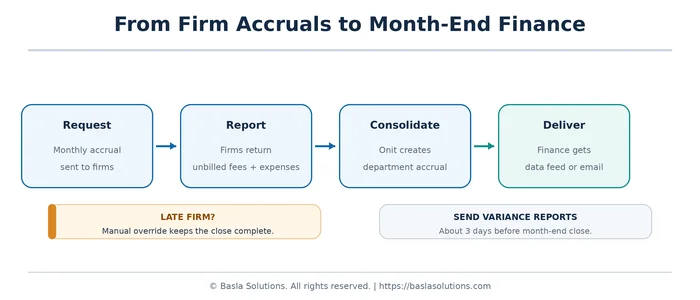
Finance consumes Onit accrual data at month end through an automated export to the data warehouse or ERP, and through scheduled email reports sent to finance mailboxes. Both run from a department accrual record that totals every firm’s monthly submission.
In our implementations, a monthly Add Accrual Process action creates the department accrual record, which collects a monthly accrual request for each open matter and firm. Finance then receives the output in one of two ways:
- Data feeds. Scheduled ETL jobs export the accrual tables to the corporate data warehouse or to finance systems such as Coupa, Oracle, or SAP over SFTP.
- Email reports. Onit’s scheduled email reports send a monthly accrual summary spreadsheet to the regional finance team.
- Manual override. Legal operations can enter or finalize a figure for any firm that misses the deadline, so finance always gets a complete number.
We aligned both feeds with the fiscal calendar and sent variance reports about three days before month-end close. Late firm submissions were the main risk to the close. The full close cycle is set out in a monthly legal spend accruals process for legal ops.
How do flat fee and AFA budgets work in Onit?
Flat fee and AFA budgets work in Onit through fee arrangements attached to the firm’s assignment to a matter, so the agreed structure is enforced on every invoice from the first one. Fee arrangements can be switched on globally, per firm, or per matter and firm.
- Fixed fees. An agreed total for a matter or phase, with invoices validated so they cannot exceed it.
- Capped fees. Hourly billing up to an agreed ceiling.
- Rate locks. Timekeeper rates locked for the life of the matter from the first invoice.
- Discounts. Tiered volume discounts and early payment discounts calculated or validated per invoice.
Alternative fees are now routine for some work. A 2025 benchmarking survey of law departments found 25 percent used fixed or flat fees for some intellectual property work, and alternative fee arrangements need their own budget and review logic.
Two fixes from our builds: volume discounts landed on matters that already had a fixed fee, so we excluded those matter types from the discount, and rate locks failed when firms billed under the wrong office ID until each timekeeper was linked to an office record.
Conclusion
Legal budgeting software earns its place when the budget, the firm’s estimate, and the invoice all live on the same record. In Onit that record is the firm’s assignment to the matter: set budgets there, require firm budgets before billing authorization, switch on accruals during onboarding, convert every currency before you calculate variance, and send finance an automated month-end feed with a manual override for late firms. The wider Onit eBilling build sets up budgets, fee arrangements, and firm onboarding together.
How Basla Solutions can help
Basla Solutions provides delivery teams for Onit implementation, covering business analysis, budget and accrual design, fee arrangement configuration, multi-currency financials, finance and ERP feeds, law firm onboarding, testing, documentation, and post-go-live support. Basla delivers legal technology services through staff augmentation or a Basla-managed delivery unit.
Frequently asked questions
Can law firms submit budgets through CounselGO?
Law firms can submit budgets through Onit’s outside counsel portal and through secure email links that Onit sends with each budget request. Confirm with Onit how your instance’s portal handles budget entry, since Counsel Exchange has replaced CounselGO.
How does Onit collect month-end accruals?
Onit’s legal budgeting software collects accruals with a monthly process that emails each firm a spreadsheet of its open matters. The firm returns unbilled fees and expenses, and administrators can upload or override figures for late firms.
Can you budget by phase or task code?
Onit supports phase budgets through budget templates, and UTBMS task codes on invoice lines track actual spend against each phase. Enforcing standard task codes keeps phase tracking accurate.
How is budget variance reported to finance?
Budget variance reaches finance through automated data warehouse or ERP feeds and scheduled email reports, aligned with the fiscal close. Reports show total budget, invoice total, and budget remaining in the base currency.
Does Onit support flat fee and AFA budgets?
Onit supports fixed fees, capped fees, rate locks, and volume and early payment discounts through fee arrangements on the firm’s matter assignment. Invoices are then validated against the agreed structure automatically.
This article is for general information only and is not legal, business, financial or tax advice. For questions about your specific situation, please consult a qualified professional.