

Budget variance warnings are automated alerts that tell the right people when spend on a legal matter is approaching or has passed its approved budget, early enough to change the outcome. You control three things that decide whether they work: the thresholds, the recipients, and the definition of spend. They decide whether an alert reaches you in week six or after the final invoice is paid. Warnings are the early-alert layer of legal spend management.
This guide covers each one in an ELM or eBilling platform, how Onit Unity tracks budget health, and how to test the alerts.
What are budget variance warnings in legal spend management?
Budget variance warnings in legal spend management are threshold-based notifications that compare a matter’s spend to its approved budget and alert named people as the gap narrows or closes. They sit on top of the matter budget record, so they are only as reliable as the budget, the spend data, and the routing rules behind them. Rate growth makes them more important, since invoice data covering more than $75 billion of 2025 spend shows average partner rates increased 5.1 percent in 2025.
A working setup has three parts:
- An approved baseline. Each matter carries a budget with an amount, a type (internal or external), a vendor where relevant, and a date range. With no approved baseline, there is nothing to measure against.
- A spend definition. The platform has to know which amounts count toward consumption: approved invoices alone, or approved and pending invoices plus accruals.
- Thresholds and routing. One or more consumption percentages trigger a notification or a status change, and each one reaches a defined set of people on that matter.
Why do outside counsel budgets overrun without early warnings?
Outside counsel budgets overrun without early warnings because the first hard signal of trouble is usually an invoice, and invoices arrive 30 to 60 days after the work was done.
The scale of the problem is well documented: in-house lawyers report that only one in five matters sent to outside counsel stays within the planned budget. In delivery work, the causes repeat from one department to the next:
- Billing lag. Monthly invoicing lets real activity run weeks ahead of the spend data the platform can see.
- Scope drift. A litigation matter budgeted for discovery moves into motion practice, and the budget is never refreshed to match the new phase.
- Silent notifications. Alerts go to a matter lead who has left the department, or to a shared inbox that nobody owns.
How does Onit decide when a matter budget is over?
Onit decides when a matter budget is over by comparing spend billed to the budget with its budget amount, and it marks each budget Within when spend is at or under that amount and Over once spend exceeds it. A budget at exactly its amount therefore still reads as Within.
Unity ELM, the upgrade of SimpleLegal, splits that spend into buckets you should understand before designing anything on top of it:
- Approved. Fees and expenses from invoices in Approved, Sent to AP, Posted to AP, Paid, Partially Paid, or Overpaid status.
- Pending. Fees and expenses from invoices that are Received, On Hold, or Processing, so committed spend shows before approval.
- Accrual. The firm’s reported unbilled estimate for the period, which shows alongside the invoice buckets on internal budgets.
A Budgets reporting dataset supports portfolio views. Which threshold notifications your instance sends, and to whom, depends on configuration, so confirm what exists before you promise stakeholders an 80 percent email.
Which thresholds should trigger a legal budget variance alert?
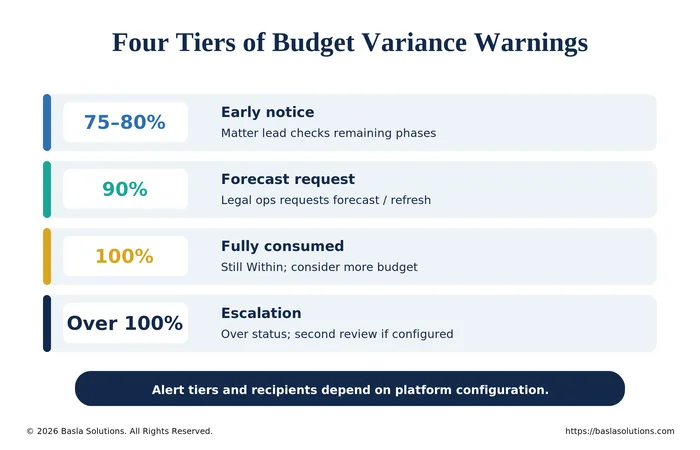
A legal budget variance alert works best as a tiered set of thresholds, typically three or four, each tied to a different action. Earlier tiers give you time to ask the firm what is still coming.
- 75 to 80 percent: early notice. The matter lead checks whether the remaining phases still fit.
- 90 percent: forecast request. Legal operations asks the firm for a forecast to completion or a budget refresh proposal within five to ten business days.
- 100 percent: fully consumed. The budget is spent but still reads as within, and the matter lead decides whether to approve more.
- Over 100 percent: escalation. The budget shows as over, and further invoice approvals go to a second reviewer where your workflow is configured that way.
Set thresholds by budget size. A three-month regulatory matter with a $40,000 budget can consume ten percent in a single invoice, so early tiers carry more weight there than on a two-year litigation budget measured in millions. The legal budget types you use matter too, because a phase budget crosses its thresholds far sooner than a life-of-matter one.
Who should receive budget alerts on each legal matter?
Budget alerts on each legal matter should go to the person who can change the spend, plus one person who can see the pattern across matters. When every alert reaches everyone, people learn to ignore them within a few weeks.
- Matter lead. Owns the conversation with the firm and receives every tier on the matters they run.
- Legal operations. Receives the 90 percent and over-budget tiers, ideally as one weekly digest across all open matters.
- Finance partner. Receives over-budget alerts only, so quarter-end accrual forecasts can be adjusted before the books close.
Review routing whenever a matter changes hands, because departed users left as recipients are a common reason an alert fires and nothing happens.
How should accruals and pending invoices count toward a matter budget?
Accruals and pending invoices should count toward a matter budget, because they represent work already done that your department will pay for. Leaving them out makes every budget look healthier than it is, and the warning arrives a full billing cycle late.
Require firms to submit accruals every month, and on larger matters by the fifth business day after month end. Count pending invoices at their submitted amount, and confirm rejected invoices drop out until resubmitted. If your accrual setup is still loose, fix it first, because the eBilling accrual configuration determines whether budget figures reflect work in progress. The same discipline belongs in your outside counsel billing guidelines, which turn budget and accrual obligations into enforceable rules.
What should happen after a budget variance warning fires?
After a budget variance warning fires, someone should either confirm the budget still holds or start a formal budget change, and the platform should record which of the two happened. An alert with no defined follow-up is noise.
Onit supports a governed path for this through vendor budget proposals and Budget Refresh requests, which ask firms to update proposals on active external budgets. A rejected proposal stays in Draft, and the firm submits a corrected version through Counsel Exchange. A workable timeline gives the matter lead two business days to decide, the firm five to submit a refresh with revised phases, and the department ten to approve it. The approved figure becomes the new baseline for every later alert.
Whether further invoices are held while a refresh is pending depends on your workflow configuration. Decide this deliberately and communicate it during law firm onboarding to eBilling, where firms learn the submission rules before their first invoice.
How do you test budget alerts before go-live?
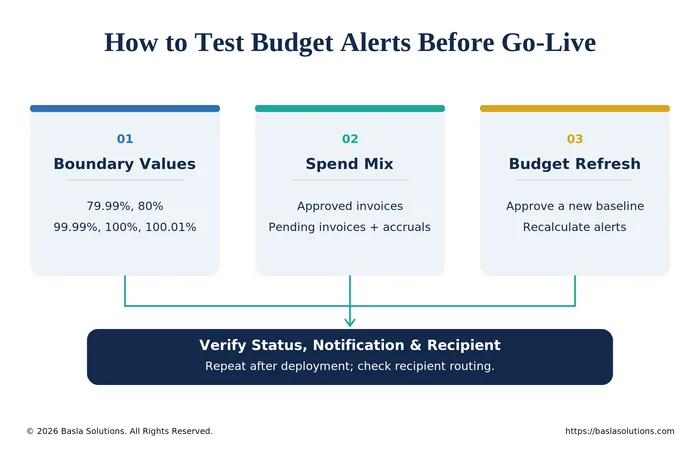
You test budget alerts before go-live by building budget records and spend scenarios that land on each side of every threshold, then confirming the right status, notification, and recipient for each one.
A focused test set usually needs 20 to 40 scenarios:
- Boundary values. Spend at 79.99, 80, 99.99, 100, and 100.01 percent of the budget, confirming that status and alerts change exactly where intended.
- Spend mix. Scenarios built from approved invoices only, pending invoices only, accruals only, and all three combined.
- Budget changes. A refresh approved partway through a matter, confirming that alerts recalculate against the new baseline.
Run the same set again in production after deployment. Check after promotion that budget notification recipients carried over.
How do you know your budget variance alerts are working?
You know your budget variance alerts are working when overruns are spotted early and budgets are refreshed before they are exceeded. Track three numbers each quarter against the quarter before go-live: the share of matters that close within budget, the share of over-budget matters that had a refresh proposal before crossing 100 percent, and the median days between the 90 percent alert and a decision.
A reasonable target is to move the second figure above 70 percent within two or three quarters. If alerts fire and outcomes stay the same, look at routing and follow-up before you change the thresholds.
Conclusion
Budget variance warnings work when the budget is current, the spend definition includes everything already incurred, and each alert reaches a person with a defined next step. The platform supplies the calculation and the Within or Over status. Your team supplies the tiers, the routing discipline, the accrual rules, and the refresh workflow that turns a warning into a decision. Test them at every boundary and measure them quarterly, and overruns become something you manage mid-matter.
How Basla can help
Basla provides delivery teams for enterprise legal management and eBilling software implementation, covering legal technology consulting, business analysis, budget and notification configuration, accrual and invoice workflow design, threshold testing, documentation, and hypercare after go-live. Basla teams work inside your Onit or other ELM environment alongside your legal operations and finance staff, so budget rules are designed, built, and tested by the same people.
Basla has delivered matter management and eBilling programs across more than 10 global jurisdictions, and has doubled delivery team size to meet compressed implementation timelines.
Frequently asked questions
What are budget variance warnings?
Budget variance warnings are automated notifications that alert matter owners when spend on a legal matter approaches or exceeds its approved budget. They notify defined recipients at set thresholds.
Does Onit send a budget alert before a budget reaches 100 percent?
Onit tracks each budget as Within or Over, and the threshold notifications available depend on how your instance is configured. Earlier warnings at 80 or 90 percent are typically built through reporting or workflow configuration, so confirm what your environment supports.
Is a budget at exactly 100 percent shown as over budget in Onit?
A budget at exactly 100 percent is shown as Within in Onit Unity, because Within means spend is at or under the budget amount. The status changes to Over only when spend exceeds the amount.
Should accruals count toward a legal matter budget?
Accruals should count toward a legal matter budget, because they represent work the firm has already performed. Excluding them delays every warning by a billing cycle.
Can an eBilling platform hold invoices once a budget is exceeded?
An eBilling platform can hold or reroute invoices on an over-budget matter only if the workflow is configured to do so. Many departments route them to a second reviewer.
How often should matter budgets be refreshed?
Matter budgets should be refreshed whenever the scope or phase of a matter changes, and at least once a year on long-running matters.
*This article is provided for general information only and does not constitute legal advice. Basla Solutions provides legal technology implementation and support services and does not practice law.*