

Onit legal spend management is the set of Onit modules that captures every outside counsel invoice, checks it against your billing guidelines, routes it for approval, tracks it against budgets and accruals, and reports the result. Each step has a clear owner, and the department only sees reliable spend figures when all of them run together. This guide walks through each step of Onit legal spend management as we configure it in our implementations, from the moment a law firm submits an invoice to the moment the GC opens a spend dashboard.
What is legal spend management?
Legal spend management is the discipline of capturing, reviewing, reporting, and acting on what a legal department pays outside counsel and other legal vendors. It covers rates and budgets before work starts, invoice review while work is billed, and analysis after payment.
The focus on outside counsel is deliberate. A 2024 benchmarking survey of about 421 legal departments found that outside counsel accounts for an average of 87 percent of the outside legal budget. The discipline breaks into four parts:
- Capture. Every invoice, electronic or paper, enters one system with the matter, vendor, and legal entity attached.
- Review. Automated rules check each line against billing guidelines, and named reviewers approve or dispute the invoice.
- Report. Spend rolls up by matter, firm, department, and legal entity, against budgets and accruals.
- Act. The department uses the data to negotiate rates, set fee arrangements, adjust panels, and forecast.
The fourth part depends entirely on the first three. A department that captures 80 percent of its invoices electronically and keeps the rest in email cannot trust any figure it reports.
How does Onit handle legal spend management end to end?
Onit handles legal spend management end to end in seven connected steps: vendor and rate setup, invoice intake, automated rule review, reviewer approval, budgets and accruals, payment export, and reporting. Each step runs on its own Onit feature and has a named owner.
Electronic billing is now the norm for this work. A 2025 survey of 186 legal operations teams found 84 percent use electronic billing. The table shows how the steps map in Onit.
| Step | Onit feature | Who owns it |
|---|---|---|
| Vendor and rate setup | Vendor assignment to matter, timekeeper rate workflow | Legal operations |
| Invoice intake | Counsel Exchange or CounselGO portal, manual invoice entry | Law firm billing contact |
| Automated review | Billing rules for guidelines, rates, codes, tax, and dates | Legal operations sets rules; law firm resolves errors |
| Reviewer approval | Approval chain with up to five approver tiers | Matter manager, then escalation by dollar limit |
| Budgets and accruals | Matter and vendor budgets, monthly accrual process | Matter manager and finance |
| Payment export | Ready for payment phase and AP feed or file | Finance and accounts payable |
| Reporting | Spend dashboards and analytics suites | Legal operations |
In our implementations, the most important design decision sits between approval and payment. Before an invoice leaves Onit, we check that GL cost allocations total exactly 100 percent, the vendor ID is active, and a purchase order is present where one is required. Invoices that fail go into a held phase, and the matter manager gets an automatic notice. That single control prevents most payment errors in accounting. For the wider rollout plan, see the Onit eBilling implementation phases from design through law firm onboarding.
How do invoices enter Onit through CounselGO and Counsel Exchange?
Invoices enter Onit when a law firm uploads them through its outside counsel portal, which is CounselGO or Counsel Exchange depending on the Onit platform the department runs. Invoices from vendors outside the portal are entered manually by the legal team.
Counsel Exchange is the vendor portal built into OnitX ELM, where law firms submit and track invoices by LEDES upload, PDF upload, or manual entry. It also handles timekeeper and rate submissions and budget collaboration. Onit moved firms from BillingPoint to Counsel Exchange as the vendor portal on September 17, 2026. Departments on other Onit deployments use CounselGO, Onit’s outside counsel portal for invoices and matter documents, and the move from BillingPoint and CounselGO to Counsel Exchange changes where firms log in, more than what they submit.
Whatever the portal, three intake rules hold up in practice:
- One path per vendor type. E-billing firms submit through the portal, and only genuine non-electronic vendors are entered manually.
- Same controls for manual invoices. We configure the manual invoice workflow to apply the same GL allocation and approval chain as LEDES invoices, so manual spend never sits outside the reports.
- Vendor assigned before billing. A firm can bill a matter only after it is assigned to that matter with approved timekeepers and rates.
The manual route is where spend data fragments. In one build, manual invoices bypassed budget tracking until we rebuilt that workflow to match the electronic one.
How does the Onit rules engine review invoices against billing guidelines?
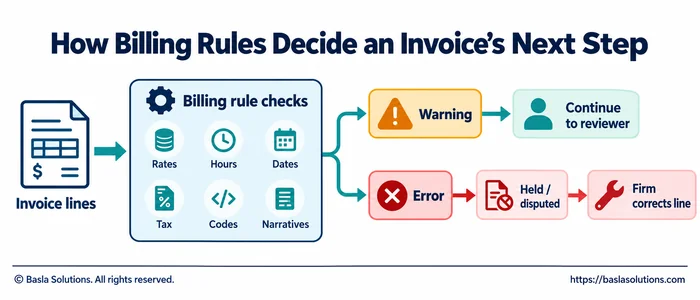
The Onit rules engine reviews each electronic invoice line against your outside counsel guidelines before the invoice reaches a human reviewer, flagging anything that breaks a rule as a warning or an error. In our implementations, every submitted LEDES line item runs through the rules automatically.
The rules we configure most often check:
- Rates. Each timekeeper’s billed rate matches the approved rate for that matter.
- Daily hours. No timekeeper bills more than a set maximum in one day.
- Service dates. Every line date falls inside the invoice’s billing period.
- Tax. Tax rates match the department’s master tax table for that country.
- Codes. Task and activity codes are valid for the matter, using standard LEDES invoice validation rules that catch bad invoices and Onit’s UTBMS code sets.
- Narratives. Lines that combine several tasks under one time entry are flagged as block billing, which hides how long each task took.
Warnings inform the reviewer and let the invoice proceed. Errors flag the line and send the invoice to a disputed or held state for the firm to fix. The split matters, because a rule set that is all errors produces rejections over small issues. In one build, firms had whole invoices fail over unapproved task codes and line dates a day outside the billing period. We added an invoice appeal and line-level comments, so reviewers could send specific adjustments back and firms could respond line by line.
Test every rule with sample LEDES files in a sandbox before you onboard the first firm. Expect two or three rounds of threshold tuning.
How do reviewer queues and approvals work in Onit?
Reviewer queues in Onit route each invoice that clears the rules to the matter manager first, then escalate it through up to five approver tiers until it reaches someone whose approval limit covers the invoice total. Each reviewer sees their Onit reviewer queue in a pending invoices widget.
The approval chain we configure works like this:
- First approver. The matter manager reviews the invoice, and we skip optional paralegal pre-review stops to keep turnaround short.
- Escalation by limit. Each user profile carries a financial approval limit, and invoices above it move to a supervisor, department head, and finally the GC.
- Rejections with reasons. Rejecting an invoice requires a comment, which goes to the law firm with the rejection.
Two gaps stall queues. Invoices above the fifth approver’s limit, and approvers whose profiles have no limit set, both leave invoices waiting with no one to act. We add a default administrator fallback for both cases and a dashboard counter for invoices pending more than seven days, so stalled queues are visible every morning. Keep approval limits current on every profile, especially after promotions and departures. For tier design, see this guide on legal invoice approval tiers and escalation.
How does Onit track budgets, accruals and alternative fee arrangements?
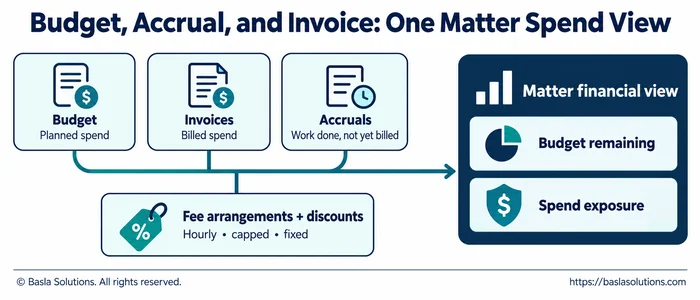
Onit tracks budgets at the matter and vendor level, collects monthly accruals from law firms through an automated request process, and applies alternative fee arrangements and discounts directly to invoices. Together they show what a matter should cost, what has been billed, and what is still owed.
- Budgets. Six budget types are available: life of matter, life of matter fees, life of matter expenses, annual, annual fees, and annual expenses. A matter manager can add a budget directly or request one from the firm, which proposes figures through an emailed link for approval. We make vendor budgets mandatory on high-value matters, so firms commit to an estimate before billing hours.
- Accruals. Setting accruals as required on a vendor or matter assignment triggers a monthly request to the firm’s billing contact with a spreadsheet to complete. Late firms get automatic reminders, and administrators can upload a completed sheet on a firm’s behalf. The monthly close routine is covered in our guide to legal spend accruals for legal operations.
- Fee arrangements. Hourly, capped, and fixed fees are configured per vendor and matter, along with tiered volume discounts and early payment discounts. Onit timekeeper rates can also be locked for the life of a matter from the first invoice, which stops mid-matter annual increases. Rate approvals themselves follow timekeeper rate approval rules in eBilling.
Volume discounts have three activation layers: global, per vendor, and per matter and vendor. In one build, discounts did not apply across subsidiaries until we switched the program on at the global level first and then opted each assignment in.
What spend reports and dashboards does Onit provide?
Onit provides spend dashboards, saved invoice views, five prebuilt analytics suites, and a financial summary on every matter. Together they let a GC see spend by department, firm, and matter without opening an individual invoice.
- Spend charts. Spend by department, by business unit, by legal team, and by firm, on the leadership and administration dashboards.
- Data views. Most expensive matters and most expensive invoices still in review.
- Counters. Invoices pending review and invoices pending more than seven days.
- Analytics suites. GC, Matter, Vendor, Timekeeper, and Audit analytics suites.
- Matter financial summary. Total budget, budget remaining, invoice total, total accruals, and settlement amount, shown in local and reporting currency.
Currency is the issue to plan for. Invoices in pounds, euros, dollars, and zloty distorted department totals in one build until we converted every line to a single reporting currency before any chart added them up. Save filtered public views for each department, so leadership can export a formatted spend report in one click.
Conclusion
Onit legal spend management works when capture, review, reporting, and action run as one chain with a named owner at each step. Put every vendor through the portal or a manual route with identical controls, tune billing rules so errors are reserved for real problems, keep approval limits current, require budgets and monthly accruals where spend is material, and convert currencies before you report. The result is a spend figure the GC can act on, built from invoices that were checked before they were paid.
How Basla Solutions can help
Basla Solutions provides delivery teams for Onit implementation, covering business analysis, billing rule design, approval chain and budget configuration, accrual automation, AP integration, law firm onboarding, testing, documentation, and post-go-live support. Basla delivers legal technology services through staff augmentation or a Basla-managed delivery unit, so eBilling goes live on schedule and stays accurate after launch.
Frequently asked questions
Does Onit review law firm invoices against billing guidelines automatically?
Onit legal spend management reviews every electronic invoice line against configured billing rules for rates, daily hours, service dates, tax, and task codes before a reviewer sees it. Breaches are flagged as warnings or as errors that hold the invoice for the firm to fix.
Can Onit track accruals?
Onit tracks accruals through a monthly accrual process that emails each participating law firm a spreadsheet request for work done and not yet billed. Reminders go to late firms, and administrators can upload completed sheets manually.
How does Onit handle alternative fee arrangements?
Onit handles alternative fee arrangements by configuring fixed, capped, and hourly fees per vendor and matter, plus tiered volume discounts and early payment discounts. Rates can also be locked for the life of a matter from its first invoice.
What spend reports does Onit provide?
Onit provides spend charts by department, business unit, legal team, and firm, views of the most expensive matters and invoices, and five prebuilt analytics suites. Each matter also shows budget, invoiced total, accruals, and budget remaining.
Is Onit legal spend management different from SimpleLegal?
Onit legal spend management and SimpleLegal cover the same core steps of invoice intake, billing rules, approvals, budgets, accruals, and reporting. SimpleLegal is Onit’s mid-market platform with lighter configuration, while Onit’s enterprise ELM supports deeper workflow and rule customization for complex, global departments.
This article is for general information only and is not legal, business, financial or tax advice. For questions about your specific situation, please consult a qualified professional.