

Onit invoice review is the step where every law firm invoice is checked against your billing guidelines, routed to the person who knows the matter, and approved by someone with the authority to pay it. When it is configured well, attorneys see only invoices that have already passed the routine checks, and finance gets invoices that are coded, allocated, and ready to export. Review is one stage of a wider Onit eBilling implementation and of legal spend management in Onit.
How do in-house legal teams automate invoice review with Onit?
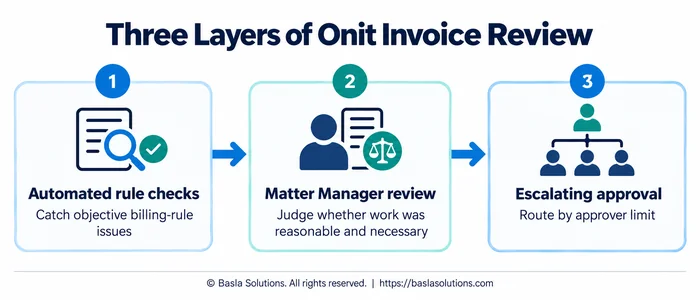
In-house legal teams automate invoice review with Onit by running every invoice through three layers: automated rule checks on upload, a first-line review by the matter’s owner, and financial approval that escalates in line with each approver’s limit.
- Automated rule checks. When a law firm uploads a LEDES file through the firm portal (Counsel Exchange, which replaced BillingPoint and CounselGO in September 2026), the rules engine checks every line item against your outside counsel guidelines.
- First-line review. The invoice lands with the Matter Manager on the parent matter, who reads the narratives and decides whether the work was reasonable and necessary.
- Escalating approval. If the invoice total is above that reviewer’s approval limit, it moves up the approval chain to someone with enough authority.
Each invoice inherits the approved rates, fee arrangement, PO number, and GL cost allocation from its parent matter. That inheritance is what makes Onit invoice review scale: you define the rules once per matter, and every invoice on it is checked automatically. In most of our builds we also switch off the optional first stop where a paralegal screens the invoice, because once the rules engine handles the clerical checks, that stop mostly adds two or three days.
What does the Onit rules engine check automatically on every invoice?
For automated legal invoice review, the Onit rules engine checks every LEDES line item against the billing rules you configure from your guidelines, covering rates, hours, dates, codes, taxes, discounts, and cost allocation, before the invoice enters a reviewer’s queue.
- Timekeeper rates. Each billed rate is compared with the approved rate card for that timekeeper on that matter.
- Daily maximum hours. A timekeeper who bills more than the daily cap across all entries, such as 10 or 12 hours, is flagged.
- Service date windows. Every line-item date must fall inside the billing period in the invoice header.
- Task and activity codes. Codes are validated against the approved code set for the matter, drawn from the published UTBMS code sets for litigation, counseling, project, bankruptcy, and other work types.
- Tax codes and rates. Tax lines are compared with the master tax table for the jurisdiction and country.
- Discounts and fee arrangements. Tiered volume discounts, early payment discounts, and alternative fee arrangements are applied and checked.
- PO numbers and allocations. A required PO number must be present, and cost allocations must add up to exactly 100 percent.
Each rule produces a warning, shown on the invoice’s alerts tab for the reviewer to weigh, or an error, a hard block that moves the invoice to Disputed or Held until the firm fixes it. Use errors for objective breaches like an unapproved rate, and warnings for judgment calls. Every rule should trace back to a clause in your outside counsel billing guidelines, and the mapping from each guideline provision to an Onit rule and default action shows where to start. Narrative checks such as detecting block-billed time entries usually sit in the warning tier.
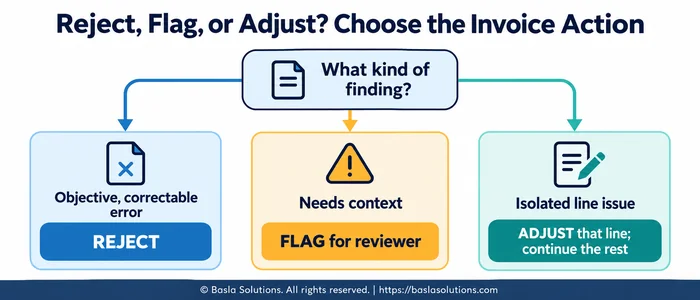
The most common early failure we have seen is a 200-line invoice blocked because one date fell outside the header period or one task code was unapproved. Line-item comments and the vendor appeal flow let the reviewer flag that single line and keep the rest moving. Before go-live, run sample LEDES files from two or three of your largest firms through the sandbox, and check them against the common LEDES invoice validation rules that catch bad invoices. The UTBMS code sets and LEDES formats Onit validates decide which of those files pass.
How do reviewer queues route invoices to the right person?
Reviewer queues in Onit route each invoice to the Matter Manager on its parent matter, who becomes Invoice Approver 1 when Onit builds the approval chain on submission.
We map Invoice Approver 1 this way because that attorney knows the work best. Reviewers find their invoices in three places:
- My Pending Invoices widget. A personal list on the home suite showing every invoice waiting on that user.
- Invoice Dashboard views. Public views for Pending Approval and Pending Payment, plus saved personal views that show a manager the team’s backlog in one click.
- Security groups. Group preferences and security groups make sure reviewers see only invoices on matters where they are a participant or team lead.
The most frequent issue was an invoice missing from a queue because the reviewer lacked a user group or was never added as a matter participant. Re-linking the participant assignment rules, so matter assignments carry straight into the approval chain, fixed it. For invoices stuck because the Matter Manager is away or has left, an Invoices Pending More Than 7 Days counter makes that backlog visible, and a fallback rule moves stale invoices to an administrative supervisor.
How do approvals escalate by amount, matter type or firm?
Approvals in Onit escalate by amount through the approval limit on each reviewer’s user profile, and by matter type or firm through the fee arrangement and vendor assignment records on the matter.
- Approver 1 checks the limit. If the invoice total is within the Matter Manager’s approval limit, their approval is final.
- The chain climbs. If the total is above it, Onit looks up that person’s reporting manager on the user profile and makes them Invoice Approver 2, and so on up to Invoice Approver 5.
- The top tier holds. An invoice above Approver 5’s limit moves to Held for executive review.
We prefer user profile limits to a hardcoded approval matrix, because a promotion or a new reporting line updates every future chain with no separate table to maintain. Matter type and firm rules come from the vendor assignment to matter record, whose fee arrangement (hourly, capped, or fixed) sets which thresholds and budget approvals apply.
In one global build, invoices arrived in USD, EUR, and PLN while approval limits were set in GBP. Converting each total to the approver’s base currency at the spot rate before the limit check fixed the routing. Keep every profile’s approval limit and reporting manager accurate, or invoices fall into Held for no good reason.
How are reductions and rejections communicated back to the law firm?
Reductions and rejections in Onit are communicated back to the law firm through an automated email, a status update in the firm portal, and the vendor invoice appeal workflow, each carrying the reviewer’s written reason.
- Rejections. Clicking Reject Invoice opens a mandatory Reason for Rejection comment. On submit, the invoice moves to Disputed and the firm’s billing contact gets an email listing the reasons.
- Reductions. Reviewers adjust individual lines or the header, then click Send for Appeals, which returns the adjusted invoice to the firm with the comments attached.
- Response window. The firm has a set number of business days, typically five to ten, to accept the reduction or appeal line by line. Setting a clear deadline for law firm invoice appeals keeps disputes from staying open for months.
Mandatory comments give firms an auditable reason tied to a specific guideline, which keeps Onit invoice review defensible when a partner pushes back. The problem we hit most was firms saying they never got the notice. Sending notifications to the billing contacts on the Onit vendor record, and syncing status back to the portal, fixed it. For small errors, prefer a line-item adjustment to a full rejection: the firm accepts it in a few clicks and never resubmits the LEDES file.
How do you measure invoice review performance and savings?
You measure invoice review performance and savings in Onit with the prebuilt analytics suites, a small set of dashboard widgets, and the calculated spend fields on every invoice, all reported in one base currency.
- Analytics suites. Audit Analytics tracks savings from rule adjustments, and the Vendor, Timekeeper, and Matter suites track spend and reductions by firm, person, and matter.
- Dashboard widgets. Invoices Pending Review, Pending More Than 7 Days, Most Expensive in Review, and spend by firm or team.
- Spend fields. Billed fees and expenses, adjustments, discounts, net amount, and paid amount, in local and base currency.
Track four numbers each month: cycle time from submission to Ready for Payment, the count of invoices pending more than seven days, the adjustment rate by firm, and the share of reductions the firm appeals. For a sense of scale, a 2023 audit of one state-backed insurer’s legal billing found average adjustments on law firm invoices consistently above 9 percent, with appeals above 15 percent. Your rate depends on how strict your guidelines are, so measure Onit invoice review against your own baseline each quarter. Convert mixed currencies to the base currency before totals are calculated, and check the seven-day widget weekly, before internal delays affect when firms get paid.
Conclusion
Onit invoice review works when each layer does one job well. The rules engine catches objective breaches, the Matter Manager judges whether the work was worth it, and the approval chain makes sure someone with enough authority signs off. Set rates, fee arrangements, and allocations on the matter, keep comments mandatory, and watch the backlog weekly. Start with routing and error rules, then tune the warnings once you have a quarter of data.
How Basla Solutions can help
Basla Solutions provides delivery teams for Onit implementation, covering business analysis, billing rule and guideline configuration, approval chain and user profile setup, law firm onboarding, multi-currency reporting, testing, documentation, and post-go-live support. We deliver legal technology services through staff augmentation or a Basla-managed delivery unit, and our teams have configured eBilling review for departments with more than 2,000 business and legal users.
Frequently asked questions
What does Onit check automatically on an invoice?
Onit checks every LEDES line item against your billing rules, including timekeeper rates, daily hour caps, service dates, task codes, tax, discounts, PO numbers, and cost allocations. This automated first pass is the foundation of Onit invoice review, so reviewers see only invoices that have passed or been flagged.
Who reviews invoices after the rules run?
The Matter Manager on the parent matter reviews the invoice first as Invoice Approver 1. If the total exceeds their approval limit, it escalates to their reporting manager and up to five tiers.
How are reductions communicated to the law firm?
Reviewers adjust the lines, add a mandatory comment, and send the invoice back for appeal through the firm portal with an email to the billing contact. The firm then has a set window, usually five to ten business days, to accept or appeal.
Can you set different review thresholds by matter type?
You can set different review thresholds by matter type through the fee arrangement on the vendor assignment to matter record. Amount-based escalation still follows each approver’s limit on their user profile.
How do corporate legal teams measure invoice review effectiveness?
Corporate legal teams measure invoice review effectiveness by tracking cycle time, invoices pending more than seven days, adjustment rate by firm, and appeal rate. Onit’s analytics suites and dashboard widgets report these in a single base currency.
This article is for general information only and is not legal, business, financial or tax advice. For questions about your specific situation, please consult a qualified professional.