

Onit training works best when it is planned by role, with each group learning only the handful of tasks it actually performs. Requesters need to submit and follow a request, attorneys need to triage and manage matters, invoice reviewers need to approve spend, administrators need to configure the platform, and law firms need to bill through the portal.
Across the Onit software family, Onit’s own certification program covers administrators and project staff well. Everyone else depends on the sessions and guides your department runs.
How do you train users on Onit?
Onit training starts by splitting users into roles, giving each role short task-based guides and a live walkthrough, and running daily drop-in support through the first weeks after go-live. Long manuals and one large launch lecture rarely change how people work.
In our implementations, we replaced multi-page manuals with single-task quick reference guides, following a one guide, one task rule, after users ignored the long versions. On one go-live wave we onboarded 63 legal team members across seven global locations this way, backed by a daily one-hour Teams drop-in clinic during a three to four week hypercare period.
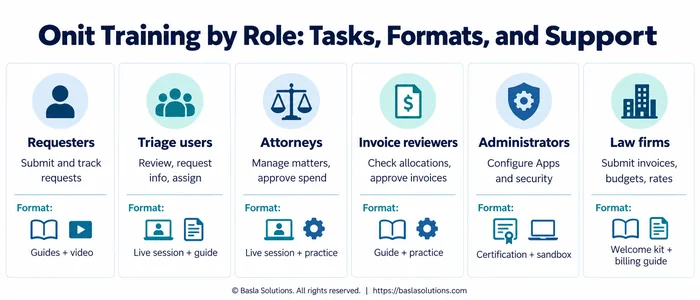
| Role | What to learn | Format |
|---|---|---|
| Requester | Access the front door, submit a request, follow up with legal | Three short guides and a two-minute video |
| Triage user | Review the queue, ask for more information, assign work | Live session and guide |
| Attorney | Open and manage matters, add updates, assign firms | Live session, guides, sandbox practice |
| Invoice reviewer | Approve invoices within limits, check allocations | Guide and practice invoices |
| Administrator | Apps, fields, rules, phases, Liquid, security | Onit certification courses and sandbox builds |
| Law firm | Submit invoices, budgets and timekeeper rates | Welcome kit, billing guide, named contact |
What should requesters and business users learn?
Requesters and business users should learn three tasks: accessing the legal front door, submitting a request, and communicating with legal about it. That is the whole curriculum, and it fits in three one-page guides.
- Access. Signing in through single sign-on, using search, and setting language and country preferences.
- Submit. Choosing a category tile, saying whether the request is for themselves or someone else, completing required fields and attaching up to 10 files.
- Communicate. Checking status in the portal and replying through the request’s own email address or feedback button.
In our implementations, follow-up emails sent to individual lawyers failed to attach to the request record. We fixed it by teaching requesters to reply to the automated notification or use the feedback button, and by disabling quick-launch record creation so every request comes through the portal.
What should attorneys and invoice reviewers learn?
Attorneys and invoice reviewers should learn triage, matter management and spend approval, focused on the screens and buttons they use every week. Most attorneys need one live session plus guides for the less frequent tasks.
- Triage and assign. Reviewing the queue, requesting more information, and assigning requests to a matter manager.
- Manage matters. Converting a request to a matter, moving it through working phases, and logging internal legal updates that business users and firms cannot see.
- Approve spend. Assigning law firms, setting cost allocations that total 100 percent, and approving invoices within their approval limit, across up to five approval tiers.
Watch the defaults during training. On one build, new matters opened in the wrong working phase. We corrected the phase configuration and added a check to the attorney guide, so attorneys confirm the phase when a matter opens.
What should administrators learn and is there a certification?
Onit training for the people who handle Onit administration covers how Apps are built: fields, roles, phases, business rules, actions, conditions, Liquid templates, lists, buttons and security. Onit runs a formal certification program with tracks for administrators and project staff.
Onit’s certification program offers App Builder, ELM and CLM tracks, with a 70 percent pass mark on each online test. The ELM and CLM tracks each have a technical lane for configuration and a functional lane for business analysts and project managers. Client courses usually run onsite on the client’s schedule.
In our implementations, new administrators complete Onit’s Apptitude, ELM and CLM boot camps, build a practice app in a sandbox, and document every field and rule they configure. A common early mistake is blank Liquid variables making rule conditions evaluate wrongly. We now teach explicit empty-value checks and require every change to be tested in a sandbox before production.
What is Onit Academy?
Onit Academy is the name people often search for, but Onit’s public training page describes its offer as a certification program with tracks, courses and online tests. That program is built mainly for administrators, developers, analysts and project managers.
End users rarely take it. Their Onit training comes from your department or implementation partner, so the role plan above matters more for adoption.
Who trains the law firms on CounselGO?
Law firms are trained by your legal operations team or implementation partner as part of Onit law firm onboarding, now on Counsel Exchange, which replaced CounselGO in September 2026. Firms need to learn invoice submission, budgets and timekeeper rate requests.
In our implementations, the most common firm errors were invoices with missing task codes and unapproved timekeeper rates. Step-by-step billing guides, a welcome kit and approving rates before billing access opened fixed most of them. The same approach works for onboarding law firms to eBilling on any platform.
How do you keep training current after releases?
You keep Onit training current by updating the affected guides every time a change reaches production, and by batching small changes into monthly releases so users learn them in one go. Out-of-date guides erode trust faster than having no guides.
- Documentation check per release. A checklist step before each production deployment confirms which guides and videos change.
- Feature highlights. Short “Did you know?” sheets after a release show users what is new.
- Ongoing drop-in sessions. Keep a lighter clinic running after hypercare for questions that guides do not answer, alongside Onit support for platform issues.
Change resistance is the real enemy of adoption. A 2025 legal technology survey found 57 percent of respondents name resistance to change as the top barrier to adopting new tools. Writing short quick reference guides and running drop-in clinics are the two habits that most reduce it.
Conclusion
Onit training succeeds when every role learns only the tasks it performs. Use Onit’s certification for administrators and analysts, run your own short guides, live sessions and drop-in clinics for requesters, attorneys and reviewers, and give law firms a welcome kit and a named contact. Then update the guides with every release, so the training stays as current as the platform.
How Basla can help
Basla provides delivery teams for Onit implementation, covering business analysis, configuration, role-based training plans, quick reference guides, training videos, drop-in clinics, law firm onboarding, documentation, and post-go-live support. We bring legal technology services through staff augmentation or a Basla-managed delivery unit, so your users are trained before the platform goes live.
Frequently asked questions
What is Onit Academy?
Onit’s public training page does not use the name Onit Academy, and describes its offer as a certification program with tracks, courses and online tests. It is aimed mainly at administrators, developers, analysts and project managers.
Is there an Onit certification?
Yes, Onit offers certification tracks for App Builder, ELM and CLM, with technical and functional lanes. Each course ends in an online test with a 70 percent pass mark.
How long does attorney training take?
Most attorneys need one live session of 45 to 60 minutes, plus short guides for less frequent tasks. A daily drop-in clinic during hypercare covers the questions that come up once they start working.
Who trains the law firms on CounselGO?
Your legal operations team or implementation partner trains law firms, now on Counsel Exchange, which replaced CounselGO in September 2026. A welcome kit, billing guide and named contact cover most needs.
How do you train a new Onit administrator?
Train a new Onit administrator through Onit’s certification courses, then sandbox practice building a sample app. Require documentation of every field and rule before granting production access.
*This article is provided for general information only and does not constitute legal advice. Basla Solutions provides legal technology implementation and support services and does not practice law.*