


Onit support covers how-to questions, break/fix work on functionality that used to work, and maintenance of existing features, starting once go-live stabilization ends. It does not cover new workflows, report changes, integrations, documentation or training. Those fall to your administrator, Onit’s professional services, or a partner. The same split applies on OnitX and on SimpleLegal, covered in our SimpleLegal support guide.
Across the Onit software family, knowing the boundary early saves weeks of tickets bouncing between your team and the vendor.
What does Onit support cover?
Onit support covers how-to questions on existing functionality, break/fix support for features that previously worked, and ongoing maintenance, across four tiers: Standard, Enhanced, Premium, and Premium with a Technical Solutions Consultant. Every tier includes the support portal, community access, webinars and articles.
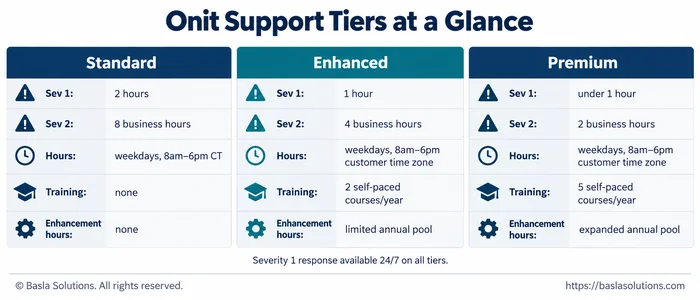
The tiers differ mainly in speed and extras. Onit’s published terms promise a Severity 1 initial response within 2 hours on Standard, 1 hour on Enhanced, and under 1 hour on Premium, 24 hours a day. Severity 2 responses range from 8 business hours on Standard to 2 on Premium. Standard support runs 8am to 6pm US Central time on weekdays, while Enhanced and Premium cover those hours in your own time zone. Enhanced and Premium also add self-paced training, training discounts and a limited pool of enhancement and build hours each year.
For context, a 2025 benchmark of more than 187 million IT service tickets found an average first response time of 9.36 hours, so Onit’s Severity 1 commitments are fast by comparison.
How do you open a ticket with Onit support?
You open a ticket through the web-based support portal included in every tier, choosing a severity that matches the business impact. For build and configuration questions on OnitX, builders also use the Build Help Requests form from the Apptitude suite tile on the /apps page.
In our implementations, incomplete tickets caused the most delay. Vague descriptions led to days of back-and-forth emails, so we made every ticket include:
- Environment URL and app names. Support needs to know exactly which environment and App failed.
- Steps, errors and screenshots. Include the exact error text and what you expected to happen.
- The urgent flag, used sparingly. Reserve it for go-live blockers and production failures, so it keeps its meaning.
- CCs for the team. Add the project team to the ticket so nobody chases updates separately.
Bookmark the direct ticket URL outside the Onit application, so you can still raise a ticket if an environment is down.

What does Onit support not do?
Onit’s vendor support desk does not build new workflows, change reports, create integrations or document templates, write documentation, or deliver training. Onit’s terms list these as customer-driven enhancements, available as professional services through a statement of work or change order.
In our implementations, custom business logic requests sent to vendor support came straight back to the project team. We fixed it with a clear routing rule: platform defects go to Onit, and changes to fields, rules, forms or reports go to the internal or partner delivery backlog.
| Need | Vendor support | Partner or in-house |
|---|---|---|
| Something that worked has stopped | Yes, break/fix | Triage and confirm first |
| How does this feature work? | Yes, how-to | Day-to-day user questions |
| New workflow, rule or form | No | Yes, configuration backlog |
| New or changed report | No | Yes |
| New integration | No | Yes, or Onit professional services |
| Data cleanup or migration | No | Yes |
| User training and guides | No, discounts on Onit training only | Yes |
| Law firm onboarding help | No | Yes, legal operations or partner |
What is the difference between vendor support and managed administration?
Vendor support fixes the platform, while managed administration runs your configuration: incident triage, user and permission changes, minor workflow changes, release and regression testing, and the enhancement backlog. Managed Onit administration is delivered by your own administrator or by a partner, never by Onit’s support desk.
We learned to keep the two apart. When daily user requests and structural enhancements shared one queue, both slowed down. Our model now runs in two layers:
- Daily administration. First-line triage of user questions, access changes and small fixes, handled the same day where possible.
- Monthly enhancement sprint. New fields, rules and reports batched, tested and released together.
- Hypercare first. A three to four week hypercare period after go-live, with a daily one-hour drop-in clinic, before moving to standard managed administration.
A dedicated hypercare triage desk makes that first month far calmer.
Who supports law firms using CounselGO and Counsel Exchange?
Law firms using Counsel Exchange, which replaced CounselGO in September 2026, are supported first by your legal operations team or implementation partner, with platform defects escalated through your vendor support channel. Onit’s support terms are written for its customer, which is your department.
In our implementations, the most common firm issue was invalid LEDES invoices with missing task codes or unapproved timekeeper rates. Walkthrough guides and approving rates before billing access opened cut those rejections sharply. The same approach works for onboarding law firms to eBilling on any platform.
When should a department bring in a partner?
A department should bring in a partner when configuration, reporting, data or training work outgrows the time its administrator has, or when a backlog of changes keeps waiting behind business-as-usual work. Vendor support will not absorb that work, so the choice is between hiring, Onit professional services, and an Onit implementation partner.
- Backlog growing. Requested changes wait more than a month for an administrator.
- New modules. You are adding contract management, intake or integrations.
- Release pressure. Onit releases need regression testing on your configured platform that your team cannot staff.
Conclusion
Onit support is strong on break/fix and how-to help, with published response times by tier, and it stops at the edge of your configuration. Plan for that boundary from go-live: route defects to Onit, route changes to an administrator or partner backlog, support law firms through legal operations, and keep daily triage separate from monthly enhancements.
How Basla can help
Basla provides delivery teams for Onit implementation, covering hypercare, managed administration, incident triage, configuration and report changes, regression testing, documentation, training, and law firm onboarding support. We bring legal technology consulting and hands-on administration through staff augmentation or a Basla-managed delivery unit, so changes keep moving after go-live.
Frequently asked questions
How do you open a ticket with Onit support?
You open a ticket through the vendor support portal included in every tier, choosing a severity that matches the impact. Include the environment URL, app name, error text and screenshots.
Does Onit support make configuration changes?
No, vendor support handles break/fix and how-to questions on existing functionality. New workflows, reports, integrations and templates are professional services, or work for your administrator or a partner.
What are Onit support hours?
Standard support runs 8am to 6pm US Central time on weekdays, and Enhanced and Premium cover those hours in your own time zone. Severity 1 issues are covered 24 hours a day on every tier.
What is managed administration for Onit?
Managed administration is the ongoing running of your Onit configuration by your administrator or a partner. It covers triage, user changes, minor enhancements, regression testing and the enhancement backlog.
Who supports law firms?
Your legal operations team or implementation partner supports law firms first, with platform defects escalated to Onit. Approve rates and billing guidelines before firms start submitting invoices.
*This article is provided for general information only and does not constitute legal advice. Basla Solutions provides legal technology implementation and support services and does not practice law.*