

An Onit administrator keeps the Onit platform running after go-live: managing users and access, fixing held invoices and failed automations, running monthly cycles such as accruals, and making the small configuration changes the business keeps asking for. On OnitX, that work happens in the low-code tools of the Apptitude platform, so the role mixes operations, support and light configuration.
This guide covers the tasks, the skills, how to size the workload, and when to hand the role to a managed service.
What does an Onit administrator do?
An Onit administrator manages users, security and day-to-day platform health, and makes routine configuration changes to fields, phases, rules and dashboards. The role sits between legal operations, IT and the vendor, and it is usually the first stop for every “can the system do this?” question, before anything goes to Onit support.
In our implementations, the administrator’s scope covered the App Builder tools, from the App Wizard to the Advanced Designer, plus user profiles, user groups and group preferences that control which menus and dashboards each role sees. We restricted system administrator and app creator rights to legal operations and technical leads, and gave everyone else role-tailored dashboards. That kept the core design protected while users still got views that fit their work.
- Access and security. Adding and removing users, assigning groups, and checking that each role sees only what it should.
- Platform health. Clearing held invoices, failed exports and automation errors before they become support tickets.
- Small changes. Adding list values, adjusting dashboards and tuning notifications without a project.
- Record of change. Keeping a configuration register of every field, rule, action and Liquid script, so one change never quietly breaks another. Our guide to Onit Apptitude explains the platform these changes are made on.
What are the weekly and monthly tasks of an Onit administrator?
An Onit administrator’s weekly tasks are user access changes, held invoice and failed-export checks, and usage review, while monthly tasks include accrual cycles, outside counsel status updates and access reviews. Daily triage keeps small problems from piling up.
| Task | Frequency | Skill |
|---|---|---|
| Triage user questions and errors | Daily | Platform knowledge |
| Clear held invoices and re-run validation | Daily to weekly | eBilling rules |
| Add, change and remove users and groups | Weekly | Security model |
| Review login activity and dashboards | Weekly | Reporting |
| Run the accrual cycle with law firms | Monthly | eBilling and finance |
| Send outside counsel status update requests | Monthly | Workflow rules |
| Review access and group membership | Monthly | Security model |
| Release batched configuration changes | Monthly | App Builder and testing |
In our implementations, we automated the monthly accrual spreadsheets and outside counsel status reminders with scheduled rules, so the administrator monitors them and chases exceptions only. Most invoice failures came from missing vendor IDs or allocations that did not total 100 percent. Validation rules before export, plus a re-evaluate button, let the administrator fix the field and send the invoice back through in minutes.
What skills does an Onit administrator need?
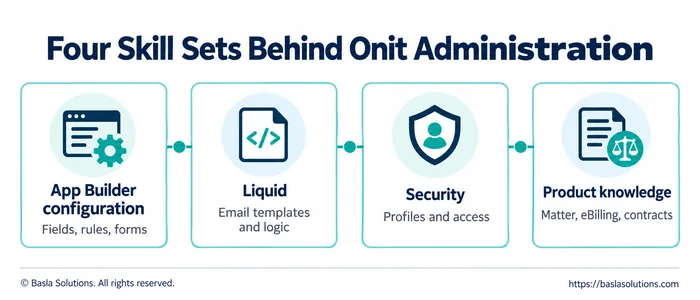
An Onit administrator needs four skill sets: App Builder configuration, Liquid templating, Onit’s security model, and working knowledge of the products in use, such as eBilling, matter management or contract management. A strong administrator also documents everything they change.
- App Builder. Fields, roles, phases, business rules, actions, conditions, cascading lists and forms in the App Wizard and Advanced Designer.
- Liquid. Templates for emails, calculated fields and lookups across related records.
- Security. User profiles, groups, group preferences and profile-based security.
- Product knowledge. Matter types, eBilling rules, contract templates, Docusign and AP exports.
Onit runs a certification program with App Builder, ELM and CLM tracks, each with an online test and a 70 percent pass mark. In our implementations, new administrators completed Onit’s Apptitude boot camps and built a practice app in a sandbox before touching production, as our Onit training plan sets out. The most common early mistake was blank Liquid variables making rule conditions evaluate wrongly, so we set a coding standard of explicit empty-value checks and sandbox testing for every change.
How many hours a week does Onit administration take?
Onit administration time depends on four things: the number of users, how many Apps and integrations are configured, the volume of change requests, and how much is automated. A small SimpleLegal deployment can run on part of one person’s week, while an OnitX platform with many Apps and integrations usually needs a dedicated administrator.
There is no reliable public benchmark for Onit administrator hours, so size the role from your own data. Count weekly access changes, held invoices, user questions and change requests during the first month after go-live, then multiply by the time each takes. The technical part of the role can be heavy where integrations are involved: a 2025 survey of more than 5,700 developers, architects and executives found 69 percent spend 10 or more hours a week on API-related work.
Plan for a peak at go-live. In our implementations, hypercare carried a dedicated support allocation of 60 hours, plus a daily one-hour drop-in clinic for three to four weeks, before routine administration took over.
What is managed Onit administration and when does it make sense?
Managed Onit administration is the ongoing running of your Onit configuration by a partner team, covering triage, user and permission changes, minor enhancements, release testing and the change backlog. It makes sense when the work is too much for a part-time owner but too little, or too specialized, for a full-time hire.
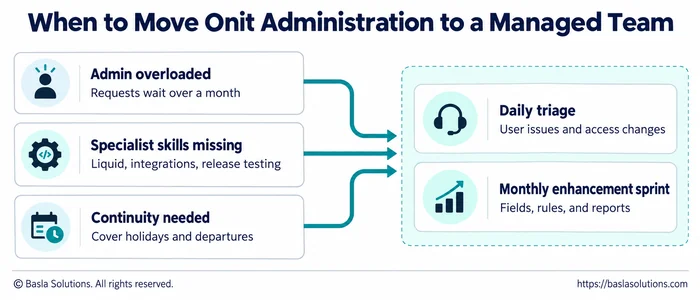
In our implementations, it worked best as two channels: daily triage for user issues and access changes, and a monthly enhancement sprint for new fields, rules and reports. Mixing them in one queue slowed both. The hand-off from hypercare to managed administration came after the three to four week stabilization window.
- Your admin is overloaded. Change requests wait more than a month.
- Specialist skills are missing. Liquid, integrations and release testing need someone who does them every week.
- Continuity matters. A team covers holidays and departures that a single administrator cannot.
An Onit implementation partner can deliver managed administration as embedded staff augmentation, a managed delivery team, or an offshore configuration and testing team, and each keeps strategic control with your legal operations lead. Pair it with disciplined release management on configured legal platforms.
How do you hand over administration when the admin leaves?
You hand over Onit administration with three things: a live configuration register, a handover pack of specs, test scripts and procedures, and a way to reassign the outgoing person’s open records in bulk. With those in place, a new administrator can work from documentation without reverse-engineering rules.
In our implementations, we built a bulk replace-participant action on the request, matter and contract Apps, so an administrator selects the old and new user and transfers every open record at once. The first version updated participant lists but left the old name on the request summary header. Adding background actions to set the matter manager and supervisor fields fixed it, so one click now updates both.
- Configuration register. Every field, rule, permission and Liquid script, with the reason it exists.
- Handover pack. Integration specs, test scripts, operating procedures and the change log.
- Overlap period. A few weeks of shadowing, where possible, before access is removed.
Undocumented configuration is the biggest handover risk, as covered in why code without documentation becomes technical debt.
Conclusion
An Onit administrator keeps users, data and configuration healthy, with daily triage, weekly access and invoice checks, and monthly cycles such as accruals and access reviews. Size the role from your own volumes, train new administrators through Onit’s certification and sandbox practice, and keep a live configuration register from day one. When the work outgrows one person, or the skills are too specialized, managed administration keeps changes moving.
How Basla can help
Basla provides delivery teams for Onit implementation, covering managed administration, daily triage, user and security changes, configuration and Liquid work, release and regression testing, configuration registers, administrator training, and handover support. We bring legal technology services through staff augmentation or a Basla-managed delivery unit, so administration continues smoothly through holidays, peaks and staff changes.
Basla teams have supported post-go-live administration across more than 200 configured applications, with access managed for more than 2,000 business users on a single platform.
Frequently asked questions
How many hours a week does Onit administration take?
Onit administration time depends on users, configured Apps, integrations and change volume, and no public benchmark exists. Measure your first month of requests after go-live and size the role from that.
Do you need a developer to administer Onit?
No, routine Onit administration uses point-and-click tools such as the App Wizard and forms builder. Liquid templates, integrations and cross-App logic are best handled by a trained configurator.
What is Onit managed administration?
Onit managed administration is a partner team running your configuration after go-live. It covers triage, user changes, minor enhancements, release testing and the change backlog.
What should a new Onit admin learn first?
A new Onit admin should learn the App Wizard and Advanced Designer first: fields, roles, phases, business rules, actions and conditions. Practice in a sandbox by building a sample app before changing production.
How do you hand over administration when the admin leaves?
Hand over Onit administration with a live configuration register, a pack of specs, test scripts and procedures, and a bulk action to reassign open records. A short overlap period helps where possible.
*This article is provided for general information only and does not constitute legal advice. Basla Solutions provides legal technology implementation and support services and does not practice law.*