


Writing business rules in Onit means deciding when an action should fire, under which conditions, and what it should do, then configuring that combination in the Apptitude Advanced Designer so it runs the same way every time. The action defines what happens. The business rule defines when it happens.
Every automated step in an Onit app, from routing a new request to sending a reminder to closing a matter, depends on a rule firing at the right moment. Get the trigger slightly wrong and an action runs before the record is ready, or runs twice, or never runs at all. The payoff for getting it right is large, since a 2023 survey of in-house legal staff found that 78 percent of teams with fully automated processes address legal requests within 72 hours, against 33 percent of teams on manual processes.
What does writing business rules involve in Onit?
Writing business rules in Onit involves combining three parts in the Business Rules node of the Advanced Designer: a rule type that sets the trigger, an optional condition, and the action that runs. You pick the type from the Add dropdown, name the rule, and choose or create the condition and action from their own dropdowns:
- Trigger. The rule type, such as Transaction Created or Participant Approved, decides which event wakes the rule up.
- Condition. An optional test that narrows when the action runs, for example only when a record’s price field is greater than 1,000.
- Action. The work itself: updating fields, creating related records, sending notifications, or changing a phase.
Keeping these three parts separate is what makes a large app maintainable. One well-built condition such as “Contract value over threshold” can serve several rules, and one action can be triggered from more than one event.
Which trigger should an Onit business rule use?
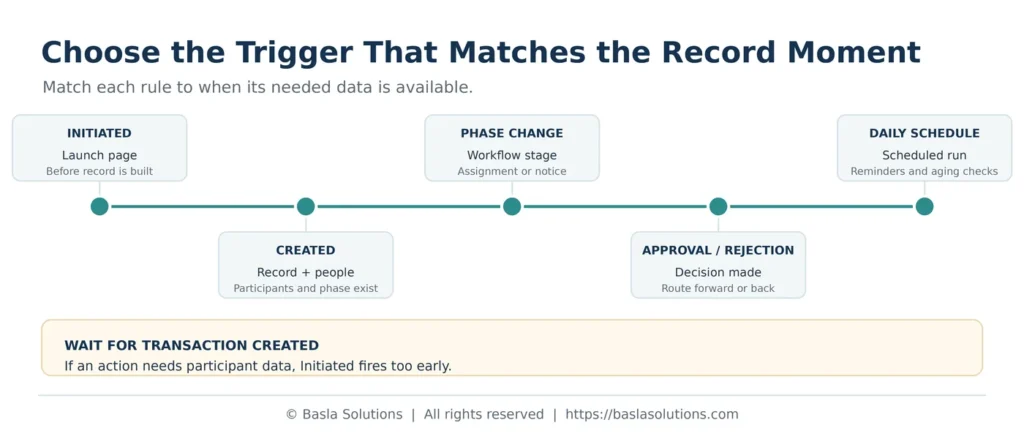
An Onit business rule should use the trigger that fires at the exact point in the record’s life when the action has everything it needs. Onit offers around 20 rule types across records, participants, comments, email, and schedules, and five of them carry most legal workflows:
- Transaction Initiated. Fires when the user submits the launch page, before the record is fully built. Use it when the starting phase depends on a field value from the form.
- Transaction Created. Fires after the record is fully built, with participants added and the phase set. Use it when the action needs to read the record’s current phase or participants.
- Transaction Phase Change. Fires when a record moves between phases. It suits notifications and assignments tied to a stage of the workflow.
- Participant Approved and Participant Rejected. Fire on approval decisions, which makes them the natural home for routing the record onward or back.
- Daily Schedule. Runs once a day for reminders, escalations, aging checks, and email reports, and for most clients Onit’s daily schedule rules run at 3am Central time, so plan reminder wording around overnight delivery.
The choice between Transaction Initiated and Transaction Created causes more early defects than any other. An action that needs the assigned attorney will fail on Initiated, because the participants do not exist yet. Participant rules carry a similar trap: Participant Approved by Proxy is a separate rule type, so when approvals can be delegated, confirm in testing that a delegate’s approval triggers the same routing as a direct one.
How should business rule conditions be written?
Business rule conditions should be written as single, reusable tests with names that read like the question they ask, such as “Value over 250,000” or “Region is EMEA”. Conditions are written in Liquid, so a short test is also easier to read and debug. Three habits keep them clean:
- One question per condition. A condition that checks value, region, and request type together cannot be reused, and when it fails nobody can tell which part failed.
- Reuse before you rebuild. Search the existing conditions before creating a new one. Apps that grow without this habit end up with five versions of the same threshold, each set to a slightly different number.
- Use the atom prefix where needed. Rules whose type does not begin with “Transaction”, such as Daily Schedule or Comment Added, cannot read record variables directly. Prefix record-level variables with `atom` in those rules.
Build compound logic from small named conditions so each part can be tested on its own.
How should Onit business rules be named?
Onit business rules should be named for what happens when they fire, so an administrator scanning the Business Rules node understands each rule without opening it. Reusing the action’s name is often the simplest approach.
A consistent pattern helps once an app holds 30 or 40 rules. “On Approval: Route to Finance” or “Daily: Remind Approver After 3 Days” tells you the trigger and the outcome in one line. Avoid names that describe the configuration (“Rule 14”, “UT phase update”) because they mean nothing to the person who inherits the app.
A rule list that reads like a description of the process also lets a legal operations lead trace a misrouted request to its rule in minutes.
How do you keep business rules from triggering each other?
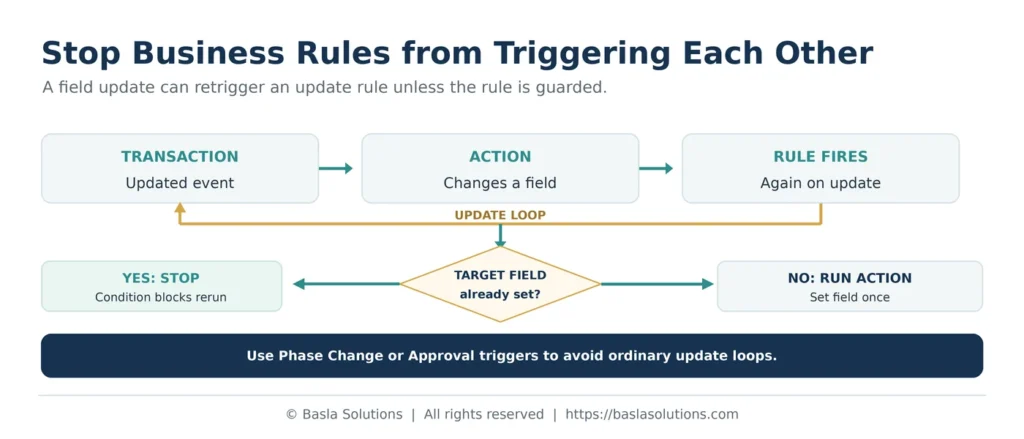
You keep business rules from triggering each other by checking whether each action changes something that another rule listens for, and adding a condition that stops the chain once the work is done. A rule that fires on Transaction Updated and itself updates the record is the classic case to watch. Three safeguards cover most situations:
- Guard with a condition. Before an update action runs, test whether the target value is already set. If it is, the condition fails and the rule stops.
- Map the chain on paper. List every rule that fires on updates and every action that writes fields. Any pair where an action writes a field another update rule reads deserves a test case.
- Prefer specific triggers. A rule that fires on a phase change or an approval cannot be set off by an ordinary field update, which removes the loop at its source.
Notification rules are especially prone to this, because a chain of updates can send the same email three or four times.
When should one business rule run several actions?
One business rule should run several actions when those actions always happen together, in a fixed order, at the same moment. Bundling them keeps the sequence predictable and halves the number of rules to maintain.
Onit lets you group actions so that a single trigger runs a set of steps, such as updating a status field, creating a related task with an FCRT action, and notifying the assigned attorney. Group actions when they share a trigger and a condition. Split them into separate rules when they need different conditions, because a grouped set with one condition forces every step to wait on the strictest test. Teams planning the wider automation program can map these choices alongside a step-by-step legal workflow automation plan.
How do you test business rules before go-live?
Business rules are tested by forcing each trigger to fire on a test record, confirming the condition passes and fails when it should, and checking the action’s result on the saved record. Three kinds of test catch most defects:
- Trigger tests. Create, update, approve, and reject test records so every rule type in the app fires at least once, at the expected moment.
- Condition boundary tests. Set values at and either side of each threshold. A contract at exactly 250,000 shows whether the condition uses “greater than” or “greater than or equal to”.
- Chain tests. For every update rule, make an edit and count the resulting actions. One edit should produce one notification.
Daily Schedule rules need extra planning, since they run once a day and a failed test costs 24 hours. For an app with 30 to 40 rules, plan three to five days of focused testing in a sandbox, then repeat the critical paths after deployment.
How should business rules be documented and maintained?
Business rules should be documented in a simple register: one line per rule with its name, trigger, condition, action, owner, and the business reason it exists. Keep it with the app’s configuration notes and update it in every release.
The register is what lets a new administrator answer “why did this record move to Finance?” in minutes. It also makes change safer. Before editing a condition, the register shows every rule that uses it. Treat rule changes like any other configuration release, with a sandbox test and an approval.
Conclusion
Writing business rules well comes down to timing and discipline. Choose the trigger that fires when the action has what it needs, keep conditions small and reusable, name every rule for its outcome, guard update rules against chains, and test every trigger, threshold, and chain before go-live. A register of rules keeps the whole set understandable as your app grows from a dozen rules to several dozen.
How Basla Solutions can help
Basla Solutions provides delivery teams for Onit implementation, covering legal technology consulting, business analysis, workflow and rule design, Advanced Designer configuration, testing, documentation, and post-go-live support. That includes choosing triggers, building reusable conditions and grouped actions, maintaining a rule register, and proving every rule path in a sandbox before launch.
The team has delivered matter management and eBilling across more than 10 global jurisdictions and built eight Legal Service Request “Front Doors” for a single enterprise legal department. That delivery discipline takes the weight off your administrators during the stretch where workflow logic is designed, built, and tested.
Frequently asked questions
What does writing business rules in Onit involve?
Writing business rules in Onit involves choosing a rule type that sets the trigger, adding an optional condition, and linking the action that should run. Rules are configured in the Business Rules node of the Advanced Designer.
What is the difference between a business rule and an action in Onit?
An action defines what happens, such as updating a field or sending a notification. A business rule defines when that action fires, through its trigger type and optional condition. One action can be used by several rules.
Should a rule use Transaction Initiated or Transaction Created?
Use Transaction Initiated when the starting phase depends on a value from the launch form. Use Transaction Created when the action needs the fully built record, including its participants and current phase.
Why do Daily Schedule rules show blank values?
Daily Schedule rules show blank values when record-level variables are referenced without the atom prefix. Rule types that do not start with “Transaction” cannot read record variables directly, so the prefix is required.
How do you stop business rules from firing repeatedly?
Stop business rules from firing repeatedly by adding a condition that checks whether the action’s work is already done. Map every update rule against the fields other actions write, and test each pairing.
How long does it take to test business rules in an Onit app?
Testing an Onit app with 30 to 40 business rules typically takes three to five days in a sandbox. Daily Schedule rules add time, since each run happens only once a day.
This article is for general information only and is not legal, business, financial or tax advice. For questions about your specific situation, please consult a qualified professional.