

The FCRT action (Find or Create Related Transaction) is an Onit workflow action that looks for a related record matching a value you specify, links and optionally updates it when one exists, and creates a new related record when none does. It works like an upsert across two apps, so a single action keeps a parent record and its child records in sync without duplicates.
You reach for it whenever one record should always have exactly one counterpart in another app: a matter and its budget record, a contract request and its contract, an invoice and its review task. Configured carefully, it runs silently for years. Configured with a loose matching field, it quietly creates duplicates or attaches data to the wrong record.
What is the FCRT action in Onit?
The FCRT action in Onit is a configurable workflow action that searches a target app for a record matching one field value, then either relates the match to the current record or creates a new related record. It runs inside Apptitude, the low-code platform underneath Onit’s products, and it fires from a business rule like any other action. Three things define every FCRT configuration:
- The relationship. The action works across a defined relation between two apps, either a HasMany and BelongsTo pair (one parent, many children) or a ManyToMany relation, the same structure relational Liquid logic reads across.
- The lookup. One field in the target app and one value to search for. This pair decides whether the action finds an existing record or creates a new one.
- The mapping. The field values written to the found or created record, set through Params Liquid or Field Updates.
How does the FCRT action decide between updating and creating a record?
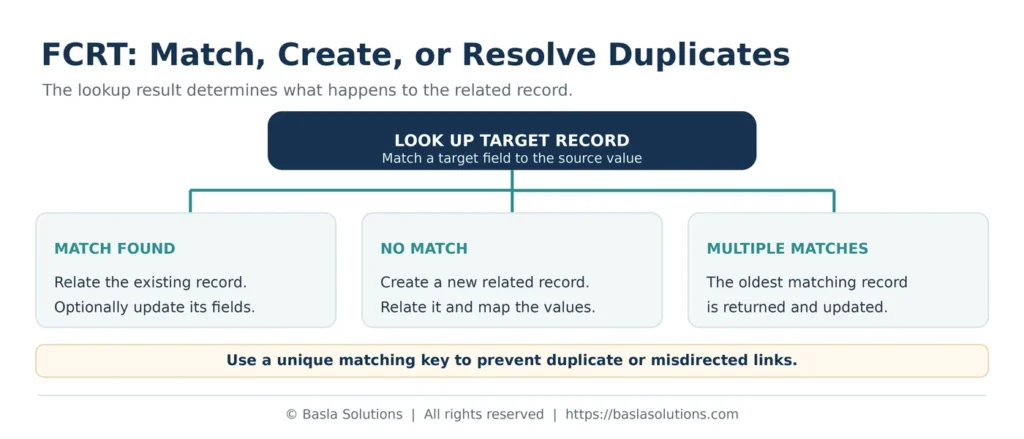
The FCRT action decides between updating and creating by running its lookup first: a match means the existing record is related and optionally updated, and no match means a new record is created and populated. Three outcomes are possible:
- Match found. The action relates the existing record to the source record and can update its fields. Nothing new is created, so repeated runs of the same rule keep touching the same child record.
- No match. The action creates a new record in the target app, relates it to the source, and fills it with the values you configured.
- Several matches. The lookup returns a single record, and when more than one record matches the lookup value, only the oldest one is returned. Duplicates in the matching field mean the action keeps updating the oldest copy while users look at the newest.
What parameters does Find or Create Related Transaction use?
Find or Create Related Transaction uses four core parameters: Related Property Name, Relation Field Name, Relation Field Value, and Params Liquid:
- Related Property Name. A dropdown of the relational fields on the current app. You pick the field that connects the current app to the target app. On a HasMany and BelongsTo relation, the BelongsTo field name must be singular, or the action fails.
- Relation Field Name. The field in the target app that the lookup searches. Custom fields need the `p_` prefix, so a custom field called `external_id` is entered as `p_external_id`.
- Relation Field Value. The value to search for. It can be hardcoded or written as a Liquid expression such as `{{external_id}}`, which pulls the value from the source record at run time.
- Params Liquid. The values written to the found or created record, one per line, in the format `field_name_on_target_app:{{ value_from_current_app }}`.
Two supporting options sit alongside these. Shared Liquid lets you assign variables once and reuse them in Params Liquid, which keeps long mappings readable. Field Updates offers a second way to populate the target record, and it cannot be combined with Params Liquid on the same action, so pick one per action.
How do you choose a unique matching field for an FCRT lookup?
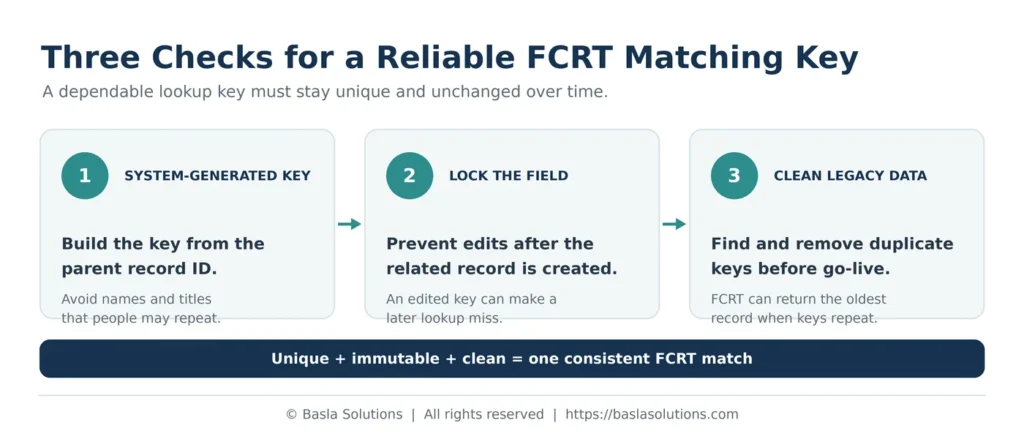
A unique matching field for an FCRT lookup is a field in the target app whose value can belong to only one record, set once and never edited by users. Matching on anything less reliable is the most common cause of duplicate or misdirected child records. Three practices keep the key sound:
- Use a system-generated key. A value built from the parent record’s ID is unique by construction. Names, titles, and descriptions are typed by people and repeat constantly.
- Lock the field after creation. If users can edit the matching field, the next run of the rule will fail to find the record and create a second one.
- Clean legacy data first. Migrated records often carry duplicate keys from the old system. Run a duplicate check on the matching field before go-live, because the action will silently favor the oldest duplicate once it is live.
Data quality problems in migrated records surface in exactly this kind of logic, which is why messy legacy data can ruin a well-built platform.
What fields must a record created by FCRT include?
A record created by FCRT must include a name, a requester name, and a requester email, unless other logic such as wizard defaults already fills them. Leave any of the three out and the create branch fails.
Teams often build and test FCRT against records that already exist, so only the update path ever runs. The first time a genuinely new parent record arrives in production, the create path fires without the required fields and the child record never appears. Write these three values into every FCRT mapping as standard, and include at least one test case where no match exists.
When should you use FCRT over other related-record actions?
You should use FCRT when a record must have exactly one counterpart and you cannot be sure in advance whether that counterpart exists yet. Onit offers several related-record actions with narrower jobs, including:
- Relate to Transaction. Links the current record to an existing record whose ID you already have. Use it when the target definitely exists.
- Create Related Transaction. Creates one or more related records from a configured list. Use it when every run should produce new records, such as a set of standard tasks for each new matter.
- Update Related Transaction(s). Writes new values to records that are already related, with an optional filter. Without a filter, it updates every related record.
FCRT earns its place in rules that may run many times on the same parent, such as an on-save rule that keeps a child summary record current. The rule that fires the action matters as much as the action itself, which is where writing business rules with guarded conditions pays off.
How do you test an FCRT configuration before go-live?
An FCRT configuration is tested by forcing both branches to run, create and update, then inspecting the target app to confirm exactly one related record exists with the right values. Three test cases cover most of the risk:
- First run on a new parent. No match exists, so the action should create one child record containing every mapped value and the three required fields.
- Repeat run on the same parent. A match now exists, so the action should update that same record. Count the child records afterward; the answer should still be one.
- Duplicate-key run. Seed two target records with the same key and confirm your team understands which one gets updated, then fix the data that allowed it.
For a typical app with three to five FCRT configurations, plan one to two days of testing in a sandbox, then repeat the repeat-run case after deployment.
How should FCRT configurations be documented for long-term support?
FCRT configurations should be documented in a short record per action: the trigger rule, the related property, the matching field and value, every Params Liquid line, and the reason the action exists. Keep it with the rest of the app’s configuration notes and update it with every release.
This matters more for FCRT than most actions because the logic is invisible to users: when a duplicate appears 18 months after go-live, the administrator needs to know which field the lookup matches on and why. Neglected logic is expensive across the industry, and one 2022 estimate put the cost of poor software quality in the US at $2.41 trillion.
Conclusion
The FCRT action is one of the most useful tools in an Onit build because it keeps parent and child records in step with a single, repeatable action. Its reliability depends almost entirely on the matching field. Choose a system-generated key that users cannot edit, include the required fields for the create branch, use one population method per action, and test both branches before go-live. Do those four things and your related records stay clean as the volume of matters, contracts, and invoices grows.
How Basla Solutions can help
Basla Solutions provides delivery teams for Onit implementation, covering legal technology consulting, business analysis, app and relationship design, Apptitude configuration, data migration support, testing, documentation, and post-go-live support. That includes designing the matching keys behind related-record actions, building and documenting FCRT mappings, and proving both the create and update paths before launch.
The team has delivered matter management and eBilling across more than 10 global jurisdictions and built eight Legal Service Request “Front Doors” for a single enterprise legal department. That delivery discipline takes the weight off your administrators while relationships and actions are built and tested.
Frequently asked questions
What does the FCRT action do in Onit?
The FCRT action in Onit searches a target app for a record matching a specified value, then relates and optionally updates it if found, or creates and populates a new related record if not. It behaves like an upsert across two related apps.
What does FCRT stand for?
FCRT stands for Find or Create Related Transaction. In Onit, a transaction is a record in an app, so the name describes exactly what the action does: find a related record, or create one when none exists.
Why is FCRT creating duplicate records?
FCRT creates duplicates when its lookup fails to find a record that already exists. The usual causes are a custom field entered without the `p_` prefix, a matching field users can edit, or a lookup value that changes between runs.
What happens when more than one record matches the FCRT lookup?
When more than one record matches the lookup value, the action returns only the oldest matching record. Updates go to that record, so duplicates in the matching field should be cleaned up before the action goes live.
Can Params Liquid and Field Updates be used together?
Params Liquid and Field Updates cannot be used together on the same action. Both populate the target record, so choose one method per action and apply it consistently across the app.
Which fields are required when FCRT creates a new record?
A new record created by FCRT needs a name, a requester name, and a requester email, unless wizard defaults or other logic fills them. Include all three in the Params Liquid mapping so the create branch never fails.
This article is for general information only and is not legal, business, financial or tax advice. For questions about your specific situation, please consult a qualified professional.