

Legal document management is how an in-house legal team stores, versions, secures, and finds the documents behind its matters and contracts. With Onit, every department has to make one early decision: whether those files live on the Onit record, in a separate document management system (DMS) linked to the record, or in a mix of both. The wrong choice shows up a year later as duplicate files, broken version chains, and lawyers who stop trusting search.
What is legal document management for an in-house legal department?
Legal document management for an in-house legal department is the set of tools and rules that decide where legal files are stored, who can open them, how versions are tracked, and how long they are kept.
A working setup handles five jobs:
- Storage. Every document has one home, tied to the matter or contract it belongs to.
- Versioning. Drafts move forward in a numbered chain, and older versions stay retrievable.
- Access. Confidential matters are visible only to the people working on them, including outside counsel.
- Search. Users find documents by content and by metadata such as matter number or document type.
- Retention. Files are kept, held, or disposed of on a schedule that matches your records policy.
Adoption is uneven. A 2021 survey of 250 in-house counsel found that 53.7 percent of legal departments used document repository technology. The firms you hire have moved faster, and a 2025 technology survey found cloud-based document management adoption among law firms at 76 percent.
How are documents stored on a matter in Onit?
Documents on an Onit matter are stored on the Documents tab of the matter record, where each file becomes a document record with its own name, type, version number, lock status, comments, and a private flag. Contract records in Onit CLM use the same tab, so the structure is consistent across matters and contracts.
In our implementations, the Documents tab carries most of the daily work:
- Folders. An Add Folder action lets users build subfolders inside the matter, such as correspondence, pleadings, and drafts.
- Intake attachments. A legal service request can carry up to 10 supporting documents, and business rules convert each one into a document record on the matter when the request becomes a matter.
- Structured upload. We removed the general Add Document button from the action panel and kept Upload, Check In, and Check Out on the Documents tab, so every file follows the same versioning and folder controls.
On one build, intake attachments did not appear on the new matter’s Documents tab at first. The fix was a document creation rule on each of the 10 attachment fields, so every uploaded file generates its own document record when the request is escalated. Build that transfer from day one, or lawyers end up downloading and re-uploading files by hand.
A clean Onit matter management setup, with consistent matter types and numbering, makes document filing far more reliable.
How does Onit link to a DMS such as iManage, NetDocuments or SharePoint?
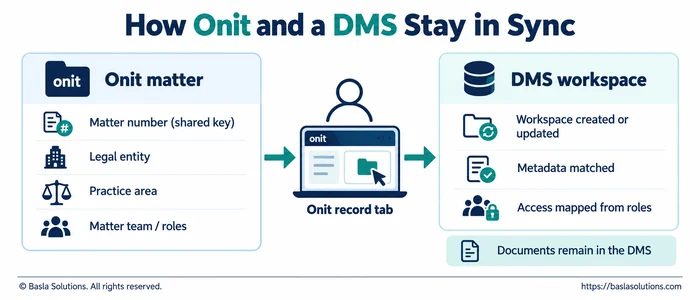
Onit links to a DMS through integrations that create or connect a workspace for each matter, push matter metadata into the DMS, and show the workspace from inside the Onit record. Documents stay in the DMS, and the matter in Onit becomes the index that points to them. Our Onit DMS integration guide covers the build, and the Onit integrations hub maps the other connections.
The iManage integration shows how this works. Onit creates the iManage workspace from the matter record and displays it in a tab on that record, maps Onit users and groups to iManage roles from full access to no access, and can be rerun to refresh workspace data. NetDocuments follows the same idea, with matter data mapped to the repository’s profile attributes, such as client, matter, document type, and practice area, and matter-centric workspaces built on top.
The step that decides success happens before any configuration:
- Match the taxonomy. Legal entity, practice area, and matter number values in Onit must match the DMS lookup tables exactly before automatic workspace creation is switched on.
- Agree the key. One field, usually the matter number, identifies the workspace in both systems and never changes.
- Map access. Decide how Onit roles translate into DMS permissions, so a private matter in Onit stays private in the DMS.
On NetDocuments, the Onit integration maps matter fields to profile attributes and workspaces, so the attribute design has to be settled first.
When should a department use a hybrid model (Onit plus DMS)?
A department should use a hybrid model when its lawyers already work in a firm-wide DMS for drafting and email filing, but its workflows, intake, and contract reconciliation run in Onit.
In our implementations, the split that holds up is simple. Onit’s Documents tab handles intake attachments, drafts that move through approval, and contract reconciliation, while metadata mappings keep the matching DMS workspace in step for long-form work and email.
| Pattern | Best for | Trade-off |
|---|---|---|
| Documents stored on the Onit matter | Teams with no DMS, or with modest document volumes | Email filing and heavy drafting are weaker than in a dedicated DMS |
| DMS linked to the Onit matter | Teams already running iManage, NetDocuments or SharePoint | Two systems to configure, and taxonomy must match exactly |
| Hybrid of Onit and a DMS | Teams with workflow in Onit and drafting in the DMS | Users need a clear rule for which document goes where |
Check the platform rules before you design a hybrid. In Onit Unity, a third-party document integration such as iManage cannot run alongside Unity’s internal document management for matter files, so the choice for that file area is one or the other. Whatever you choose, write a one-page rule on which document types go where.
Where should contracts live, in Onit CLM or in the DMS?
Contracts should live in Onit CLM when you want contract data to drive reminders, obligations, and reporting, because the executed file and its metadata then sit on the same record. The DMS can still hold a copy for records purposes, but the CLM record is the working source.
In our implementations, executed agreements live on the Documents tab of the CLM record. The signed PDF comes back from the e-signature integration, and reconciled metadata such as expiration date, notice period, and governing law then drives obligation reminders and reports.
Three details make this reliable:
- Reconcile before activation. A person confirms the expiration date, notice period, and governing law against the signed PDF before reminders start.
- Flag legacy uploads. Setting the executed flag on legacy agreements skips the authoring and approval stages, which saves real time on a large back-catalog.
- Test file creation. On one project, legacy uploads created contract records but the file did not appear on the Documents tab. Correcting the document creation rule and its uniqueness keys fixed it, and the test scripts now check that every upload produces a visible file.
How does document version control work on a matter?
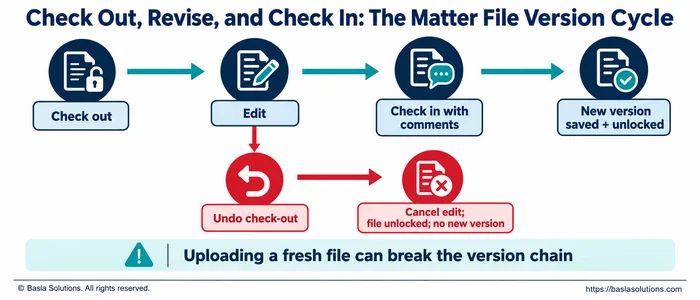
Document version control on an Onit matter works through check-out, check-in, and undo check-out, which lock a file while one person edits it and record each new version with a number and comments. Every check-in creates a document version record, so the full history sits on the Document Versions sub-tab.
The three actions behave like this:
- Check out. The document locks for the current user, showing a locked status and timestamp so nobody else overwrites the draft.
- Check in. The user attaches the updated file, chooses a minor version such as v1.1 or a major version such as v2.0, and enters revision comments. The file then unlocks.
- Undo check-out. The edit session is cancelled and the document returns to unlocked with no new version.
The most common failure is people uploading a fresh file in place of checking in the existing one, which breaks the version chain. In our implementations, the fix combined three things: removing the general upload button, setting up the Onit Word Add-In for internal review, and training reviewers to check in with comments every time. Make revision comments mandatory. The same principles apply across systems, as covered in document version control for contracts and matters.
Can outside counsel upload documents to an Onit matter?
Outside counsel can upload documents to an Onit matter when they are added as matter participants in the outside counsel group, which gives them a dashboard showing only the matters assigned to them. From there they post comments with attachments and upload documents during review phases.
Access design is the harder part:
- Assigned matters only. Profile-based security and private matter settings keep each firm inside its own matters.
- Hidden internal tabs. Internal status updates and financial allocation tabs stay hidden from the outside counsel role. Test this with a real law firm login before go-live.
- Role-specific actions. Buttons meant for firms, such as a monthly status update, should show only to the outside counsel role.
- A closing window. We configure a 60-day window after matter closure for firms to submit trailing documents and invoices, after which the matter locks to them.
Conclusion
Legal document management with Onit comes down to one decision made early and enforced consistently: files on the matter, files in a linked DMS, or a clear hybrid. Store workflow documents on the Onit record, move intake attachments across automatically, lock versioning to check-in and check-out, and match your taxonomy before you connect a DMS. Keep executed contracts on the CLM record so their data can do work, and give outside counsel exactly the access their matters need.
How Basla can help
Basla provides delivery teams for Onit implementation, covering business analysis, document and folder design, DMS integration mapping, intake-to-matter document rules, CLM reconciliation, testing, documentation, and post-go-live support. Basla delivers legal technology services through staff augmentation or a Basla-managed delivery unit, so your program can add capacity without slowing down.
Basla teams have delivered matter management and eBilling across 10 or more global jurisdictions and doubled delivery team size to meet compressed implementation timelines.
Frequently asked questions
Does Onit have its own document management system?
Onit has its own legal document management capabilities, with a Documents tab on matter and contract records, folders, check-in and check-out, version history, and search across content and metadata. Many departments use it as their primary matter repository.
Can Onit integrate with iManage or NetDocuments?
Onit integrates with iManage and NetDocuments by creating or connecting a workspace for each matter and mapping matter metadata into the DMS. The workspace can then be viewed from inside the Onit record.
Where should contracts live, in Onit CLM or in the DMS?
Contracts should live on the Onit CLM record when contract metadata drives reminders, obligations, and reporting. A copy can sit in the DMS for records purposes, with the CLM record as the working source.
How does document version control work on a matter?
Document version control on a matter uses check-out to lock a file, check-in to save a new minor or major version with comments, and undo check-out to cancel an edit. Every version stays on the Document Versions sub-tab.
Can outside counsel upload documents to a matter?
Outside counsel can upload documents to a matter once they are added as participants in the outside counsel role. Profile-based security limits them to their assigned matters and hides internal tabs.
*This article is provided for general information only and does not constitute legal advice. Basla Solutions provides legal technology implementation and support services and does not practice law.*