

Document version control is the set of rules and platform features that keep every draft of a legal document recoverable, show clearly which version is current, and record who changed what and when. In legal work, it is what lets you answer “which draft did we sign?” in seconds.
Without it, drafts multiply as email attachments named “final”, “final v2”, and “final clean”, and nobody is certain which one the counterparty accepted. Legal platforms such as Onit and connected document management systems handle much of this automatically, but only when the rules behind them are designed deliberately. This guide covers what versioning should capture, how to control editing, how to protect executed documents, and how versions move between systems.
What is document version control in legal work?
Document version control in legal work is the practice of saving each revision of a contract, pleading, or matter file as a new version while keeping every earlier version retrievable and auditable. The current version is always identifiable, and nothing is overwritten. Getting this wrong costs time, and 2024 estimates put time lost organizing, storing, and managing agreements at 6,000 hours a year per business function. Clear versions also help readers, since research on contracting found around 90 percent of business people find contracts difficult to understand.
A sound setup delivers five things:
- No lost drafts. Every earlier version stays in the history, so a deleted clause can always be recovered.
- A clear current version. Users open the right draft by default, without comparing file names.
- Controlled editing. Only one person edits at a time, or edits merge in a managed way.
- An audit record. Each version records the user, date, and reason for the change.
- Reliable retrieval. Earlier versions can be found and downloaded when a dispute or audit asks for them.
Versioning supports every stage of the contract lifecycle, which runs from request through renewal, and the matter work around it.
What should each document version record?
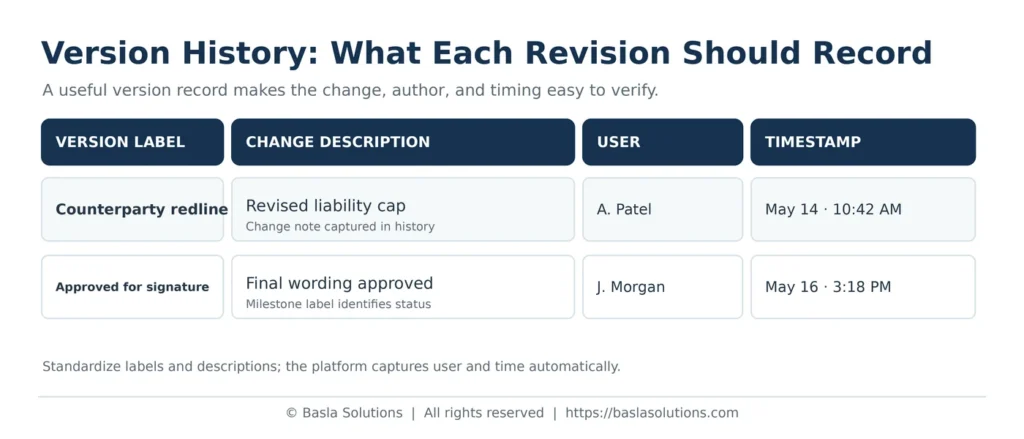
Each document version should record who created it, when, a short label, and a description of what changed. That metadata is what turns a version list into a usable history.
Fields worth making standard:
- Label. A short marker such as “Counterparty redline” or “Approved for signature”.
- Description. One or two sentences on what changed, such as “accepted revised liability cap”.
- User and timestamp. Captured automatically by the platform.
Labels matter most when a contract runs through ten or more rounds. Without them, users open six versions to find the one that went to the counterparty. Agree a short list of eight to twelve standard labels so reports can group versions by stage.
How should check-out and locking prevent conflicting edits?
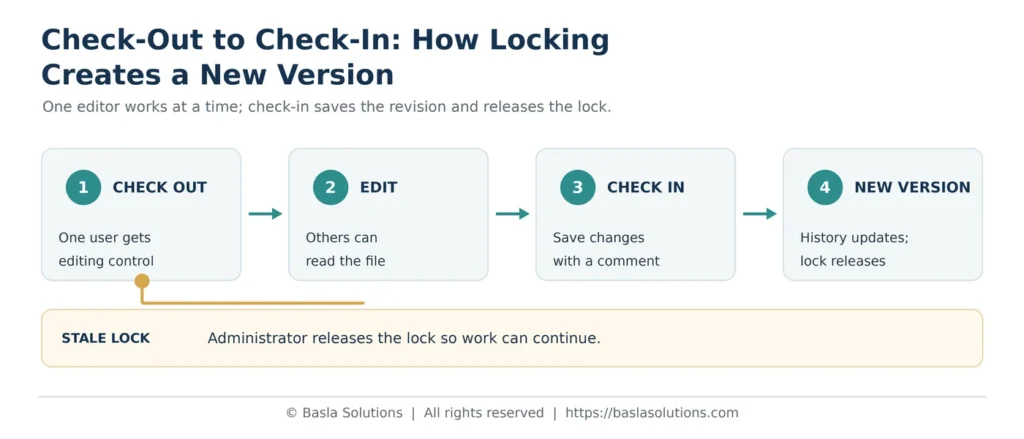
Check-out and locking prevent conflicting edits by giving one user control of a document while others can still read it. When that user checks the document back in, the platform saves a new version and releases it.
Rules to set during implementation:
- When locking applies. Lock documents under active negotiation, where two edits at once create conflicting redlines.
- Who can release a lock. Name an administrator who can release a lock left by someone on leave.
- Stale lock alerts. Notify the holder when a lock passes two or three business days.
Locking behavior differs between platforms and configurations, so confirm the exact lock states in your deployed setup during testing. Locks left in place over a weekend are one of the most common support tickets in the first month after go-live.
Should legal teams use major and minor version numbers?
Legal teams can use major and minor version numbers as a governance convention, with minor versions for working drafts and major versions for milestones such as approval or execution. The numbering model depends on the platform and must be confirmed in your configuration.
A common convention uses minor versions (1.1, 1.2) for internal drafts and redline rounds, and major versions (2.0, 3.0) for formal milestones such as approved for signature or executed. The convention helps users scan history quickly: a jump from 1.6 to 2.0 signals that something important happened. Whatever scheme you choose, write it into the user guide and keep it the same in every system that stores the document.
How should the executed version of a contract be protected?
The executed version of a contract should be kept as a distinct, protected record with a clear execution status, restricted edit rights, and a full audit history. It is the version every later question refers back to.
Practical protections:
- Separate status. Mark the signed document as executed so it cannot be confused with the last negotiated draft.
- Read-only access. Limit edit rights to a small administrative group, often two or three people.
- Linked amendments. Store amendments as new linked documents, so the original executed text never changes.
Protection comes from permissions, repository controls, and audit history together. Describe the executed record as protected and auditable in policies, and avoid promising that it can never be changed, since administrators retain some rights. Approval steps before signature are covered in contract approval workflows that route each agreement by value and risk.
How does Onit handle document versions?
Onit handles document versions by saving an uploaded revision as a new version, marking the earlier file as a previous version, and keeping it in the version history. Users can view that history and download earlier versions from the file’s actions menu.
Onit also supports labels and descriptions on versions, and a revision audit trail, so each change is traceable. In contract records, users can see the document history alongside reportable contract data. The detail of how versions behave in your environment depends on configuration, so confirm it during design. The wider build is covered in what an Onit ELM implementation actually involves.
How should versions work between Onit and a DMS?
Versions between Onit’s document management and a DMS such as NetDocuments should follow one rule: a single system owns the version history for each document type. The other system links to it or receives a copy at defined points.
Onit supports NetDocuments integration, but the scope of synchronization, the direction documents move, metadata mapping, and version behavior are set per deployment. Decide these during design:
- System of record. For example, Onit owns contract drafts during negotiation, and the DMS stores the executed copy.
- Sync points. Which events copy a version across, such as execution or matter closure.
- Conflict rule. What happens when someone edits the copy in the non-owning system, usually a block or a warning.
Two systems that both accept edits to the same document will produce diverging histories within weeks. The DMS side of the design is covered in how NetDocuments architecture connects repositories, cabinets, and workspaces.
Where do AI review outputs fit in version history?
AI review outputs fit in version history only where the workflow is designed to store them there, since tools such as ReviewAI produce findings, risk profiles, and recommended redlines as structured data. Saving an AI-marked-up copy as a new version is a design choice.
Two patterns work well. Some teams store the AI findings on the contract record and leave the document version alone until a lawyer accepts changes. Others save the AI-redlined copy as a labeled version, such as “AI review”, so the history shows what was suggested. Pick one pattern and apply it to every contract type, so users always know where to look.
How do you test document version control before go-live?
You test document version control by running real drafts through every versioning scenario, from first upload to execution, and confirming the history, labels, locks, and permissions behave as designed. Testing should include the DMS hand-off where one exists.
Build 15 to 25 test cases covering new versions, concurrent edit attempts, lock release, executed-record protection, and sync to the DMS. Run each with users from at least three roles. Treat versioning like any other configured logic, since CLM testing proves clause and approval logic against real scenarios before users depend on it.
Conclusion
Document version control turns a pile of drafts into a traceable record of how each contract and matter file evolved. Capture labels and descriptions, lock documents under active negotiation, protect the executed version, and give each document type one system of record across Onit and the DMS. Test every scenario before go-live, and your team will always know which version is current and how it got there.
How Basla can help
Basla provides delivery teams for Onit implementation, covering legal technology consulting, business analysis, document and versioning design, workflow configuration, DMS integration support, testing, documentation, and post-go-live support. The team defines versioning rules with your legal users, then tests every scenario, from first draft to executed record, before rollout.
On a Contract Lifecycle Management rollout, Basla created and executed more than 1,000 test records, and the delivery team doubled in size to meet a compressed implementation timeline.
Frequently asked questions
What is document version control?
Document version control is the practice of saving each revision as a new version while keeping earlier versions retrievable and recording who changed what and when. Document version control ensures the current version is always clear.
What is check-in and check-out in document management?
Check-out gives one user control to edit a document while others can only read it. Check-in saves the revised file as a new version and releases it for others.
Should contracts use major and minor version numbers?
Contracts can use minor versions for drafts and redline rounds and major versions for milestones such as approval or execution. The numbering model should be confirmed in your platform configuration.
How do you protect an executed contract from changes?
An executed contract is protected by marking it with an executed status, restricting edit rights to a small group, and storing amendments as separate linked documents. The audit history records any later access.
Does Onit keep previous versions of documents?
Onit keeps previous versions when a file is uploaded as a new version, marking the earlier file as a previous version in the history. Users can view and download earlier versions from the file’s actions menu.
Should Onit or NetDocuments own document versions?
One system should own the version history for each document type, and the choice is set during implementation. A common pattern has Onit own drafts during negotiation and NetDocuments store the executed copy.
*This article is provided for general information only and does not constitute legal advice. Basla Solutions provides legal technology implementation and support services and does not practice law.*