

Legal spend management software is the platform a legal department uses to control outside counsel and vendor spend, from the moment a matter opens to the moment the invoice is paid and reported. Every vendor demo shows invoices, budgets, and a dashboard, so platforms look alike on a feature list. The differences show up in how each one handles rules, accruals, global invoices, and the handoff to finance.
The software is the engine of a wider legal spend management program, which also covers the people, policies, and reporting rhythm around it. It sits inside the enterprise legal management category, and this guide covers what the software must do, how it differs from eBilling, how to compare vendors, and what drives the cost.
What is legal spend management software?
Spend management software for legal departments is the system used to capture, check, approve, budget, accrue, and report on outside counsel and vendor spend across every matter and firm.
Investment in the category is rising. A survey of general counsel found that 31 percent planned to invest in eBilling and spend management software in 2025, one of the three most common planned technology investments alongside AI assistants.
The software comes in two forms. Some departments buy it as a module of a full ELM platform that also runs matter management and intake. Others buy a focused spend platform that handles invoices, budgets, and reporting, and connect it to a separate matter system. A side-by-side view of the full platforms is in our guide to comparing enterprise legal management software.
What should legal spend management software do?
Spend management software should cover seven jobs end to end: matter and firm setup, invoice rules, reviewer workflow, budgets, accruals, analytics, and the handoff to accounts payable. A platform that is weak on any one of them leaves a manual workaround in your process.
Use this capability table as a demo checklist:
| Capability | What it should do | What to test in the demo |
|---|---|---|
| Matter and firm setup | Link every invoice to a matter, firm, business unit, and legal entity | Create a matter, assign a firm, and submit an invoice against it |
| Invoice rules | Check rates, codes, expenses, and budgets on every line | Load a real invoice with known violations and count what is caught |
| Reviewer workflow | Route flagged lines to the right reviewer with tiers by amount | Approve, reduce, and reject lines, then send a coded reason to the firm |
| Rate management | Hold approved rates per timekeeper and an annual increase process | Submit a rate increase and an invoice with an unapproved timekeeper |
| Budgets | Track actuals against matter or phase budgets and warn on overruns | Push a matter past 80 percent of budget and check the alert |
| Accruals | Collect firm estimates of unbilled work and post them to finance | Run a month-end accrual cycle and export the result |
| Analytics | Report spend by firm, matter type, business unit, and period | Rebuild one of your current monthly reports from the platform |
| AP handoff | Send approved invoices to the ERP and receive payment status back | Trace one invoice from approval to paid status in your ERP |
Two capabilities separate platforms most often. Accruals vary widely, from a simple estimate form to a scheduled process with validation, and the right accrual cadence, whether monthly, by period, or annual, should be configurable per firm. Analytics also vary, and what a spend dashboard should report is covered in our guide to legal spend analytics. For the AP side, ask how the platform handles connecting eBilling to AP in Coupa or your own procurement system.
How is it different from eBilling software?
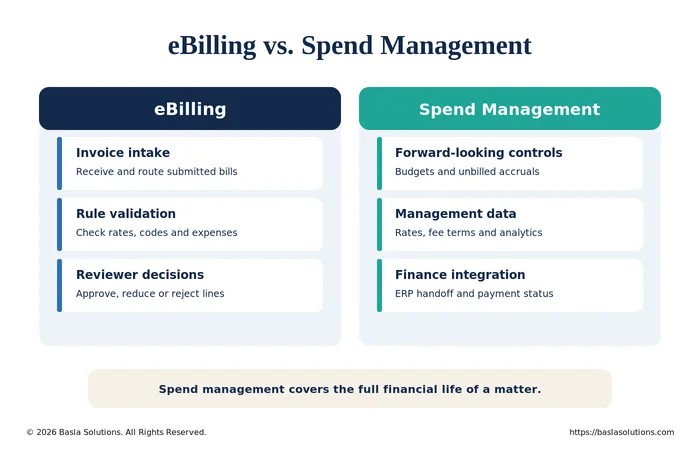
Spend management software includes eBilling and adds the controls around it: eBilling receives, validates, and routes law firm invoices, while spend management adds budgets, accruals, rate management, analytics, and the link to finance.
The two terms are often used interchangeably by vendors, so test the difference directly:
- Scope. eBilling covers the invoice. Spend management covers the matter’s full financial life, from budget and fee arrangement through accrual and final payment.
- Timing. eBilling looks backward at invoices already submitted. Spend management also looks forward, through budgets and accruals for work not yet billed.
- Users. eBilling serves reviewers and AP. Spend management also serves finance at month-end close and the GC in quarterly reporting.
- Data. eBilling needs invoice and rate data. Spend management also needs budgets, fee arrangements, legal entities, and GL codes.
If your department already runs legal eBilling software well, the gap to fill is usually budgets, accruals, and reporting.
What is the best legal spend management software?
The best spend management platform is the one that fits your invoice volume, firm panel, finance systems, and global footprint, and that fit differs from one department to the next.
Platforms tend to fall into four groups:
- Enterprise ELM suites. Spend management inside a full platform with matter management, intake, and deep configuration, suited to large departments with several hundred invoices a month.
- Mid-market spend platforms. Faster to deploy with less configuration, suited to departments with smaller teams and simpler approval chains.
- eBilling-first tools. Strong invoice review with lighter budgets and accruals, suited to departments whose main problem is invoice compliance.
- Procurement and finance modules. Legal spend handled inside a wider procurement suite, suited to companies that want one supplier process for every category.
Ask each vendor to show how it connects spend to performance. Most departments can report what they paid each firm, and far fewer can say which firms delivered value for that money. A platform that links each invoice to a matter type, an outcome, and a firm scorecard closes that gap. A fair comparison follows the same steps for every vendor:
- Write the requirements first. List 30 to 50 requirements grouped under the seven capabilities, and mark each as must-have or nice-to-have before any demo.
- Script the demo. Give each vendor the same scenarios and the same anonymized invoices, so you compare how the platforms behave on your work.
- Score in the room. Have each evaluator score every scenario on a simple scale during the demo, while the detail is fresh.
- Check references. Speak to two customers of a similar size and region, and ask how long firm onboarding and the ERP integration actually took.
Most selections take eight to twelve weeks from requirements to contract when the shortlist is held to three vendors.
How do you evaluate legal spend management software for a global team?
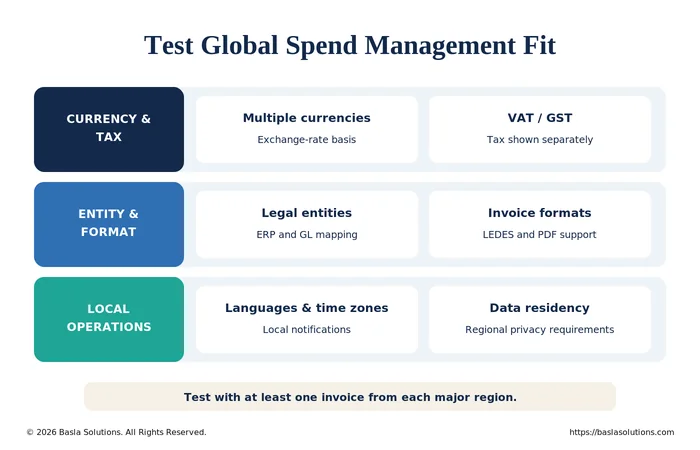
You evaluate spend management software for a global team by testing how it handles currencies, tax, legal entities, invoice formats, and languages, using real invoices from each region you operate in.
- Multiple currencies. Invoices in the firm’s currency, approvals in a reporting currency, and payment in the entity’s currency, with a clear rule for which exchange rate applies.
- Tax and VAT. Regional VAT and GST rules checked on every invoice, with tax shown separately from fees.
- Legal entities. Each matter mapped to the entity that pays, so spend lands in the right ERP and GL account.
- Invoice formats. The international LEDES format added fields needed for global eBilling and now carries 52 fields per invoice line. Check that the platform validates it, along with PDF invoices from firms that cannot send LEDES.
- Languages and time zones. Interfaces and notifications for firms and reviewers in their working language, with deadlines that respect local time.
- Data residency. Where invoice and matter data is stored, and whether that meets your regional privacy requirements.
Run the test with at least one invoice from each major region. Global problems rarely appear in a demo built on US invoices.
What does legal spend management software cost?
The cost of spend management software depends on four things: how the subscription is priced, who pays for invoice processing, how much implementation the platform needs, and how much administration it takes to run.
- Subscription basis. Vendors price by users, matters, invoice volume, or the amount of spend under management, so model the cost on your own volumes for three years.
- Firm-paid models. Some platforms charge law firms a fee per invoice or a share of billed amounts. This lowers the department’s cost, and some firms push back or build it into rates.
- Implementation. Configuration, data migration, ERP integration, and firm onboarding often take three to six months, and longer across several regions.
- Administration. Rules, rates, and firm records need an owner. Plan for at least a part-time administrator after go-live.
Compare vendors on three-year total cost, including implementation and internal effort. The cheapest subscription can cost more if it needs heavy manual work every month, such as rebuilding reports in spreadsheets or keying accruals by hand. Ask each vendor which features are included in the base subscription and which are priced as add-ons, since analytics, accrual modules, and extra ERP connectors are often sold separately.
Conclusion
Legal spend management software earns its place when it covers the full financial life of a matter: rules on every invoice, budgets and accruals for work not yet billed, analytics that link spend to performance, and a clean handoff to finance. Test those capabilities with your own invoices, include every region you operate in, and compare vendors on three-year total cost. The platform that fits your volume and finance systems is the right one for your department.
How Basla can help
Basla provides delivery teams for enterprise legal management and eBilling software implementation, covering business analysis, requirements and demo scripts, rules and rate configuration, budgets and accruals, multi-currency and VAT setup, ERP and AP integration, law firm onboarding, testing, documentation, and post-go-live support. Basla delivers legal technology services through staff augmentation or a Basla-managed delivery unit, so your spend platform is configured around your process from the first release.
Basla teams have delivered matter management and eBilling across 10 or more global jurisdictions and doubled delivery team size to meet compressed implementation timelines.
Frequently asked questions
Is legal spend management software the same as ELM?
Spend management software is one part of enterprise legal management. ELM platforms add matter management, intake, and document features, while some spend tools focus only on invoices, budgets, accruals, and reporting.
Which vendors sell legal spend management software?
Vendors that sell spend management software include Brightflag, LawVu, Legal Tracker, Mitratech, Onit, and Wolters Kluwer ELM Solutions, listed alphabetically. Several procurement and finance suites also offer legal spend modules.
Can legal spend software integrate with SAP or Coupa?
Most spend platforms integrate with SAP, Coupa, and other AP systems, sending approved invoices as a payment file or through an API and receiving payment status back. Vendor, entity, and GL code mappings need to be agreed before the integration is built.
How long does implementation take?
Implementation usually takes three to six months for a single region and six to twelve months for a global rollout with several ERPs. Law firm onboarding and finance integration are usually the longest workstreams.
*This article is provided for general information only and does not constitute legal advice. Basla Solutions provides legal technology implementation and support services and does not practice law.*