

eDiscovery billing is the way an eDiscovery vendor charges for collecting, processing, hosting, and reviewing electronic data on a legal matter, and the way the legal department checks those charges before paying them. The invoices are built from gigabytes, months, and reviewer hours, so the controls built for law firm fee narratives miss most of the risk. This guide is one part of a wider approach to legal bill review across rules, reviewers, and managed services, and it fits inside any enterprise legal management program that already handles law firm invoices.
How do you review eDiscovery vendor invoices?
You review eDiscovery vendor invoices by checking every line against the signed pricing schedule, the vendor’s own data volume reports, and the matter budget before anyone approves payment. Good eDiscovery billing review starts with knowing what each unit should cost and how many units were used.
- Pricing schedule. Load the agreed rate card for each vendor and matter, including volume tiers, minimum charges, and any discount for archiving data.
- Volume reports. Ask for a monthly report of GB processed, GB hosted, and documents reviewed, so each line traces to a stated number.
- Matter and phase. Confirm the invoice is coded to the right matter and discovery phase.
- Approver. Route the invoice to the case attorney for a reasonableness check and to legal operations for the price check.
Industry guidance on choosing eDiscovery providers recommends that you ask providers to list every possible charge up front, and that list becomes the reference for every review that follows.
How are eDiscovery charges structured?
eDiscovery charges are structured as unit prices for each stage of the work: per custodian or device for collection, per GB for processing and hosting, and per hour or per document for review. Every eDiscovery billing line should map to one of these units.
| Charge type | Unit | What to check |
|---|---|---|
| Collection | Per custodian, per device, or hourly | Custodian count matches the hold list; no repeat collections |
| Processing | Per GB ingested or per GB processed | Volume matches the vendor report; no reprocessing billed twice |
| Hosting | Per GB per month | GB matches the current workspace; archived data at the lower rate |
| Analytics and TAR | Per GB or per document | Approved in writing before it was switched on |
| Managed review | Per hour or per document | Reviewer roster, pace, and the agreed rate per level |
| Production | Per GB, per page, or per volume | Production count matches what was served |
| Project management | Per hour | Hours stay within the agreed cap or percentage |
Review is where most of the money goes. One industry estimate puts review at about 65 percent of eDiscovery task spend in 2023. Hosting looks small per line, but it repeats every month the matter stays open.
What should be validated on a hosting or processing invoice?
A hosting or processing invoice should be validated for the billable volume, the billing period, and the price tier, because these three numbers drive almost every overcharge.
- Billable GB. Check whether the vendor bills on ingested data or on data left after deduplication and culling.
- Hosting months. Compare the billing period with the date the workspace was opened, and stop the clock when data moves to archive or the matter closes.
- Analytics tier. Confirm that analytics-enabled hosting was approved.
- Duplicate processing. Compare each processing line against earlier invoices for the same custodians and date ranges, and flag any batch billed twice.
- Minimums and fees. Check monthly minimums, user license fees, and setup fees against the rate card.
Market rates give you a sanity check. A winter 2026 pricing survey found that 54.7 percent of respondents paid under US$10 per GB per month for basic hosting, so a rate well above that needs a reason in the contract.
How do review hours get checked?
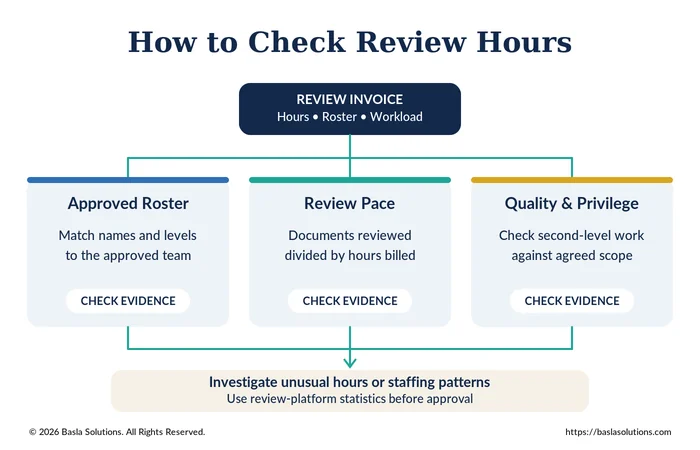
Review hours get checked by comparing the hours billed with the number of documents reviewed, the approved reviewer roster, and the agreed rate for each reviewer level.
- Reviewer roster. Match every name on the invoice to an approved reviewer and level, such as first-level reviewer, second-level reviewer, or project manager.
- Documents per hour. Divide documents reviewed by hours billed, and question any sharp drop in pace.
- Quality control and privilege. Check that second-level review and privilege logging stay within an agreed share of total hours, often 10 to 20 percent.
Ask for the review platform’s statistics with each invoice.
Can eDiscovery invoices go through eBilling?
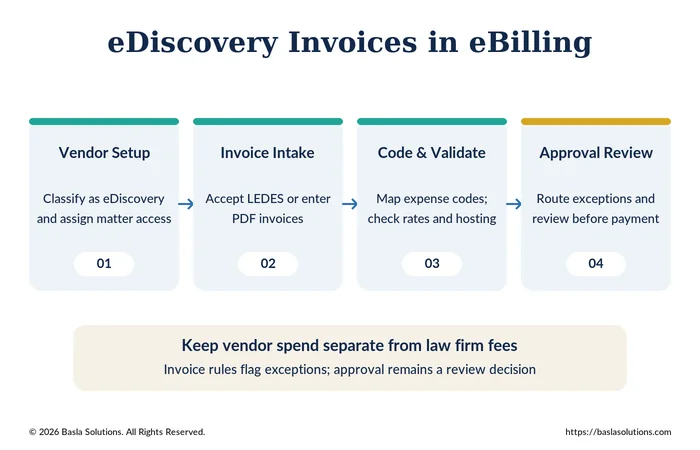
eDiscovery invoices can go through eBilling when the vendor is set up as a non-law-firm vendor with its own rate card, matter access, and validation rules. This puts eDiscovery billing under the same approval workflow and reporting as outside counsel spend.
- Vendor setup. Classify the vendor as eDiscovery or litigation support, so its spend reports separately from law firms.
- Invoice format. Some vendors can submit LEDES files, while many still send PDF invoices that are entered by hand or uploaded through the vendor portal.
- Codes. Map each charge to task and expense codes, using the standard UTBMS expense codes for vendor costs, so spend rolls up correctly.
- Rules. Configure rate checks per unit, a maximum monthly hosting amount, and a rule that flags any line without a matching rate card entry.
The same setup is used to pay experts, court reporters, and other vendors outside the law firm panel, which keeps all expert witness fees and vendor costs in one system.
How do you budget eDiscovery spend?
You budget eDiscovery spend by estimating data volume from custodians, then pricing processing, hosting time, and review hours against the vendor’s rate card. A budget built on the same units as eDiscovery billing can be tracked line by line.
- Volume estimate. Multiply the number of custodians by a typical volume per custodian, often 5 to 15 GB of email and files, and adjust for the date range.
- Culling rate. Agree with counsel how much data deduplication and search terms should remove before review.
- Hosting duration. Budget hosting for the expected life of the case, often 12 to 24 months for litigation, with a step down when data is archived.
- Monthly re-forecast. Compare actual GB and hours with the budget each month, and re-forecast when volumes move by more than 10 percent.
Conclusion
eDiscovery billing is easier to control once each charge is tied to a unit you can count. Load the rate card before work starts, ask for volume reports with every invoice, run the invoices through eBilling under their own vendor rules, and budget eDiscovery as a phase of the matter.
How Basla can help
Basla provides delivery teams for enterprise legal management and eBilling software implementation, covering business analysis, vendor and rate card setup, invoice validation rules, UTBMS code mapping, approval workflows, testing, documentation, and post-go-live support. Basla delivers legal technology services through staff augmentation or a Basla-managed delivery unit, so eDiscovery providers and experts can be onboarded alongside your law firm panel.
Basla teams have delivered matter management and eBilling across 10 or more global jurisdictions.
Frequently asked questions
Do eDiscovery vendors use LEDES?
Some eDiscovery vendors can submit LEDES files, but many still send PDF or spreadsheet invoices. An eBilling system handles both kinds of eDiscovery billing, through a LEDES upload or manual entry against the vendor’s rate card.
What is a typical per-GB hosting charge structure?
A typical hosting charge is a rate per GB per month, often with a lower rate for basic hosting and a higher one for analytics. Many contracts add a cheaper archive rate for inactive data and a monthly minimum.
Should eDiscovery be a separate matter or a phase?
eDiscovery is usually tracked as a phase or budget line within the litigation matter it supports. A separate matter makes sense only when one eDiscovery workspace serves several related cases.
How do you catch duplicate processing charges?
You catch duplicate processing charges by comparing each processing line with earlier invoices for the same custodians and date ranges. Ask the vendor for batch IDs on every line, and flag any batch that appears twice.
*This article is provided for general information only and does not constitute legal advice. Basla Solutions provides legal technology implementation and support services and does not practice law.*