

Vendor suspension is the controlled process of stopping an outside counsel firm from receiving new work, removing it from a specific matter, or deactivating it across your organization, while protecting active legal work and the billing record.
Most eBilling platforms give you the switches. The rules around them are yours to write: when each level applies, what must be checked first, and who approves. This guide covers both, using SimpleLegal, now upgraded to Onit Unity, as the worked example.
What are vendor suspension rules in legal operations?
Vendor suspension rules in legal operations define when a law firm’s status changes, how far the change reaches, and what checks and approvals come first. They turn a one-click platform action into a decision with a clear scope and a paper trail. Vendor risk is rising, and an analysis of 12,195 confirmed breaches found third-party involvement in breaches doubled to 30 percent. Evidence is often thin, since a 2025 survey of 1,000 general counsel found fewer than a third track outside counsel performance, value, or stakeholder satisfaction.
Good rules separate three questions that often get blurred. Can the firm receive new matters? Can it keep working on a specific matter? Can it still submit invoices and see its history? Each answer can differ, and the platform controls for each are different, so the policy needs to address them one at a time.
When should a law firm be suspended or deactivated?
A law firm should be suspended or deactivated when continuing the relationship creates legal, financial, or operational risk that ordinary performance management cannot fix. The trigger decides the scope, so name it before taking any action.
- Relationship ended. The engagement or panel term has finished and the firm will no longer complete or bill work.
- Compliance failure. The firm has breached outside counsel guidelines, vendor data privacy and security terms, or insurance requirements.
- Conflict of interest. A new conflict prevents the firm from acting on one matter or for the whole organization.
- Sustained poor performance. Repeated low scores in your law firm panel review or billing problems persist after a documented remediation period.
- Structural change. A merger, name change, or new tax entity means the existing vendor record no longer describes the firm correctly.
Performance-based suspension should follow your evaluation process. Your legal vendor scorecard can trigger a review, and a person decides the outcome. Automatic suspension from a low score is a policy choice, and most departments keep a human approval in that loop.
What suspension levels should a vendor policy define?
A vendor suspension policy should define three levels, each with a different reach: a soft hold on new work, a matter-level removal, and a full deactivation. Most situations call for the lightest level that addresses the risk.
- Soft hold. The firm keeps its active matters but receives no new assignments, and any exception needs legal operations approval.
- Matter-level suspension. The firm’s role ends on one matter, after pending invoices, accruals, and final billing on that matter are settled.
- Hard deactivation. The firm receives no new work anywhere in the organization, after every open matter, invoice, and accrual has been reviewed.
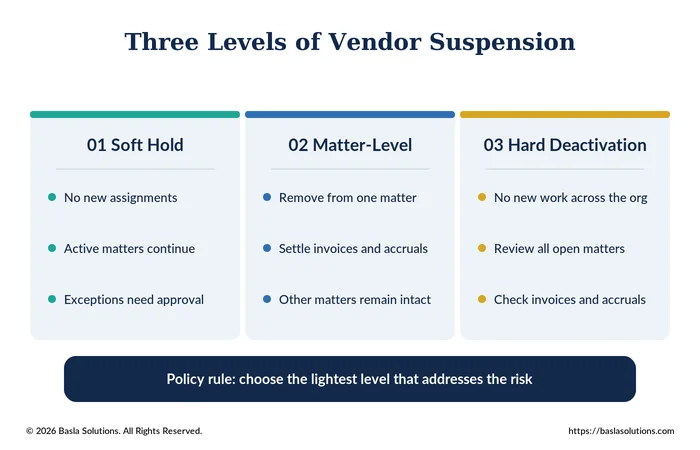
These tiers are governance policy. In Unity, vendor deactivation is a platform action and matter-level changes run through the matter’s Vendors section; a soft hold is usually enforced through your assignment procedure and approval steps.
How does vendor deactivation work in SimpleLegal?
Vendor deactivation in SimpleLegal, now Onit Unity, is an administrative action for a firm that will no longer complete or bill work, done by selecting Inactivate from the vendor’s Actions menu on the Vendors list. A single deactivation takes effect without a confirmation prompt, while bulk inactivation asks you to confirm, so check the firm’s open matters first and make sure no matter loses its only assigned vendor.
Deactivation is a status change with history attached. The Vendors list shows active vendors by default, with tabs for inactive and all vendors, so the record stays available for disputes and audits. What a deactivated firm can still see in Counsel Exchange, and whether it can still submit, is not set out in the vendor guides, so confirm it in your environment before you rely on it.
What checks should happen before deactivating a law firm?
Four checks should happen before deactivating a law firm: open matters, open invoices, accruals, and final billing. Skipping any of them is how a clean deactivation turns into a month of manual cleanup.
- Open matters. List every open matter the firm is assigned to, and reassign any where it is the only vendor before you deactivate.
- Open invoices and disputes. Resolve or route invoices still under review, on hold, or in dispute, so payment decisions are not left hanging.
- Accruals. Close out the firm’s outstanding accrual estimates, then switch off its accrual requests, which Unity lets you do vendor by vendor.
- Final billing window. Agree a cut-off date for trailing invoices, typically 30 to 60 days after the effective date, and tell the firm in writing.
Run the checks a week or two before the planned effective date. On a firm with 15 open matters, reassignment alone can take several days.
How do you remove a law firm from a single matter in SimpleLegal?
You remove a law firm from a single matter in SimpleLegal from the matter’s Vendors section, where assigned firms are listed, which leaves the firm’s vendor record and its other matters untouched. This is the right tool for a conflict, a change of counsel, or a matter the firm should no longer work on. Portal behavior after a removal depends on configuration, so check three things with a test vendor.
- Matter access. The firm can no longer see the matter’s files and updates in Counsel Exchange.
- Invoice history. Invoices it already submitted on the matter stay on record for review and payment.
- Other matters. Its other assignments and its vendor record are unaffected.
Before removing the firm, settle what it still needs to bill for work already done, and confirm a replacement firm is assigned if the matter continues.
What happens to a suspended law firm’s invoices and history?
After a law firm is suspended, its previously submitted invoices and past matters remain on record in the platform. What happens to new invoices depends on how your environment is configured, so it needs testing.
- Historical records. Past invoices and matters stay available to your team, which supports audits and late disputes.
- Audit record. Unity’s Activity Log records changes, so later edits to the firm’s records can be traced.
- New invoice behavior. Whether a suspended firm can still submit an invoice, and whether it is held before payment, depends on your configuration and integrations.
Test that last point before you rely on it. Submit a test invoice from a suspended test vendor, check how it is handled, and confirm nothing reaches accounts payable without approval, using payment holds where an invoice must wait.
How should law firm suspensions be approved and documented?
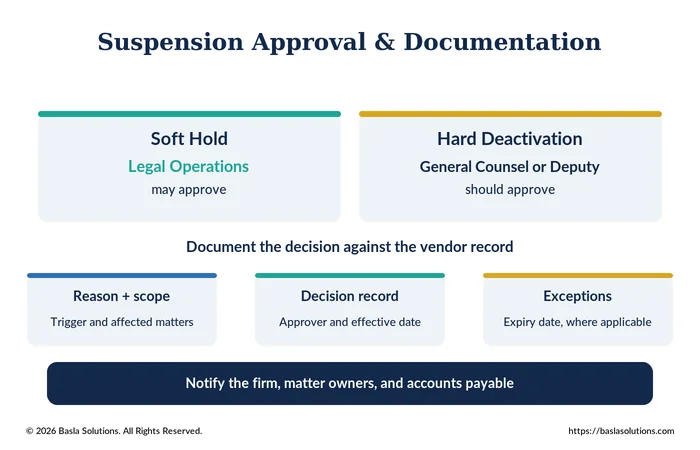
Law firm suspensions should be approved by a named owner at a level that matches their reach, and documented with the reason, scope, effective date, and any exceptions. A suspension with no record is hard to defend when the firm asks why, or when it asks to come back.
- Approval by tier. A soft hold can sit with legal operations; a hard deactivation should need the general counsel or a deputy.
- Complete record. Keep the trigger, scope, approver, effective date, affected matters, and expiry date for any exception.
- Clear notice. Tell the firm, the internal matter owners, and accounts payable what changes, from when, and what the firm may still submit.
Store the record against the vendor so it is visible to whoever handles the firm next.
How do you reinstate a suspended law firm?
You reinstate a suspended law firm by confirming the trigger has been resolved, validating its vendor details, and getting approval at the same level that approved the suspension.
Before reactivating, check the vendor record is still accurate: legal name, tax details, billing contacts, and rates. A firm that merged during its suspension may need a new record. Reconfirm its Counsel Exchange users, and run a test invoice through the first billing cycle. For performance-based suspensions, set a review date one or two survey cycles after reinstatement to confirm the problem has not returned.
Conclusion
Vendor suspension works when it is a set of clear rules applied in order: name the trigger, choose the lightest tier that addresses it, run the pre-checks, act in the platform, and record the decision. SimpleLegal, now Onit Unity, provides the core controls, deactivation and matter-level vendor changes, while keeping the invoice history on record. Everything else, from soft holds to payment blocks, is policy and configuration you design, test, and document before you need it.
How Basla Solutions can help
Basla Solutions provides delivery teams for enterprise legal management and eBilling software implementation, covering legal technology consulting, vendor lifecycle and approval design, configuration, invoice and accrual workflow testing, documentation, and post-go-live support. For suspensions, that means writing the tiered policy, configuring the platform controls that support it, and testing exactly how invoices from a suspended firm are handled before a live case arises.
Basla has delivered matter management and eBilling across more than 10 global jurisdictions, and its delivery bench takes the weight off your team when vendor changes stack up during a panel refresh.
Frequently asked questions
What is vendor suspension in legal operations?
Vendor suspension in legal operations is the controlled process of stopping an outside counsel firm from receiving new work, removing it from a matter, or deactivating it entirely. It protects active legal work and keeps the billing record intact.
How do you deactivate a vendor in SimpleLegal?
You deactivate a vendor in SimpleLegal, now Onit Unity, by selecting Inactivate from the vendor’s Actions menu on the Vendors list. Before doing so, check the firm’s open matters and reassign any where it is the only assigned vendor.
Can a deactivated law firm still see its invoices?
A deactivated law firm’s past invoices stay on record in the platform, but what the firm can still see in Counsel Exchange depends on configuration. Confirm it with a test vendor before you tell firms what to expect.
What happens when a law firm is removed from one matter?
When a law firm is removed from one matter, it should lose access to that matter’s files and updates in Counsel Exchange, while its submitted invoices and other matters are unaffected. Test this with a sample vendor before relying on it.
Does vendor deactivation block new invoices automatically?
Whether vendor deactivation blocks new invoices depends on your configuration and integrations. Test it with a suspended test vendor before relying on it, and confirm nothing reaches accounts payable without approval.
Should low scorecard results suspend a law firm automatically?
Low scorecard results should trigger a review of a law firm, with suspension decided by a named approver. Automatic suspension from a score is a policy choice, and most departments keep a person in that decision.
This article is for general information only and is not legal, business, financial or tax advice. For questions about your specific situation, please consult a qualified professional.