


Accrual data validation is the set of checks applied to law firm accrual estimates after they are submitted and before your department relies on them: matching each estimate to the right matter and firm, checking the values are complete and sensible, and confirming the total that reaches finance matches what was loaded. It is the legal spend management stage between collecting estimates and posting them.
Most effort in the monthly legal spend accrual close goes into getting firms to respond. Much less goes into checking what they sent, and the checking is often manual: a 2025 survey of 100 finance professionals found 94 percent of teams use Excel in their month-end close. Yet a single estimate attached to the wrong matter, entered in the wrong currency, or keyed with an extra zero can distort a month’s legal spend figure. This guide covers the checks to run, how estimates update SimpleLegal matters, and reconciling with finance.
What is accrual data validation?
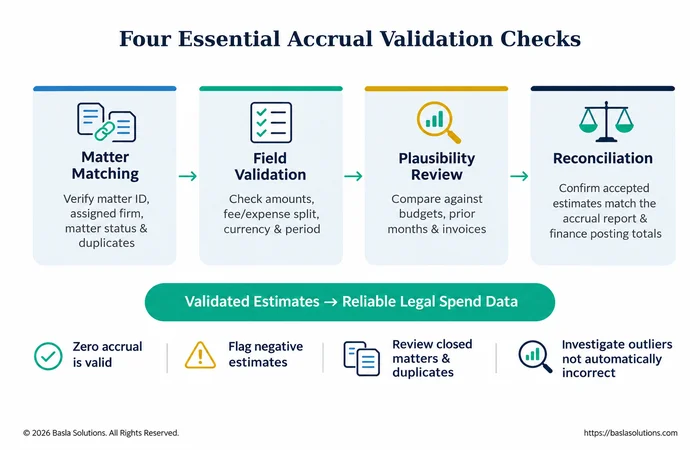
Accrual data validation is the process of checking submitted accrual estimates for correct matter and firm references, complete and valid fields, plausible amounts, and a total that reconciles with what finance posts. It turns a set of firm submissions into a figure your department can stand behind.
The checks fall into four groups: matching, field rules, plausibility, and reconciliation. Some can be enforced by the platform at submission; others are reports your team reviews each month. The aim is to catch problems in the two or three days between the firm deadline and the hand-off to finance, while there is still time to ask the firm.
Why do law firm accrual estimates need validating?
Law firm accrual estimates need validating because they are entered by people at many firms, often under time pressure at month end, and errors pass straight into the company’s financial statements. A form or spreadsheet can enforce structure, but it cannot tell whether an estimate makes sense.
- Reference errors. Firms use their own matter numbers, and a mismatch can put an estimate on the wrong matter or nowhere at all.
- Keying errors. An extra zero or a figure typed into the expense column turns a routine estimate into an outlier.
- Stale submissions. Firms sometimes resubmit last month’s figures unchanged, which hides real movement in unbilled work.
In a cycle covering 40 firms and several hundred matters, a handful of rows needing attention each month is normal. The risk is that each error looks reasonable on its own. An estimate on the wrong matter still produces a sensible-looking total, and a resubmitted figure from last month passes every format check. Validation exists to catch exactly these quiet errors, which no single firm submission reveals.
How should accrual rows be matched to matters and firms?
Accrual rows should be matched to matters and firms using your platform’s matter identifier, with the firm’s assignment to that matter confirmed before the estimate is accepted. Matching on matter names or firm reference numbers alone causes most of the errors in this stage.
- Platform matter ID. Send each firm its list of matters with your matter IDs, and require the same IDs back.
- Active assignment. Accept an estimate only where the firm is currently assigned to the matter.
- Closed matters. Flag estimates on closed matters, since they usually mean a trailing invoice is coming or the firm used an old list.
- Duplicate rows. Flag two estimates from the same firm for the same matter and period, and keep only the confirmed one.
When firms respond through the form an automated accrual request links to, matching is handled for them, because the form lists only the matters they are assigned to. Returned spreadsheets need these checks most.
Which field-level checks should accrual estimates pass?
Accrual estimates should pass field-level checks for sign, completeness, currency, and period before they are accepted. These are simple rules, and most can be enforced automatically at submission.
- No negative amounts. A negative unbilled estimate usually signals a keying error or a credit that belongs elsewhere.
- Fees and expenses split. Require separate figures for fees and expenses where your finance team posts them to different accounts.
- Currency. Confirm the estimate is in the matter’s billing currency, or convert it using an agreed rate and date.
- Period. Confirm the estimate is for the current accrual period, so a late submission for last month is not counted twice.
A zero is a valid entry. A firm with no unbilled work should submit zero, and your rules should accept it as a complete response.
How do you flag implausible accrual amounts?
You flag implausible accrual amounts by comparing each estimate with the matter’s remaining budget, the firm’s recent estimates on the same matter, and its recent invoices. Estimates that fall far outside those ranges go on a review list for a quick check with the firm.
- Against budget. Flag any estimate that would take cumulative spend past the approved matter budget.
- Against prior months. Flag estimates more than double or less than half the firm’s average for the matter over the last three months.
- Against invoices. Flag estimates that differ sharply from what the firm has actually billed per month recently.
Keep the thresholds simple and adjust them after a few cycles. The goal is a short review list of five to fifteen items a month, small enough that every item gets a real look.
How do accrual estimates update matter records in SimpleLegal?
Accrual estimates in SimpleLegal, now upgraded to Onit Unity, are stored against each matter and firm, and the matter’s accruals tab shows the estimates submitted by each assigned firm over recent reporting periods. That history is what makes the plausibility checks above practical, since reviewers can see a firm’s last few estimates on one screen.
In some deployments, each returned spreadsheet row becomes its own record linked to the matter and firm assignment, and the matter’s financial summary shows a total accruals figure alongside budget and invoice totals. Confirm how your environment stores and totals accruals, and whether a corrected estimate replaces the original or sits beside it. That choice affects both reporting and the audit trail.
How should validated accruals be reconciled with finance?
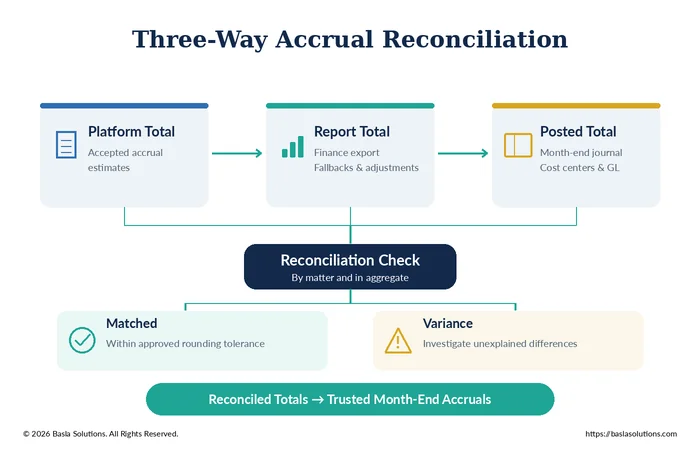
Validated accruals should be reconciled with finance by confirming that the total loaded in the legal platform, the total in the accrual report, and the amount finance posts all match, by matter and in aggregate. Any difference is either a data error or a manual adjustment that needs explaining.
- Platform total. The sum of accepted estimates for the period, after validation.
- Report total. The figure in the accrual report or export handed to finance, with fallbacks and adjustments shown separately.
- Posted total. The amount in the month-end journal entry, coded to the matters’ cost centers and GL accounts.
Agree a small tolerance for rounding and investigate anything above it. Reporting around these checks often spans several systems too, and a 2023 survey of in-house counsel and legal operations professionals found that 62 percent name disconnected software applications as their top legal technology pain point.
How do you test accrual data validation before go-live?
You test accrual data validation before go-live by submitting a prepared set of estimates that includes each type of error, then confirming each is caught by the platform or appears on the review report. A test file of 20 to 30 rows covers the main cases.
- Matching errors. A wrong matter ID, a closed matter, an unassigned firm, and a duplicate row.
- Field errors. A negative amount, a missing expense figure, a wrong currency, and a prior-period estimate.
- Plausibility cases. An estimate ten times the prior month and one that exceeds the remaining budget.
Record the expected and actual result for each row. Data problems found in testing are cheap to fix; the same problems found in a live close are not, as rushing legacy data work shows across platform builds.
Who should own accrual data quality?
Accrual data quality should be owned by one named person in legal operations, who runs the checks, clears the review list, and signs off the total before it goes to finance. Shared ownership usually means the review list is left until the day of the close.
The owner does not need to resolve every query personally. Matter owners can confirm whether an outlier is genuine, and firms can correct their own submissions. The owner’s job is to make sure every flagged item is resolved or explained before sign-off, and to track recurring errors by firm. A firm that sends the wrong matter IDs three months running needs a call with its billing team and an updated matter list. Report accuracy and error counts alongside your other spend measures; legal analytics dashboards work best when they track a small set of decision-ready measures.
Conclusion
Accrual data validation is the step that makes accrual figures trustworthy. Match every estimate to the right matter and firm, enforce simple field rules, flag implausible amounts against budget and history, reconcile the platform total with what finance posts, and give one person ownership of the result. With those checks in place, the accrual figure that reaches finance reflects the work firms actually did, and month-end questions get quick answers.
How Basla can help
Basla provides delivery teams for enterprise legal management and eBilling software implementation, covering legal technology consulting, business analysis, accrual configuration, data validation rules, finance integration testing, reporting, documentation, and post-go-live support. For accrual data, that means designing matching and field rules, building review and reconciliation reports, and testing every error case before your first live close.
Basla has delivered matter management and eBilling across more than 10 global jurisdictions, and its delivery bench takes the weight off your team while accrual processes are validated and rolled out.
Frequently asked questions
What is accrual data validation?
Accrual data validation is the process of checking law firm accrual estimates for correct matter references, complete fields, plausible amounts, and a total that reconciles with finance. It happens after submission and before posting.
How should accrual estimates be matched to matters?
Accrual estimates should be matched using your platform’s matter ID, with the firm’s assignment to the matter confirmed. Firm matter numbers or matter names alone cause most matching errors.
What field checks should accrual estimates pass?
Accrual estimates should have no negative amounts, separate fee and expense figures where required, the correct currency, and the current accrual period. A zero is a valid entry.
How do you spot an implausible accrual estimate?
You spot an implausible accrual estimate by comparing it with the matter’s remaining budget, the firm’s recent estimates, and its recent invoices. Estimates far outside those ranges go on a review list.
How are accruals reconciled with finance?
Accruals are reconciled with finance by confirming the platform total, the accrual report total, and the posted journal entry match by matter and in aggregate. Any difference must be explained.
Who should own accrual data quality?
Accrual data quality should be owned by one named person in legal operations who runs the checks, clears the review list, and signs off the total before it reaches finance.
*This article is provided for general information only and does not constitute legal advice. Basla Solutions provides legal technology implementation and support services and does not practice law.*