

UTBMS expense codes are the standard codes law firms put on each disbursement line of an electronic invoice, so the client can see what the money was spent on and apply its expense rules automatically. They sit alongside the task and activity codes in a LEDES invoice file, and in most eBilling setups they are the main control on expenses. The codes are one piece of enterprise legal management, but they decide a surprising share of what gets paid.
What are UTBMS expense codes?
UTBMS expense codes are a set of standard codes, numbered E101 to E124, that classify the expenses and disbursements on a legal invoice. The original set was released in 1997 and contains 24 expense codes.
Expense codes work together with the fee-side codes. Fee lines carry a task code, such as L310 for written discovery, and an activity code, such as A103 for drafting. The guide to UTBMS codes for task-based billing covers those. Expense lines carry an E-code instead, and the eBilling system uses it to decide whether the charge is allowed, whether it needs a receipt, and where it is reported.
A revised set exists too. In 2013, the body that maintains the standard ratified revised codes with an X prefix, such as X101, that split the original categories into finer ones. Most corporate clients still run on the E-code set, so this guide focuses on it.
What does each E-code cover?
Each E-code covers one category of expense, from internal copying (E101) through to a general “other” code (E124). The table lists all 24 UTBMS expense codes with the error that most often goes with each.
| Code | Covers | Common error |
|---|---|---|
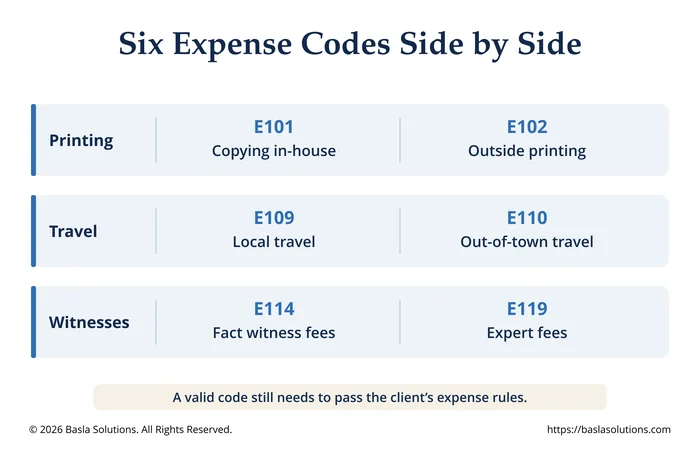
| E101 Copying | Internal photocopies and printing | Billed when the client treats copying as overhead |
| E102 Outside printing | Printing by an outside vendor | Internal copies coded here to avoid a per-page cap |
| E103 Word processing | Word processing charges | Billed at all, when most guidelines treat it as overhead |
| E104 Facsimile | Fax charges | Billed per page when the client bans fax charges |
| E105 Telephone | Telephone charges | Routine calls billed as an expense |
| E106 Online research | Online legal research services | Subscription cost passed through when it is overhead |
| E107 Delivery services/messengers | Couriers and messengers | Postage coded here |
| E108 Postage | Postal charges | Bulk mailings billed with no itemization |
| E109 Local travel | Mileage, taxis, parking near the office | Short trips billed below the client’s distance threshold |
| E110 Out-of-town travel | Airfare, hotels, trains, car rental | Premium fares billed without approval |
| E111 Meals | Meals, usually during travel | Working meals at the office billed |
| E112 Court fees | Filing and court fees | Late fees or publication costs coded here |
| E113 Subpoena fees | Fees for serving subpoenas | Process server and witness fees mixed together |
| E114 Witness fees | Fees paid to fact witnesses | Expert fees coded here |
| E115 Deposition transcripts | Court reporter transcripts | Video deposition costs coded here |
| E116 Trial transcripts | Trial transcripts | Daily copy ordered without approval |
| E117 Trial exhibits | Exhibit preparation | Internal staff time billed as an expense |
| E118 Litigation support vendors | Outside litigation support | eDiscovery hosting buried in one lump sum |
| E119 Experts | Expert witnesses and consultants | Expert invoices with no attached detail |
| E120 Private investigators | Investigators and reports | Billed without prior approval |
| E121 Arbitrators/mediators | Neutral fees | The client’s share billed twice |
| E122 Local counsel | Fees of local counsel | Local counsel billed as an expense with no invoice |
| E123 Other professionals | Other outside professionals | Used as a catch-all in place of E119 |
| E124 Other | Anything not covered above | Overused for items the client would reject |
Litigation support vendors under E118 include eDiscovery providers, and the companion guide on reviewing eDiscovery vendor invoices covers how to check their hosting, processing, and review charges.
How are expense codes validated in eBilling?
Expense codes are validated in eBilling by rules that check every expense line for a valid code, an allowed category, correct arithmetic, a sufficient description, and a receipt where one is needed.
- Code required and valid. Every expense line must carry an E-code from the client’s accepted set, or it is rejected.
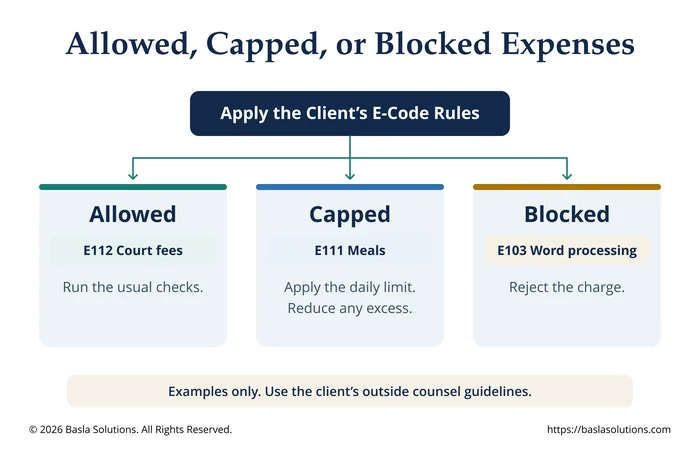
- Category allowed. Codes the client does not pay, such as E103 word processing, are rejected or reduced to zero automatically.
- Arithmetic. Units times unit cost must equal the line total, which catches rounded or estimated charges.
- Caps and rates. Per-page copying rates, daily meal limits, and mileage rates are checked against the guideline values.
- Receipt threshold. Expenses above a set amount, commonly $50 to $100, must have a receipt attached.
- Description quality. Generic descriptions such as “miscellaneous” or “costs” are flagged, the same way vague fee narratives are caught by block billing detection.
Public sector guidelines show the standard clients apply. One state attorney general’s office requires that out-of-pocket costs be itemized and passed through with no markup.
What are the most common E-code errors?
The most common E-code errors are billing for categories the client treats as overhead, using the wrong code to get around a limit, and overusing the catch-all codes.
- Overhead billed as an expense. Copying, word processing, telephone, and research subscriptions are billed although the client’s guidelines exclude them.
- Code shopping. Internal copies coded as E102 outside printing, or office meals coded as travel meals, to avoid a cap or a ban.
- Catch-all overuse. E123 and E124 used for items with a proper code, which hides spend and defeats reporting.
- Wrong litigation code. Expert fees under E114 witness fees, or video depositions under E115 transcripts.
- Lump-sum vendor charges. A single E118 line for a vendor invoice with no detail on what was bought.
Most of these are setup problems at the firm. Clear expense rules, shared at onboarding, remove a large share of them before the first invoice.
Can a client restrict which expenses are billable by code?
A client can restrict which expenses are billable by code, by configuring its eBilling system to accept, cap, or reject each E-code under its outside counsel guidelines. Code-level restrictions are the simplest and most reliable expense control a department has.
A typical setup puts every code into one of three groups. Allowed codes, such as E112 court fees, pass with normal checks. Capped codes, such as E101 copying at a set per-page rate or E111 meals at a daily limit, pass up to the limit and are reduced above it. Blocked codes, such as E103 word processing and E105 telephone, are rejected outright.
How do expense codes feed spend reporting?
Expense codes feed spend reporting by giving every disbursement a category, so the department can see what it spends on travel, experts, transcripts, and vendors across firms and matters. UTBMS expense codes turn a pile of disbursements into data you can compare.
- Spend by category. Totals by E-code show which expense types are growing and which firms drive them.
- Firm comparison. Expense spend as a share of fees, by firm, highlights firms that pass through more costs than their peers.
- Rule tuning. Reductions by code show which rules are working and which caps need resetting.
Reporting is only as good as the coding. If E124 holds more than a small share of expense spend, the categories need tightening.
Conclusion
UTBMS expense codes give a legal department a simple, standard way to control disbursements, as long as the eBilling rules behind them are configured with care. Decide which codes are allowed, capped, or blocked, require receipts above a threshold, check the arithmetic, and watch the catch-all codes.
How Basla can help
Basla provides delivery teams for enterprise legal management and eBilling software implementation, covering business analysis, billing guideline and expense rule configuration, LEDES and UTBMS code set setup, law firm onboarding, testing, documentation, and post-go-live support. Basla delivers legal technology services through staff augmentation or a Basla-managed delivery unit.
Basla teams have delivered matter management and eBilling across 10 or more global jurisdictions.
Frequently asked questions
Is E101 copying still billable?
E101 copying is billable only where the client’s billing guidelines allow it, and many clients now treat internal copying as overhead. Clients that allow it usually cap it at a low per-page rate for black-and-white copies.
What code is used for travel?
Travel uses E109 for local travel, such as mileage, taxis, and parking, and E110 for out-of-town travel, such as airfare, hotels, and car rental. Meals during travel go under E111, and billable travel time goes on a fee line with a task and activity code.
Can firms add custom expense codes?
Firms cannot add their own expense codes, because the client’s eBilling system accepts only the codes the client has configured. Clients can add custom codes, and the revised code set reserves X900 to X998 for that purpose.
How do expense guidelines map to E-codes?
Expense guidelines map to E-codes by placing each guideline rule on the code it governs, as allowed, capped, or blocked. A meal limit attaches to E111, a copying rate to E101, and a ban on word processing to E103.
*This article is provided for general information only and does not constitute legal advice. Basla Solutions provides legal technology implementation and support services and does not practice law.*