

E billing for law firms is the process of sending invoices as structured data files into a corporate client’s billing portal, where software checks every line against the client’s rules before a person reviews it. For the client, it is one part of enterprise legal management. For your firm, it decides how quickly invoices get paid and how much gets cut along the way.
How does eBilling work for law firms?
E billing for law firms works by exporting a finished pre-bill as an electronic file, usually in LEDES format, and uploading it to the client’s portal, where automated rules validate it before it is routed for approval. The client’s side of the process is covered in the guide to legal e-billing software. Your side of the legal billing process runs in six steps.
- Setup. The client invites your firm to its portal, and you register timekeepers, rates, and billing contacts.
- Matter assignment. The client opens a matter and assigns your firm, which gives you a client matter ID to bill against.
- Submission. You export a LEDES file from your billing system and upload it, usually once a month.
- Validation. The portal checks format, matter, rates, codes, and guideline rules, and returns any file that breaks a hard rule.
- Review and approval. Invoices that pass go to an in-house reviewer, who can approve them, reduce individual lines, or send them back.
- Payment. Approved invoices pass to accounts payable, commonly on 30 to 60 day terms.
Validation is the step firms underestimate, because one mismatched matter number rejects the whole file.
What do corporate clients require from a law firm’s invoices?
Corporate clients require invoices that match their outside counsel guidelines line by line: approved rates, registered timekeepers, correct codes, specific narratives, and expenses within policy. The portal enforces those guidelines as rules.
Public sector guidelines show how specific this gets. One state attorney general’s office requires that time be billed in 0.1-hour increments on a per-task basis, and it treats vague charge descriptions as unacceptable. Most corporate guidelines follow the same pattern.
| Client requirement | What the firm must do | Common failure |
|---|---|---|
| Approved timekeeper rates | Submit new rates for approval before billing at them | January rate increase billed before the client approves it |
| Registered timekeepers | Add each timekeeper in the portal before their first entry | Associate joins mid-month and is never registered |
| Correct matter ID | Store the client matter ID on the matter in the billing system | Firm’s internal matter number sent in the client field |
| UTBMS task and activity codes | Code every fee line with the client’s chosen code set | Litigation codes used on a counseling matter |
| Specific narratives | Name the task, its purpose, and the document or person involved | “Review documents” or “attention to file” |
| One task per entry | Record a separate entry for each task | Several tasks blocked into a single 4.5-hour entry |
| Expense policy | Itemize expenses at cost, with receipts above the threshold | Unitemized “miscellaneous” charges or office overhead |
| Submission window | Bill within the client’s deadline after the work is done | Time older than 90 or 120 days submitted |
Narratives drive most reductions after validation, and the companion guide on legal billing descriptions that pass review works through examples.
Which eBilling portals do law firms submit to?
Law firms submit to whichever eBilling portal each client has chosen, so a firm with 30 corporate clients can be working in five or six different systems at once. The client picks the platform, and the firm adapts to each one.
The basic flow is shared, but portals differ in ways that change your workload:
- Firm access. Some portals give you a separate login for each client, while others use one firm-side account where your billing team sees every client on that platform.
- Upload method. Most portals expect a LEDES upload, and some also accept a keyed or PDF invoice from firms without a LEDES export, which usually gets slower review.
- Validation depth. Some clients switch on only format and rate checks, while others add guideline rules and automated narrative review that flags vague or block-billed entries.
- Rate submission. Rate requests may go through the portal, a spreadsheet, or an email to legal operations, each with its own approval timing.
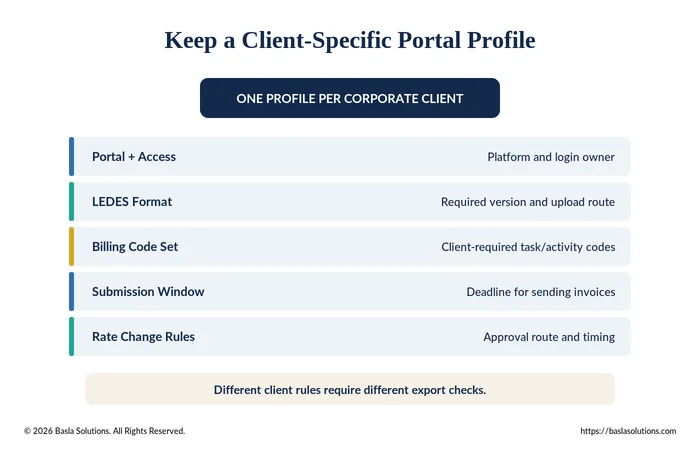
Keep a one-page profile for each client: portal, login owner, LEDES version, code set, submission deadline, and rate-change window.
How does a firm produce a compliant LEDES file?
A firm produces a compliant LEDES file by exporting it from the billing system with every client-specific field mapped correctly, then checking it against the client’s format version before upload. The format itself is simple. The mapping is where errors creep in.
The most widely used version, LEDES 1998B, is a pipe-delimited text format containing 24 fields, covering invoice and matter identifiers, timekeeper details, task and activity codes, units, rates, and line totals. International clients often ask for LEDES 98BI or XML 2.1, which add tax and currency fields, so confirm the version before the first upload.
- Map client identifiers. Store the client ID and client matter ID on each matter, so the export never uses your own numbers.
- Match timekeeper IDs. Use the same timekeeper ID and classification the client registered, because a mismatch fails the rate check.
- Check the arithmetic. Each line total must equal units times rate plus adjustments, and rounding on discounts is a frequent culprit.
- Test new clients. Upload a small first invoice of five to ten lines before sending a large backlog.
The checks a client portal runs on the file are set out in the guide to LEDES invoice validation.
Why do client portals reject invoices?
Client portals reject invoices when a line breaks a hard rule: the wrong matter, an unapproved rate or timekeeper, an invalid code, bad arithmetic, or a date outside the billing window. Softer guideline issues usually lead to line reductions, and hard failures send the whole invoice back.
Rejections are rising as clients add automated review. Billing data from about 400 law firms showed invoice rejection rates rose from 11 percent to 18 percent in 2025. The causes fall into four groups.
- Setup gaps. A timekeeper not registered, a rate not approved, or a matter that is closed or not yet assigned to your firm.
- File errors. The wrong LEDES version, missing required fields, totals that do not add up, or a duplicate invoice number.
- Guideline breaches. Block billing, vague narratives, staffing beyond approved limits, or expenses outside policy.
- Timing. Fees older than the submission window, or an invoice that pushes the matter over its budget.
Rejections cluster on the first invoice of a new matter and the first invoice after annual rate increases. Both trace back to setup, so they can be prevented before the file is built.
How should a firm organize billing to pass review?
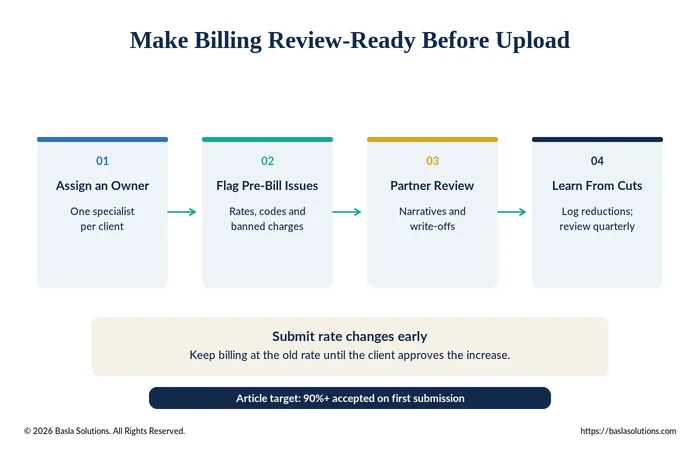
A firm organizes billing to pass review by giving each client an owner, loading that client’s rules into the billing system, and learning from every reduction. Good e billing for law firms is a routine with checkpoints, and the work happens before month end.
- Name one owner per client. One billing specialist who knows that client’s portal and guidelines handles every submission.
- Load guidelines as pre-bill warnings. Rate caps, required codes, and banned charges flag entries during pre-bill, so problems surface before export.
- Run a pre-bill review. The responsible partner reviews narratives and write-offs within three to five days of month end.
- Submit rates early. Send rate increases 60 to 90 days ahead, and bill the old rate until approval arrives.
- Track every reduction. Log the reason for each cut and review the log quarterly, because repeated reasons point to a timekeeper habit or a setup gap.
Set a target of 90 percent or more of invoices accepted on first submission, and track it monthly by client.
Conclusion
E billing for law firms rewards preparation done before month end. Clients publish their rules, portals enforce them automatically, and nearly every rejection traces back to a rate, a timekeeper, a matter ID, or a narrative that could have been fixed before upload. A firm that maps each client’s requirements, owns each portal, and tracks every reduction gets paid faster and spends far less time on appeals.
How Basla can help
Basla provides delivery teams for enterprise legal management and eBilling software implementation, covering business analysis, billing guideline and validation rule configuration, LEDES setup, law firm onboarding, testing, documentation, and post-go-live support. Basla delivers legal technology services through staff augmentation or a Basla-managed delivery unit, working on the corporate side where the portal rules that firms meet are designed and tested.
Basla teams have delivered matter management and eBilling across 10 or more global jurisdictions.
Frequently asked questions
Do law firms pay to use client eBilling portals?
E billing for law firms usually costs the firm nothing, because the corporate client licenses the platform. Some platforms charge firms a subscription or a per-invoice fee, so check the engagement terms and raise any cost before the first submission.
What is the difference between CounselGO, Legal Tracker and Brightflag for firms?
CounselGO, Legal Tracker and Brightflag are client-side eBilling platforms, each with its own route for firms to submit invoices. CounselGO was the SimpleLegal vendor portal until Onit’s Counsel Exchange replaced it in September 2026, Legal Tracker is a long-established corporate eBilling platform, and Brightflag is known for automated line-item review. For a firm, the real differences are login, upload method, rate submission, and how strictly each client configured its rules.
How long does client approval take?
Client approval of a clean invoice commonly takes 10 to 30 days, depending on the approval tiers. Payment then follows the client’s payment terms, often 30 to 60 days after approval.
Can a firm appeal a reduction?
A firm can appeal a reduction in most eBilling portals, usually within a set window such as 10 to 30 days after the adjustment. A strong appeal cites the guideline, fixes a weak narrative, and attaches expense support.
*This article is provided for general information only and does not constitute legal advice. Basla Solutions provides legal technology implementation and support services and does not practice law.*