

Simple legal billing software takes invoices from outside counsel, checks them against the department’s rules and approved rates, and sends clean invoices to approvers, and SimpleLegal is Onit’s version for mid-market legal departments. Two people live with it daily: the department administrator who sets the rules, and the law firm billing clerk who has to get invoices past them.
The first three sections below are for the department side. The last four are for the law firm side.
How does SimpleLegal eBilling work?
SimpleLegal eBilling works by receiving each law firm invoice through Onit’s vendor portal, validating it against the department’s billing rules and approved timekeeper rates, and routing it through an approval chain before it is released to accounts payable. For a department weighing simple legal billing software, that flow is the whole product: submit, check, review, approve, pay.
SimpleLegal is Onit’s mid-market ELM platform, and eBilling sits next to matter management, budgets, and vendor management in the same system. Every invoice belongs to a matter and a vendor, so your rules can depend on the matter type, the firm, or the timekeeper. Reviewers open each invoice with every rule hit already marked, as described in how invoice review works in Onit, and approved invoices pass to accounts payable, often through an ERP integration.
In our implementations, invoices route through one to five approval tiers based on each approver’s financial authority, and administrators track invoices that have waited more than seven days at any step. The same design questions apply on Onit’s larger platform, covered in our Onit eBilling implementation guide.
How does a department set up billing rules and guidelines in SimpleLegal?
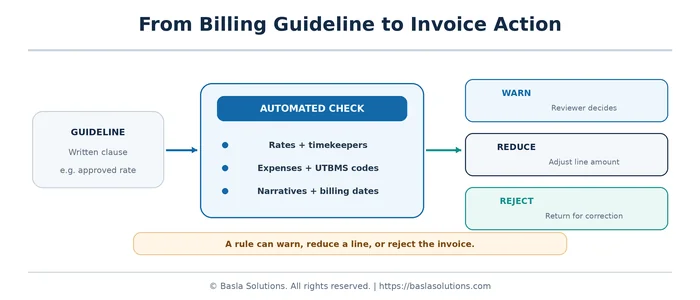
A department sets up billing rules in SimpleLegal by translating each enforceable line of its outside counsel guidelines into an automated check, then choosing whether each check warns, reduces the line, or rejects the invoice. The guideline document is the source, and the rules are the version a computer can apply.
Most departments get good coverage from 10 to 20 rules at launch:
- Rate rules. Billed rates must match the approved rate for that timekeeper on that matter, and anything above it is reduced to the approved rate.
- Timekeeper rules. Lines from timekeepers who are not on the firm’s approved list are flagged or rejected.
- Expense rules. Caps on travel, meals, and copying, plus outright bans on items your guidelines exclude, such as first-class airfare.
- Code rules. Every fee line needs a valid UTBMS task and activity code from the code set that fits the matter.
- Narrative rules. Block billing, vague descriptions, and administrative work billed at professional rates get flagged for a reviewer.
- Timing rules. Invoices submitted outside your billing window, for example more than 90 days after the work, are rejected.
The reason to automate is reviewer time. A 2025 study comparing human invoice reviewers with AI models found that lawyers spent 194 to 316 seconds reviewing each legal invoice, which adds up fast across a few hundred invoices a month. Good simple legal billing software lets rules handle the routine problems so reviewers spend those minutes on real decisions.
Run new rules in warning mode for the first 30 to 60 days to see how often each one fires, then tell your firms what changed. Our guide to turning outside counsel billing guidelines into rules walks through the translation line by line.
How are timekeepers and rates approved in SimpleLegal?
Timekeepers and rates are approved in SimpleLegal through a request and approval step: the law firm submits each timekeeper with a role, a requested rate, and an effective date, and a department approver accepts or adjusts it before any invoice can bill that person at that rate. The approved rate becomes the number every invoice line is checked against.
The approver accepts the rate, counters with a lower one, or declines, and the decision is logged. Firms then request new rates once a year, and many departments cap the increase at a set percentage in their guidelines.
Two habits keep this clean. Ask firms to submit new timekeepers before they bill any time, because an unapproved timekeeper is one of the most common reasons an invoice stalls. And keep matter-specific rates apart from firm-wide rates, so a discount negotiated on one matter stays on that matter.
How do law firms submit invoices to SimpleLegal through CounselGO?
Law firms now submit SimpleLegal invoices through Onit Counsel Exchange, which replaced CounselGO on September 17, 2026, by selecting the client’s matter, uploading the LEDES file with a PDF copy, and submitting it into the client’s review queue. The steps are the ones firms followed in CounselGO, and the firm still cannot create its own account; the client adds the firm as a vendor and sends the invitation.
What changes from client to client is the rule set.
- Set up access first. Accept the invitation, confirm your tax ID, and add the billing contacts who should get notices.
- Register timekeepers. Submit every timekeeper and rate before you bill their time.
- Upload the files. Attach the PDF to the LEDES file, with the same invoice number and total on both.
- Track the status. Follow the invoice from submitted to approved and paid, and check for rejections and reviewer comments.
Our explainer on what CounselGO was and how firms used it covers the legacy portal, and the guide to Onit BillingPoint covers its OnitX counterpart. Both are now one system: Onit Counsel Exchange replaced BillingPoint and CounselGO, and invoice history carried over.
What LEDES fields must be correct for a SimpleLegal invoice to pass?
A SimpleLegal invoice passes LEDES validation when the file structure is correct and the invoice, matter, firm, timekeeper, code, and amount fields all match what the client has on record. Most failures come from a small set of fields, so a short checklist catches nearly all of them.
Use this LEDES field checklist before every upload:
- File structure. The LEDES standard defines 1998B as a pipe-delimited format with 24 fields; the file opens with the LEDES1998B header line and ends each line with two square brackets. International clients may require LEDES 1998BI, which adds currency and tax fields.
- Invoice number and dates. A unique invoice number, with the invoice date and billing period in YYYYMMDD format.
- Client matter ID. The client’s own matter number for an open matter, which is often different from your internal matter number.
- Law firm ID. Your tax ID exactly as it appears on the client’s vendor record.
- Timekeeper fields. Timekeeper ID, name, and classification matching the approved timekeeper list.
- Codes. A UTBMS task and activity code on every fee line, and an expense code on every expense line.
- Units, rates, and totals. Units times rate equals the line total, and the line totals add up to the invoice total to the cent.
The rules behind these checks are explained in LEDES invoice validation.
Why do SimpleLegal invoices get rejected and how do firms fix them?
SimpleLegal invoices get rejected for two kinds of reasons: structural errors that fail the file check on upload, and guideline breaches that a rule or reviewer catches afterward. Firms fix them by correcting the data in their own billing system, re-exporting, and resubmitting against the original invoice.
- Structural errors. Wrong field count, a bad date format, curly quotes, a total off by a cent, or a matter ID that is closed or unknown.
- Timekeeper and rate problems. A timekeeper who was never approved, or a rate higher than the approved one.
- Code problems. Missing UTBMS codes, or codes from the wrong code set for that matter.
- Guideline breaches. Block billing, vague narratives, excluded expenses, or an invoice submitted outside the billing window.
Read the rejection reason and the line comments first, because they usually point straight at the field. Fix the data in your time and billing system and export a fresh LEDES file, since hand-editing the text file tends to introduce a second error. For rate and timekeeper rejections, get the approval in place before you resubmit.
How do appeals and reductions work in SimpleLegal?
Appeals and reductions in SimpleLegal work at the line level: a rule or reviewer reduces a line and records a reason, and the law firm either accepts the reduction or appeals it with a comment explaining why the original amount is correct. The reviewer then restores the amount or upholds the cut.
- Reduction. The line is cut, often to the approved rate or the expense cap, with a reason code the firm can see.
- Firm response. The firm accepts the adjusted invoice or appeals specific lines, with a comment on each.
- Reviewer decision. The reviewer reverses the reduction or upholds it, and the invoice continues through approval.
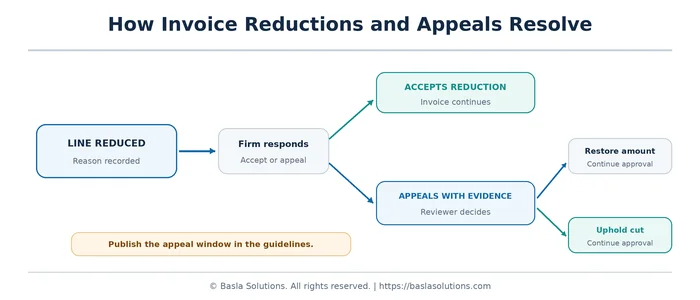
On the department side, set how long firms have to appeal (ten business days is a common choice) and put it in your guidelines before the first dispute. On the firm side, appeal with evidence, such as the approval email for a rate or the client instruction behind an unusual expense. A one-line “please reconsider” rarely works.
Conclusion
Simple legal billing software only stays simple when both sides work from the same rules. Departments need a short, tested rule set, clean rate approvals, and a published appeal window. Firms need approved timekeepers before billing, a LEDES export that passes the checklist, and fixes made in the source system. Get those right, and most invoices move from upload to approval with no back-and-forth.
How Basla Solutions can help
Basla Solutions provides delivery teams for Onit implementation, covering business analysis, eBilling rule design, timekeeper and rate approval workflows, LEDES validation, Counsel Exchange and law firm onboarding, testing, documentation, and post-go-live support. Basla delivers legal technology services through staff augmentation or a Basla-managed delivery unit, so your SimpleLegal or Onit program can move at the pace your department needs.
Our teams configure approval routing and help law firms get their first invoices through cleanly.
Frequently asked questions
Does SimpleLegal accept LEDES invoices?
Yes, SimpleLegal accepts LEDES invoices uploaded through Counsel Exchange, which replaced CounselGO in September 2026, and LEDES is the standard format most departments require from their firms. Simple legal billing software of this kind checks each LEDES file’s structure, codes, rates, and totals before the invoice reaches a reviewer.
How do you set billing rules in SimpleLegal?
You set billing rules in SimpleLegal by turning each enforceable line of your outside counsel guidelines into an automated check on rates, timekeepers, codes, expenses, narratives, or timing. Each rule then warns, reduces the line, or rejects the invoice.
Why was my invoice rejected in CounselGO?
Your invoice was most likely rejected in CounselGO, or in Counsel Exchange since it replaced CounselGO, for a structural LEDES error, an unknown matter ID, an unapproved timekeeper or rate, missing UTBMS codes, or a guideline breach. The rejection reason and the reviewer’s line comments show which one.
Can a law firm appeal a reduction in SimpleLegal?
A law firm can appeal a reduction in SimpleLegal by commenting on each reduced line and sending the invoice back with its reasons, within the appeal window the client sets. The reviewer then restores the amount or upholds the reduction.
How long does invoice approval take?
Invoice approval time depends on how many approval tiers an invoice passes through and how quickly each approver acts, and a clean invoice on a two- or three-tier chain usually clears in one to three weeks. In our implementations, administrators track invoices that have waited more than seven days at any step so delays get chased early.
This article is for general information only and is not legal, business, financial or tax advice. For questions about your specific situation, please consult a qualified professional.