

Onit timekeeper rates are the approved hourly rates for each law firm timekeeper, stored by firm, office, matter and currency and checked against every invoice line. Rate management in Onit covers three linked processes: how firms propose timekeepers and rate changes, how legal operations approves them, and how the annual increase cycle feeds the approved rates.
When it runs well, invoices validate cleanly and increases arrive on a predictable schedule. The general process is set out in timekeeper rate approval in eBilling, and this page is the Onit configuration layer behind it.
How does timekeeper and rate approval work in Onit?
Timekeeper and rate approval in Onit works as a three-phase workflow: a firm submits a timekeeper or rate through the law firm portal, the record waits in Pending, and a client administrator approves or rejects it. The approved rate then becomes the benchmark for every invoice that firm submits.
- Pending. The submission waits for review, and a counter widget on the admin dashboard shows the backlog.
- Approved. The rate is stored in the timekeeper rates app and syncs back to the portal for validation.
- Rejected. The firm’s billing contacts get an automatic notice with the administrator’s comment.
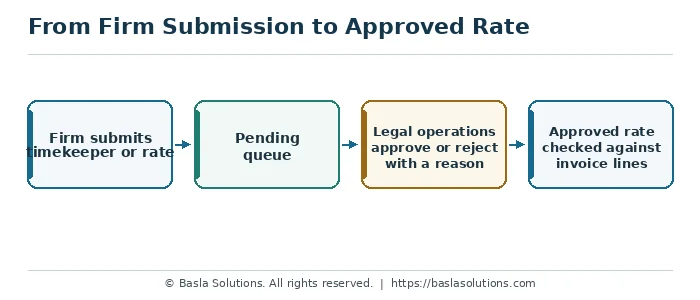
Onit’s newer workflow requires that rejecting a timekeeper rate includes a written reason of up to 250 characters, and we give every rejection a reason because firms resubmit faster when they know what to fix. Submissions once sat unreviewed because notices went to inactive administrators, so we now route them to a team mailbox. Approval authority sits with central legal operations in our builds, so one team applies the same outside counsel guidelines to every firm.
How does a law firm propose a new timekeeper through CounselGO?
A law firm that used CounselGO now proposes a new timekeeper through Counsel Exchange, which replaced CounselGO and BillingPoint as Onit’s law firm portal on September 17, 2026. The billing contact adds the timekeeper, classification, office and proposed rate, and the record arrives in Onit as Pending.
- Office link. Each timekeeper sits under a specific vendor office, which keeps tax and currency rules aligned.
- Matter-level rates. On matter-level fee arrangements, firms enter a rate for each timekeeper on the billing authorization before billing starts.
- Timing rule. Firms submit new timekeepers before the first invoice that uses them.
A timekeeper still in Pending blocks the invoice on upload, which is why the timing rule goes into the outside counsel guidelines. How firms use the portal is covered in Onit eBilling for law firms.
How are rate cards stored by firm, matter and currency?
Rate cards are stored at firm level in the timekeeper rates app, linked to vendor and office records, with each rate carrying its billing currency and matter-level overrides held separately. Reporting converts every rate to a base currency.
- Firm rate card. The standard approved rate for each timekeeper at a firm.
- Matter override. A locked or negotiated rate for one matter, held on the billing authorization.
- Currency code. A London partner bills in GBP and a New York associate in USD on the same panel.
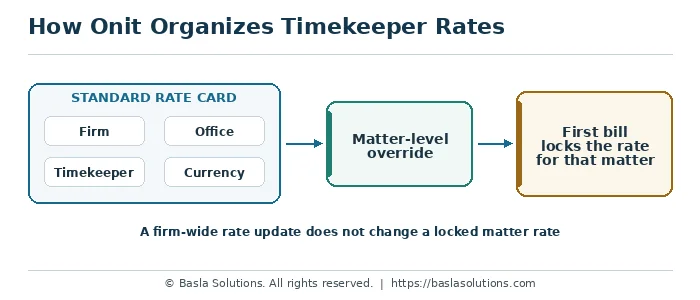
Office mismatch is the most common failure. In one rollout, rate locks failed because firms submitted timekeepers under the wrong office, until we linked each timekeeper to its office record on the firm’s matter assignment. Locking matter rates on first bill keeps Onit timekeeper rates fixed for the life of a matter, and a firm-wide update no longer changes rates on matters already under way. The detail is in matter-specific rates in eBilling.
How does the annual rate increase cycle run in Onit?
The annual rate increase cycle runs through the same approval workflow as any rate change: firms submit proposed increases before the new billing year, and legal operations reviews each one against the outside counsel guidelines. Approved increases then update the rate card for every later invoice.
1. Submission. Firms submit increase proposals in a fixed window before the first invoice of the year.
2. Queueing. Each proposal lands in Pending and raises an alert on the admin dashboard.
3. Review. Administrators test each increase against the guidelines and record a comment.
4. Activation. Approved rates update and sync to the portal for all later validation.
The pressure on this cycle is real: Am Law 100 worked rates grew 9.8% in Q1 2026, up from 9.3% across 2025. Increases submitted mid-cycle once caused rejections on invoices already in progress, which is why the window is fixed. A disciplined window keeps Onit timekeeper rates negotiated, so increases never slip in by default.
What happens when an invoice uses an unapproved timekeeper or rate?
An invoice that uses an unapproved timekeeper or rate fails validation, because the rules engine compares every line’s timekeeper and rate against the approved rate card and any locked matter rate. The result depends on how the rule is set.
- Warning. A minor mismatch shows on the invoice alerts tab for the reviewer to weigh.
- Error. An unapproved timekeeper or a rate above the approved rate blocks the invoice until the firm fixes it.
- Line-level fix. The firm corrects or appeals the single line, which avoids resubmitting the whole invoice.
We set unapproved rates as errors and judgment calls as warnings. How that rule sits in the wider build is covered in Onit eBilling implementation.
How do you report rate increases year over year?
You report rate increases year over year by comparing each timekeeper’s approved rate across billing years and grouping the change by firm, practice area and seniority. Onit’s timekeeper and vendor analytics show billed rates and the effective blended rate, converted to one base currency.
- Rate change by firm. The average approved increase per firm, against the guideline cap.
- Blended rate. Total fees divided by total hours, which captures staffing mix as well as rate.
- Approval outcomes. Increases requested, approved and rejected each year.
A blended rate that rises faster than the approved increases usually means more senior staffing. These reports sit beside the spend views described in Onit legal spend management, so rate decisions and spend trends are reviewed together.
Conclusion
Onit timekeeper rates stay under control when every timekeeper is approved before billing, every rejection carries a reason, matter rates lock on first bill, and annual increases arrive in a fixed window. Set unapproved rates as validation errors, report increases and blended rates each year, and the rate card becomes a lever the department actually uses.
How Basla Solutions can help
Basla Solutions provides delivery teams for Onit implementation, covering business analysis, timekeeper and rate approval workflows, rate card and office setup, matter rate locks, annual increase windows, validation rules, rate reporting, testing, documentation, and post-go-live support. Basla delivers legal technology services through staff augmentation or a Basla-managed delivery unit, helping legal operations hold the line on outside counsel rates.
Frequently asked questions
Can a law firm propose a new timekeeper through CounselGO?
Firms now propose new timekeepers through Counsel Exchange, which replaced CounselGO and BillingPoint on September 17, 2026. The submission lands in Onit as Pending for a client administrator to review.
How are rate increases approved?
Rate increases are approved by central legal operations administrators, who test each proposal against the outside counsel guidelines. Firms submit increases in a fixed window before the new billing year.
Can rates differ by matter?
Onit timekeeper rates can differ by matter through matter-level fee arrangements and rate locks. A locked rate stays fixed for that matter even when the firm’s standard rate card changes.
What happens when an invoice uses an unapproved rate?
The invoice fails validation, and an unapproved rate set as an error blocks it until the firm corrects or appeals the line. Warnings only flag the line for the reviewer.
How do you report rate increases year over year?
You compare each timekeeper’s approved rate across years and group the change by firm and seniority. Adding the blended rate shows whether staffing mix is driving costs up.
This article is for general information only and is not legal, business, financial or tax advice. For questions about your specific situation, please consult a qualified professional.