


BillingPoint was the portal law firms used to submit invoices to companies running Onit’s OnitX legal platform, and it has been replaced by Counsel Exchange. To log in now, go to counselexchange.onit.com, enter your existing username, and choose “Forgot Password?” with the email address you used before to set a new password.
What is BillingPoint?
BillingPoint was the law firm eBilling portal Onit provided for OnitX clients, where firms submitted invoices, managed timekeepers and rates, and tracked invoice status. It sat between outside counsel and the client’s Onit system and checked every invoice before the client’s legal team saw it.
In our implementations, firms used it to:
- Submit invoices. Upload a LEDES file or create a manual invoice line by line.
- Request rates. Submit timekeeper rate requests for the client’s approval.
- See authorizations. View the matters and billing authorizations assigned to the firm.
What replaced BillingPoint for OnitX clients?
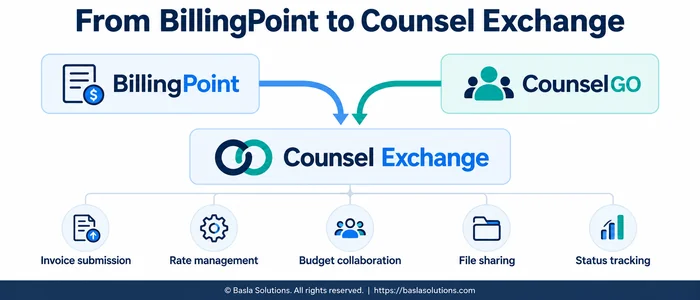
Counsel Exchange replaced the old portal for OnitX clients, combining it with CounselGO, Onit’s other law firm portal, into one eBilling site. The core work carries over: invoice submission, timekeeper and rate management, budget collaboration, file sharing, and status tracking.
Onit’s activation guide describes Counsel Exchange as the single portal that brings Onit’s two law firm portals together, with clearer invoice status and validation feedback. It went live in July 2026, both old portals stayed open alongside it for a transition period, and access to them ended on September 17, 2026. The differences between Counsel Exchange and the portals it replaced matter more to clients than to firms.
Where do law firms log in now that BillingPoint has moved to Counsel Exchange?
Law firms now log in at counselexchange.onit.com, the single address for every Onit client a firm bills. The old per-client portal addresses no longer give access, and every Onit-family portal and who logs in to each is listed separately.
- Bookmark the new address. Replace every old portal bookmark your billing team uses.
- Use the right email. The password reset goes to the email address on your old account, so a shared billing mailbox may hold the reset link.
- Check your client list. After logging in, confirm that every OnitX client you bill appears. If one is missing, ask that client’s legal operations team to check your matter assignments.
Do firms need a new account after the move?
Firms do not need a new account after the move to Counsel Exchange: existing usernames carry over, and each user resets their password on first login. Invoices, matters, files, and historical reports moved across automatically, with no data migration needed from the firm.
On first access, each user also accepts updated terms and conditions. In our implementations, the most common login problem was a billing contact never activated during the client’s vendor onboarding, which the client has to fix.
How does a law firm submit an invoice to an OnitX client today?
A law firm submits an invoice to an OnitX client today by logging in to Counsel Exchange, choosing the matter, and either uploading a LEDES file or entering a manual invoice.
- Choose the matter. Pick the matter, which appears only once the client assigns your firm to it.
- Upload or enter. Upload a LEDES file, or create a manual invoice with the invoice number, dates, and service period.
- Add lines. Each fee line needs a date, approved timekeeper, task and activity code, hours, and description, and each expense line needs an expense code, unit cost, and quantity.
- Submit to the client. The invoice is validated and, if it passes, routed to the client’s reviewer.
Most failed submissions in our implementations came from an unapproved timekeeper or rate, a task code outside the approved set, a date outside the billing period, or a missing purchase order number. When one line is queried, reply on that line with a comment or appeal, which avoids resubmitting the whole invoice.
This matters for cash flow: a 2026 analysis of billing data from about 400 law firms found invoice rejection rates rose from 11 percent to 18 percent in 2025.
Conclusion
BillingPoint has been retired, and Counsel Exchange is where firms now log in, submit, and track invoices for OnitX clients. Keep your existing username, reset your password at the new address, check that every client appears, and confirm timekeeper and rate approvals before you upload. Clients planning the client-side setup can see how the Onit eBilling build configures validation rules and firm onboarding together.
How Basla Solutions can help
Basla Solutions provides delivery teams for Onit implementation, covering eBilling configuration, invoice validation rules, timekeeper rate workflows, law firm onboarding and training, testing, documentation, and post-go-live support. Basla delivers legal technology consulting through staff augmentation or a Basla-managed delivery unit.
Frequently asked questions
Is BillingPoint the same as Counsel Exchange?
BillingPoint was the earlier Onit law firm portal, and Counsel Exchange replaced it, combining it with CounselGO.
Where is the BillingPoint login?
The old login has been retired, and firms now log in at counselexchange.onit.com. Use your existing username and reset your password on first login.
Do I need a new account after the move to Counsel Exchange?
You do not need a new account, because existing usernames carry over to Counsel Exchange. You set a new password through “Forgot Password?” using the email address on your old account.
How do I submit an invoice to an OnitX client?
Log in to Counsel Exchange, choose the assigned matter, and upload a LEDES file or create a manual invoice. The invoice is validated against the client’s billing rules before it reaches the reviewer.
This article is for general information only and is not legal, business, financial or tax advice. For questions about your specific situation, please consult a qualified professional.