

The CounselGO login has been retired, and law firms that billed through CounselGO or BillingPoint now log in at counselexchange.onit.com with their existing username.
Where do I log in to CounselGO, Counsel Exchange, SimpleLegal or Onit?
You log in to Counsel Exchange if you are a law firm, and to your company’s SimpleLegal or Onit site if you work in the client’s legal or finance team.
| Portal | Who logs in | URL |
|---|---|---|
| Counsel Exchange | Law firms billing any OnitX, SimpleLegal, or Unity client | counselexchange.onit.com |
| CounselGO (retired) | Law firms that billed SimpleLegal clients | app.counselgo.com, now Counsel Exchange |
| BillingPoint (retired) | Law firms that billed OnitX clients | A per-client address, now Counsel Exchange |
| SimpleLegal | The client’s in-house legal, finance, and AP users | app.simplelegal.com |
| Onit (OnitX or Unity) | The client’s in-house legal and business users | A company-specific address, usually through single sign-on |
Which Onit portal does my client use?
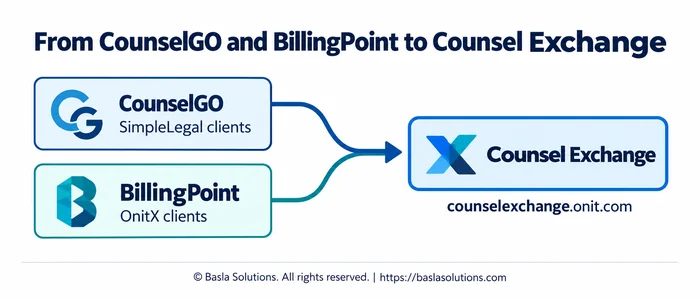
Your client uses Counsel Exchange for law firm billing, whichever Onit platform it runs internally. Before the change, OnitX clients used BillingPoint, the older OnitX firm portal, and SimpleLegal clients used CounselGO.
Onit’s guidance is that Counsel Exchange became the single access point for invoice submission when BillingPoint and CounselGO access ended on September 17, 2026. Background on the older portal is in what CounselGO was and how SimpleLegal clients used it.
What is the CounselGO login URL and who uses it?
The CounselGO login URL was app.counselgo.com, used by law firm staff submitting invoices, budgets, and accruals to SimpleLegal clients.
Since the move, the CounselGO login no longer gives access, and invoices, matters, and history moved to Counsel Exchange automatically.
What is the Counsel Exchange login URL and who uses it?
The Counsel Exchange login URL is counselexchange.onit.com, used by law firm and vendor staff billing any client on OnitX, SimpleLegal, or Unity.
No new account is needed. On first login, use “Forgot Password?” with the email on your old account, then accept the updated terms. The changes Counsel Exchange brought are mostly in the interface.
What do I do if I cannot log in or the password reset does not arrive?
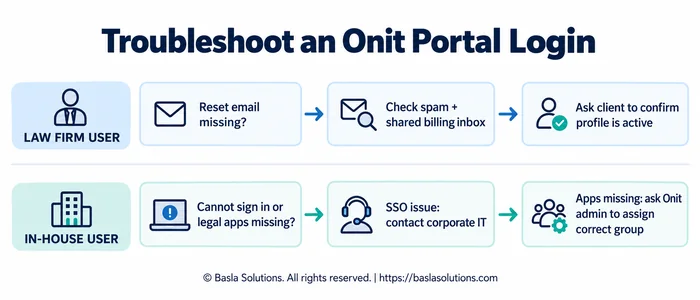
If you cannot log in or the reset email does not arrive, check spam and any shared billing mailbox, then ask the client to confirm your user is active. In our implementations, an inactive vendor profile was the most common cause, and only the client can activate it.
- Blocked email. Ask your IT team to allow Onit’s mail, since filters often hold automated resets.
- Inactive profile. The client’s legal operations team reactivates your profile.
- Missing matters. No matters showing means the client has not assigned your firm yet.
In-house users log in through corporate single sign-on in our implementations, so password resets sit with corporate IT, and a new user given a business-user role sees no legal apps until an administrator assigns the right group.
Keep each login personal. Credential abuse was the initial access vector in 22 percent of breaches in the 2025 breach investigations report, so never share a billing password.
Can one login cover several clients?
One Counsel Exchange address covers every Onit client your firm bills, and your existing username carried over from the older portals.
Inside one client, a login can span many entities. In our implementations:
- One account, many brands. A single in-house login covered more than 15 brands and several regional legal entities.
- Security groups. Group membership controlled which entities and queues each user saw.
- Entity access. Administrators grant or withhold each entity’s queues per user.
Conclusion
The CounselGO login and the BillingPoint login have both been retired, and law firms now use counselexchange.onit.com with their existing username and a reset password. The client-side setup is part of the wider Onit eBilling build that configures firm onboarding and access.
How Basla Solutions can help
Basla Solutions provides delivery teams for Onit implementation, covering law firm onboarding, vendor and user profile setup, single sign-on configuration, eBilling rules, training, documentation, and post-go-live support. Basla delivers legal technology services through staff augmentation or a Basla-managed delivery unit.
Frequently asked questions
What is the CounselGO login URL?
The CounselGO login URL was app.counselgo.com, and it has been retired. Law firms now log in at counselexchange.onit.com with their existing username.
Which portal does my client use, CounselGO or Counsel Exchange?
Every Onit and SimpleLegal client now uses Counsel Exchange for law firm billing. CounselGO and BillingPoint access ended when Counsel Exchange took over.
What do I do if my CounselGO password reset email does not arrive?
Reset your password from counselexchange.onit.com, using the email address on your old account, and check spam and shared billing inboxes. If nothing arrives, ask your client to confirm your user profile is active.
Can one login cover multiple clients?
One Counsel Exchange address covers every Onit client your firm bills, and existing usernames carried over.
This article is for general information only and is not legal, business, financial or tax advice. For questions about your specific situation, please consult a qualified professional.