

Onit billing guidelines are your outside counsel guidelines (OCGs) rebuilt as invoice rules in Onit, so every LEDES line a law firm submits is checked against the policy before an attorney opens the invoice. The document says what firms may bill, and the rules decide what happens when they bill something else. This article covers the configuration side; what the document itself should say is covered in outside counsel billing guidelines that can be enforced.
How do you turn outside counsel billing guidelines into automated rules in Onit?
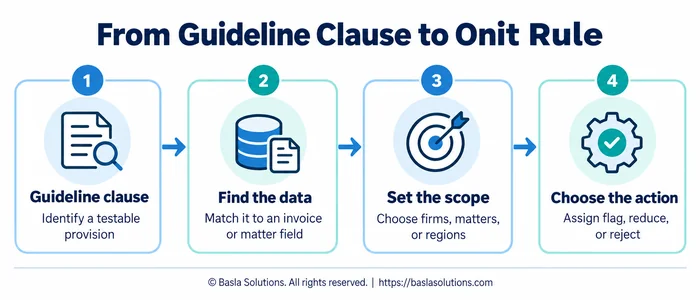
You turn outside counsel billing guidelines into automated rules in Onit by splitting the document into provisions a system can test, setting each one as a rule on the firm portal or the matter, and assigning each rule an action: flag, reduce, or reject.
The work runs in four steps:
- Split the document. Go through the guidelines clause by clause and mark each one as testable (a rate, a cap, a date, a code) or judgment-based (whether the work was necessary). Only the first group becomes rules.
- Find the data. For each testable clause, name the LEDES field or Onit record that carries the value: the timekeeper rate, the hours, the task code, the PO number.
- Set the scope. Decide whether the rule applies to every firm, one firm, one matter type, or one region.
- Choose the action. Pick whether a breach produces a warning for the reviewer or an error that stops the invoice.
In our implementations, Onit billing guidelines run when the firm uploads its LEDES file through the portal (Counsel Exchange, which replaced BillingPoint and CounselGO in September 2026), before the invoice lands on the matter record. Attorneys only see invoices that have passed the clerical checks, and firms get the error while the file is still open.
Some invoices passed every billing rule on upload and then failed the payment export, because a PO number was missing or cost allocations did not reach 100 percent. Adding a second set of validation requirements that runs before an invoice can move to Ready for Payment closed that gap. Your Onit billing guidelines need checks at both points, on upload and before payment.
Which guideline provisions can Onit enforce automatically?
Onit can enforce automatically any guideline provision that maps to a value on the invoice or the matter, which covers rates, hours, dates, codes, tax, discounts, fee arrangements, POs, and cost allocation.
The table below lists the 15 provisions we see most often in guideline documents, the rule that enforces each, and the default action we would start with.
| Guideline provision | Onit rule | Default action |
|---|---|---|
| Approved hourly rates | Timekeeper rate compared with the approved rate card | Reject |
| Rate freeze for the life of a matter | Locked matter rate checked on later invoices | Reject |
| Unapproved timekeepers | Timekeeper must have an approved rate on the matter | Reject |
| Maximum daily hours | Daily hours cap per timekeeper across all entries | Flag |
| Six-minute increments | Hours must be a multiple of 0.1 | Flag |
| Block billing | Narrative check for several tasks in one entry | Flag |
| Staffing limits | Cap on timekeepers per matter or per event | Flag |
| Service dates inside the period | Line dates within the invoice billing period | Reject |
| Approved task and activity codes | UTBMS code set assigned to the matter | Reject |
| Expense codes and receipts | Approved expense codes with description and attachment | Flag |
| Travel limits | Travel expense codes checked against caps | Reduce |
| Tax and VAT | Tax lines matched to the master tax table | Reject |
| Volume and early payment discounts | Discount calculated and checked on each invoice | Reduce |
| Fixed and capped fees | Fee arrangement on the vendor assignment | Reduce |
| PO and cost allocation | PO present and allocations summing to 100 percent | Reject |
When a fee arrangement is set to lock the rate on the matter, the first approved invoice fixes each timekeeper’s rate, and a later invoice billing above the locked rate fails validation and cannot be submitted. We switch this on wherever guidelines freeze rates for the life of an engagement.
Tax is the provision that causes the most early noise. In one build, firms kept submitting local tax codes that did not exist in the client’s master tax table. Clear error messages naming the expected code for that jurisdiction cut the resubmissions quickly.
How do you configure rules for block billing, increments and staffing caps?
You configure block billing, increment, and staffing rules as checks on the time entry itself: the narrative for block billing, the hours value for increments, and the count of timekeepers for staffing caps.
- Block billing. A block-billed entry lumps several tasks under one time value, which makes each task impossible to assess. Detection looks at the narrative for several distinct tasks joined by semicolons or “and”, combined with a high hours value. Because narratives vary, start it as a warning and let the reviewer decide. The article on how to detect and reduce block billing covers the reviewer side.
- Six-minute increments. Many guidelines require time in tenths of an hour. The rule is simple: any hours value that is not a multiple of 0.1, such as 0.25, is flagged.
- Staffing caps. Guidelines often limit how many timekeepers attend a deposition or meeting, or how many partners work a matter. A daily hours cap per timekeeper sits alongside this, and Onit lets you bypass the maximum timekeeper hours limit by staff class, so a trial team can bill longer days without tripping the rule.
Unapproved timekeepers are the staffing rule that matters most in practice. If a timekeeper has no approved rate on the matter, the rate check fails, which stops unexpected staffing before any narrative is read.
How do you handle expense and travel guidelines as rules?
You handle expense and travel guidelines as rules by requiring a specific expense code, description, unit cost, and quantity on every expense line, and then checking codes and amounts against what the guidelines allow.
Each expense line in our builds carries eight fields (date, code, description, unit cost, quantity, discount, line total, and taxes), which makes most expense provisions testable.
- Approved codes only. Expense codes outside the approved list produce a warning, so a firm cannot bury travel under a general disbursement code.
- Detailed descriptions. A description is required on every travel and expense line, which gives reviewers something to audit.
- Receipts attached. Firms attach receipts as PDF or ZIP files with the invoice, so the reviewer can check the unit cost against the receipt.
- Travel caps. Limits such as economy airfare or a nightly hotel ceiling are checked against the travel codes.
The problem we hit was firms using generic expense codes that slipped past the travel checks. Letting reviewers write down those lines with a mandatory comment and send them back for appeal closed the gap, because a rule can only test what is coded correctly.
Should a rule flag, reduce or reject an invoice?
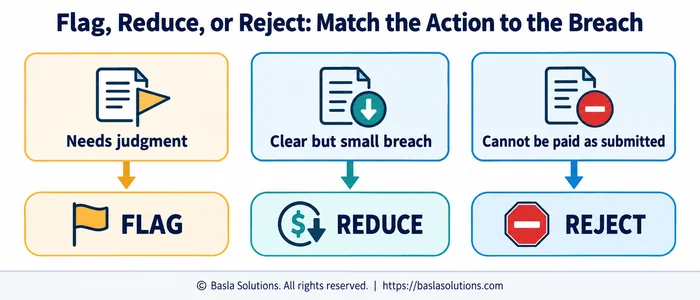
A rule should flag an invoice when the breach needs judgment, reduce it when the breach is clear but small, and reject it only when the invoice cannot be paid as submitted.
- Flag. Warnings appear on the invoice alerts tab and do not block submission. High daily hours, possible block billing, and unusual staffing belong here.
- Reduce. The reviewer writes down the line or the header, adds a comment, and clicks Send for Appeals, which returns the adjusted invoice to the firm. Small expense overages and discount errors fit this tier.
- Reject. Reject Invoice requires a written reason, moves the invoice to Disputed, and emails the firm’s billing contact. Reserve it for unapproved timekeepers, unmapped matters, and invoices that fail tax or PO requirements.
We default to warnings and reductions for minor breaches, because a rejection forces the firm to resubmit the whole LEDES file and payment slips a full cycle. Rejections without a reason caused the most firm complaints in our builds, so comments are mandatory on every rejection and reduction. Flagged invoices then move into the reviewer queues and approval chain in Onit.
Can rules differ by law firm, matter type or region?
Rules in Onit can differ by law firm, matter type, and region, because each rule reads from records that are set at those three levels: the vendor, the matter, and the legal entity.
- By law firm. Firm-specific rate cards, fee arrangements, and discount tiers live on the vendor and vendor assignment to matter records. Tiered volume discounts can be switched on globally, per firm, or per firm on one matter.
- By matter type. The fee arrangement on the matter (hourly, capped, or fixed) changes which checks apply, and discount programs can exclude specific matter types.
- By region. Each legal entity links to its own tax table, currency, and PO requirements, so a European invoice is checked against local VAT and a US invoice against PO rules.
In one build, a global volume discount reduced fees on bankruptcy and investigation matters that had been negotiated separately, until those matter types were excluded on each firm’s discount record. Set the legal entity on the matter at creation, and the regional Onit billing guidelines follow automatically.
How often should billing rules be reviewed and tuned?
Billing rules should be reviewed 60 to 90 days after go-live, then every quarter, and again whenever the guidelines or a firm’s terms change.
- The first review. After two or three billing cycles, look at which warnings reviewers dismiss most often. A warning dismissed 80 or 90 percent of the time is set too tight or belongs elsewhere.
- Quarterly tuning. Check rejection and appeal rates by rule and by firm. A rule that firms win on appeal most of the time needs rewording or a looser threshold.
- Change-driven updates. A new rate cycle, a new firm on the panel, or a revised guidelines document should trigger a rule review before the next invoice arrives.
A 2023 audit of one state-backed insurer’s legal billing found average adjustments on law firm invoices consistently above 9 percent, with appeals above 15 percent. Track your own adjustment and appeal rates per rule, and treat a sudden change as a sign that a rule or a firm’s behavior has shifted.
Conclusion
Onit billing guidelines work when every testable clause in your guidelines has a rule, a data field behind it, a clear scope, and an action that fits the breach. Start with rates, timekeepers, codes, tax, and allocations as hard errors, keep judgment calls like block billing as warnings, and check invoices again before payment. Then review the rules every quarter, so they keep matching how your firms bill.
How Basla Solutions can help
Basla Solutions provides delivery teams for Onit implementation, covering business analysis, guideline-to-rule mapping, rate card and fee arrangement setup, tax and legal entity configuration, law firm onboarding, testing, documentation, and post-go-live support. We bring legal technology consulting and hands-on configuration through staff augmentation or a Basla-managed delivery unit.
Rules are one workstream within a full Onit eBilling implementation, and we plan them alongside firm onboarding so the first invoices pass cleanly.
Frequently asked questions
Can Onit detect block billing automatically?
Onit billing guidelines can include a narrative check that flags entries combining several tasks under one time value. Because narratives vary, most departments set it as a warning so the reviewer makes the final call.
How do you enforce a six-minute increment rule?
You enforce a six-minute increment rule by flagging any time entry whose hours value is not a multiple of 0.1. Entries such as 0.25 or 0.75 hours trip the rule.
Can rules differ by law firm or by matter type?
Rules can differ by law firm through vendor rate cards, fee arrangements, and discount records, and by matter type through the matter’s fee arrangement. Discount programs can also exclude specific matter types.
Should a rule reject or flag an invoice?
A rule should flag an invoice when the breach needs judgment and reject it only when the invoice cannot be paid as submitted. Small, clear breaches are usually better handled as line-item reductions sent back for appeal.
How often should billing rules be reviewed?
Billing rules should be reviewed 60 to 90 days after go-live and then every quarter. Any change to the guidelines, rate cycle, or firm panel should trigger an extra review.
This article is for general information only and is not legal, business, financial or tax advice. For questions about your specific situation, please consult a qualified professional.