

Onit ELM SAP integration is the connection that sends legal invoices, once approved in Onit, to accounts payable in SAP or another ERP for payment. The same design applies to Oracle, NetSuite and Coupa: an approved invoice is validated, packaged with its vendor ID, GL codes and cost allocation, and handed to the AP system, with payment status ideally coming back.
This guide, part of our Onit integrations hub, covers the handoff, the data that has to be right, and the mistakes that leave invoices stuck.
How does Onit send approved invoices to an ERP?
Onit sends approved invoices to an ERP through one of three methods: a flat file exchanged over SFTP, an API connection, or a structured email to the AP team or intake mailbox. Onit’s documentation describes flat-file exchange over SFTP as the most common and recommended AP integration, with API and email as alternatives.
In our implementations, we have also used a one-way email export to launch quickly. A scheduled daily job picks up approved invoices, runs validation checks, generates a PDF of the invoice with its fee and expense lines, adjustments, taxes and approval history, and zips any supporting documents. It then emails the payload to the AP system’s intake address, with vendor, invoice, amount and GL details in the email body.
- Flat file. Best for SAP and Oracle at volume, usually handled by middleware or an ETL job on the finance side.
- API. Suits teams with integration developers and a need for faster status updates.
- Email. The quickest to launch, and a good interim step while an API or file design is finalized.
How does the approved-invoice to accounts payable handoff work?
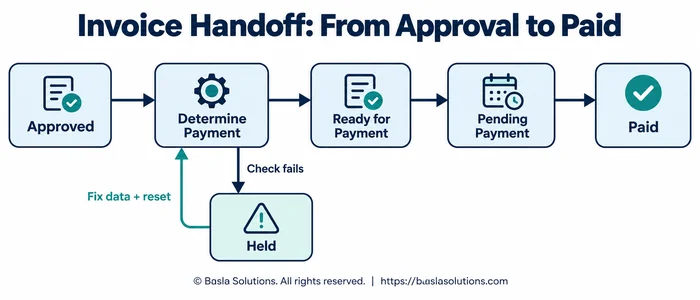
The approved-invoice to accounts payable handoff in an Onit ELM SAP integration works as a short chain of invoice phases, with automated validation between approval and export. If any check fails, the invoice is held inside Onit for legal operations to fix, so bad data never reaches the ERP.
| Phase | What happens in Onit | What can stop it |
|---|---|---|
| Approved | Legal approval completes and the payment step begins | Nothing, it moves on automatically |
| Determine Payment | Up to six validation checks run | Missing allocation, vendor ID, AP system, AP email or PO number |
| Ready for Payment | PDF and supporting files are generated | A file or attachment error |
| Pending Payment | The payload is sent and the date sent to AP is stamped | Delivery failure at the AP endpoint |
| Held | Failed checks are flagged and the matter manager is emailed | Data still missing after review |
| Paid | Payment confirmation is recorded | No paid file or status coming back |
We chose to hold failed invoices in Onit and keep them away from the law firm, because the missing data is almost always internal. A reset action lets the matter manager fix the field, pull the default AP details from the legal entity and vendor records again, and send the invoice back through validation.
How are vendor master records kept in sync?
Vendor master records are kept in sync by storing each law firm’s ERP vendor ID in Onit, one ID per firm per AP system, and checking it before every export. A global firm can have a different vendor ID in each regional AP system, so a single vendor ID field on the firm record is rarely enough.
In our implementations, we built a child app under the vendor record to hold each vendor and AP system pair, with the vendor, AP system, vendor ID and a combined key. A validation rule blocks duplicate pairs, so each combination maps one to one. The same vendor ID mapping across multiple ERPs applies whether the target is SAP, Oracle or Coupa. Verify AP vendor IDs at onboarding, before a firm reaches any live matter, and a “vendor ID is not blank” rule catches gaps before they become payment holds.
Who assigns GL codes to legal invoices?
GL codes on legal invoices are assigned by internal legal users, usually the matter manager, at the matter level, and every invoice inherits them automatically. Outside firms never see or choose your chart of accounts.
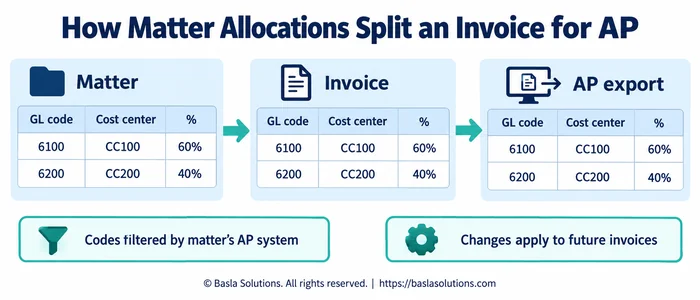
The matter manager adds one or more allocations, each with a GL code, cost center and percentage, and the percentages must total exactly 100. The cost code list is filtered by the AP system linked to the matter’s legal entity, so users only see valid codes. When an invoice arrives, Onit applies the matter’s allocations and calculates the split amounts from the invoice total. The same rules apply to splitting legal spend across entities and cost centers.
- Default codes. Set default cost codes on each legal entity so new matters start with standard GL coding.
- Future only. Allocation changes on a matter apply to future invoices, which protects invoices already sent to AP.
- Hard stop. Blank or partial allocations block export until corrected.
How do you reconcile Onit and AP at month end?
You reconcile Onit and AP at month end by comparing invoices Onit marked as sent with what the ERP received and paid, and the cleanest way to do that is a returned “invoices paid” file. Onit’s flat-file design supports exactly this, with the AP system sending a paid file back for Onit to consume.
A one-way design such as an email export sends nothing back automatically. In our implementations using that model, the specification did not include ingesting payment files, so reconciliation becomes a report comparison: invoices in Pending Payment with their date sent to AP, against the ERP’s received invoice list. If you start one-way, plan the paid-file return for phase two.
- Monthly check. Compare counts and totals by vendor and entity, and investigate any invoice in Pending Payment for more than 30 days.
- Accruals. Reconciled payment data feeds eBilling accrual configuration and keeps Onit month-end accruals accurate.
- Spend reporting. Paid amounts close the loop on Onit legal spend management reports, so legal and finance quote the same figures.
Does Onit integrate with SAP, Oracle, NetSuite and Coupa?
Onit integrates with SAP, Oracle, NetSuite and Coupa through its standard AP integration methods, which work with any ERP that can exchange files, call an API or receive structured email. For SAP and Oracle at volume, the usual choice for an Onit ELM SAP integration is a flat file handled by middleware on the finance side.
In our implementations, we designed an AP system master app in Onit, with one record per regional ERP endpoint, such as a UK Coupa instance and Oracle Financials. Each legal entity links to its AP system, so invoices route to the right ERP automatically. On one program, direct API integration with Oracle Financials was not ready at go-live, so we launched with the email export and kept the design ready for the API later.
Plan for integration effort. A 2024 connectivity benchmark found the average enterprise runs more than 900 applications, yet only 28 percent of them are integrated, so map every regional AP system and its vendor ID structure during design. The broader picture of integrating ELM with finance and ERP systems covers the governance around it.
Conclusion
Onit ELM SAP integration works when the handoff is designed around data quality first. Validate allocations, vendor IDs, AP system details and PO numbers before export, hold failures inside Onit, and give finance a payment file or status to send back for reconciliation. Start with email or flat files if the API is not ready, and map every regional ERP and vendor ID structure before the first invoice goes out.
How Basla Solutions can help
Basla Solutions provides delivery teams for Onit implementation, covering business analysis, AP integration design, vendor master and GL allocation setup, validation rules, payment file specifications, testing, documentation, and post-go-live support. We bring legal technology consulting and hands-on configuration through staff augmentation or a Basla-managed delivery unit, so legal and finance agree on the handoff before build starts.
Frequently asked questions
Does Onit integrate with SAP?
Yes, Onit ELM SAP integration uses Onit’s standard AP methods, most often a flat file over SFTP through middleware, or an API or structured email. Onit sends approved invoices and SAP can return a paid file.
How are vendor records kept in sync?
Vendor records are kept in sync by storing each firm’s ERP vendor ID in Onit, one per AP system. A validation check blocks export when the ID for that AP system is missing.
Who assigns GL codes to legal invoices?
Internal legal users, usually the matter manager, assign GL codes and cost centers at the matter level. Invoices inherit them automatically, and allocations must total 100 percent.
How do you reconcile Onit and AP at month end?
You reconcile by comparing invoices sent from Onit with what the ERP received and paid, ideally through a returned paid file. One-way exports need a monthly report comparison.
This article is for general information only and is not legal, business, financial or tax advice. For questions about your specific situation, please consult a qualified professional.