

Onit DMS integration connects Onit matters and contracts to the document management system where your legal documents live, most often iManage, NetDocuments or SharePoint. The integration decides three things: where each document is stored, whether Onit creates and updates the DMS workspace, and whether users can see the documents without leaving the Onit record.
Getting these decisions right early saves you from duplicate files, orphaned workspaces and users who stop trusting either system. This guide sits under our Onit integrations hub, and our guide to legal document management covers the storage decision itself.
How does Onit integrate with iManage, NetDocuments or SharePoint?
Onit integrates with iManage and NetDocuments through documented connectors that create or update workspaces from a matter and display them inside the record, and with SharePoint through Onit’s generic REST actions or a link to a site or library. The right approach depends on your DMS, your Onit product, and how much you want the two systems to share.
| DMS | Pattern | Notes |
|---|---|---|
| iManage (OnitX) | Sync and embed | A Create Workspace action builds or updates the workspace from the matter, maps metadata and adds participants, and an embedded tab shows it (iManage 10.1 or later) |
| iManage (Unity) | Sync from matter template | Onit enables the connection, and each matter template carries a default iManage workspace template |
| NetDocuments | Sync and embed | A REST action updates workspace attributes keyed on the matter number, and an embedded panel shows the workspace |
| SharePoint | Link, or custom sync | No packaged connector, so a link field or custom REST calls to Microsoft’s APIs |
One limit applies to Unity: third-party DMS integrations cannot run alongside Unity’s internal document management, so choose one home for matter files.
Cloud DMS is now the norm for this kind of build. A 2025 legal technology survey found cloud-based document management adoption at 76 percent, which means most Onit DMS integration work today is API-to-API, with OAuth tokens and permissions to manage.
What are the link, sync and embed integration patterns?
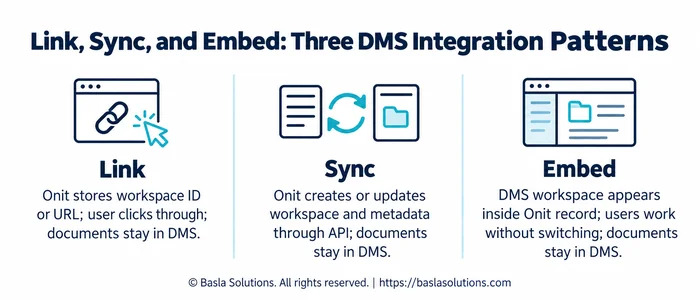
The link, sync and embed patterns are the three ways an Onit DMS integration can connect the two systems: link stores a pointer to the workspace, sync pushes data such as workspace creation and metadata through an API, and embed shows the DMS inside the Onit record. Most good builds combine sync and embed.
- Link. The Onit record holds the workspace ID or URL, and users click through to the DMS. It is quick to build and needs no API, but nothing stays aligned automatically.
- Sync. Onit calls the DMS API to create the workspace, set its name and attributes, and add or remove participants. Metadata changes in Onit flow to the DMS.
- Embed. An iFrame panel or tab in the Onit record shows the DMS workspace, so users can open, drag in and edit documents without switching systems.
Documents themselves usually stay in the DMS under all three patterns. The integration moves workspace data and access, and leaves document storage where your records policy says it belongs.
Can Onit create a DMS workspace when a matter opens?
Onit can create a DMS workspace when a matter opens with iManage, and can create or update workspace details in NetDocuments, using an action on the matter record. On OnitX, the iManage Create Workspace action builds the workspace from a template and performs an upsert, so running it again refreshes the existing workspace.
The action needs a few fields on the matter: workspace ID, workspace link, template, and the security setting the workspace is shared under. Metadata maps either as validated lookup fields, where one iManage field carries an alias and a description, or as custom fields mapped one to one. Your iManage consultant supplies the field names, because Onit users cannot see them directly. Participants are added as users or groups with full, read and write, read, or no access.
For NetDocuments, Onit authenticates with OAuth using lookup, read and edit scopes, and the refresh token expires if unused for 60 days. Put a monitoring check on that token, because a silent expiry stops every workspace update. How NetDocuments workspaces are built on one primary attribute matters here, since the matter number usually becomes the workspace key.
How do matter and contract records stay aligned with DMS workspaces?
Matter and contract records stay aligned with DMS workspaces when one shared key, usually the matter number, links each record to exactly one workspace and every later change runs through the same sync action. Onit owns the matter data, and the DMS owns the documents.
- One key. Use the matter number as the workspace key in NetDocuments and as the workspace ID reference in iManage. Never let users rename it in the DMS.
- Upsert on change. Rerun the sync action when the matter name, client or responsible lawyer changes, so the workspace description and attributes follow.
- Participants from Onit. Drive DMS access from the Onit team on the matter, adding and removing participants as people join or leave.
- Close with the matter. When a matter closes, update the workspace status so records retention rules can apply.
The same discipline applies to the wider NetDocuments integration with Onit, where cabinet and workspace design comes before any API work.
Where should executed contracts be stored?
Executed contracts should be stored on the Onit contract record, or the parent matter, as the final signed PDF, with a copy filed to the DMS workspace if your records policy requires it. That keeps one audited source of truth next to the metadata and obligations that depend on it.
In our implementations, the signed PDF returns from Docusign and lands on the Documents tab of the contract record, named to a standard convention of contract type, counterparty and record number. The record then moves into an In Reconciliation phase, where legal operations checks the effective date, expiry, notice period, governing law and renewal terms before activating it. Legacy agreements come in through a separate intake form that marks the contract as executed and skips drafting and approval, so the reconcile phase still runs.
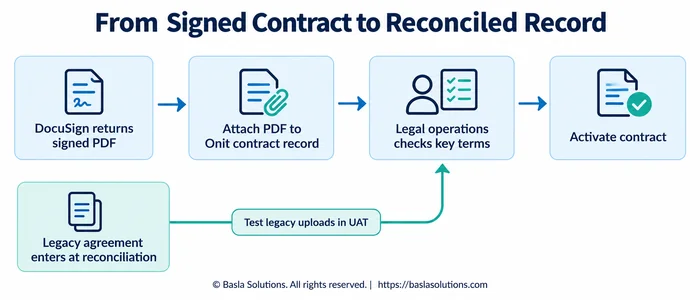
We hit one problem worth knowing: legacy uploads created the contract record but the file did not appear on the Documents tab. The cause was a document-creation rule with an invalid uniqueness key. Fixing the rule made every upload create and link its document record reliably, so test legacy uploads as a separate scenario during user acceptance testing.
Which DMS is easiest to integrate with Onit?
iManage is usually the easiest DMS to integrate with Onit, because Onit documents a dedicated connector covering workspace creation, metadata mapping, participants and an embedded tab. NetDocuments is close behind, with a documented REST and embed setup, and SharePoint takes the most custom work.
- iManage. Most complete out of the box on OnitX, and enabled by Onit on Unity. The embedded tab needs a configuration file on the iManage server and a registered redirect URL.
- NetDocuments. Straightforward once OAuth credentials and cabinet details are in hand. Plan for token management.
- SharePoint. Flexible but custom, so budget design and testing time for permissions and folder structure.
Whichever you choose, test the Onit DMS integration with real matters across every matter type before go-live.
Conclusion
Onit DMS integration works best when you decide the pattern first, then build. Use sync and embed with iManage or NetDocuments, link SharePoint until a custom build is justified, key every workspace to the matter number, and keep executed contracts on the Onit record with a reconciliation step before activation. Monitor tokens and sync actions after go-live, because a quiet failure is the one users notice last.
How Basla Solutions can help
Basla Solutions provides delivery teams for Onit implementation, covering business analysis, DMS integration design, workspace and metadata mapping, REST action configuration, Docusign and executed-contract workflows, testing, documentation, and post-go-live support. We bring legal technology services through staff augmentation or a Basla-managed delivery unit, and our teams also include NetDocuments-certified specialists for the DMS side of the build.
Frequently asked questions
Can Onit create a DMS workspace when a matter opens?
Yes, Onit can create an iManage workspace from a matter using a Create Workspace action that also updates it on rerun. With NetDocuments, Onit updates workspace attributes keyed on the matter number.
Do documents sync or link?
Documents usually stay in the DMS, while Onit syncs workspace details and metadata and embeds the workspace in the record. A link-only setup stores a pointer and keeps nothing aligned automatically.
Which DMS is easiest to integrate with Onit?
iManage is usually easiest, with a documented connector for workspaces, metadata and participants. NetDocuments is close behind, and SharePoint needs the most custom work.
Where should executed contracts be stored?
Executed contracts should be stored on the Onit contract or matter record as the signed PDF, with a DMS copy if policy requires. A reconciliation step should verify key terms before the contract is activated.
This article is for general information only and is not legal, business, financial or tax advice. For questions about your specific situation, please consult a qualified professional.