


Onit legal request assignment is the step that gives each submitted legal service request a single accountable owner, either through a rule that fires on submission or through a person who assigns it by hand. It decides how fast business users hear back and how evenly work spreads across your lawyers. The gap matters: a 2023 survey of in-house legal staff found that 78 percent of teams with fully automated processes address legal requests within 72 hours, against 33 percent of teams on manual processes.
How does Onit legal request assignment work?
Onit legal request assignment works through two routes: manual actions that let an authorized user assign or take a request, and business rules that set the assignee from the request’s data. Both routes write the same thing, a named owner who is accountable for the next step.
On the manual side, an Intake Admin triages each new request and hands it to an assignee. In Unity LSR, the Assign/Reassign action selects the new owner, sends them an automated notification, and offers an optional Notify Requester checkbox. An attorney can also use Start Work to take a request, which assigns it to them and moves it from In Triage to In Progress in one step. Where your build adds routing rules, predictable request types reach an owner without anyone touching them.
What should an Onit assignment matrix include?
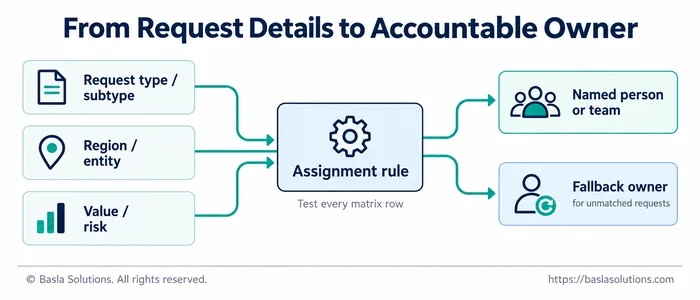
An Onit assignment matrix should include every combination of request data that changes who owns the work, plus a named fallback for anything the rules miss. Build it as a spreadsheet first, agree it with Legal, and only then configure it.
- Request type and subtype. The primary driver. Privacy requests go to privacy counsel, NDAs to the commercial team, subpoenas to litigation.
- Region or legal entity. For global departments, the same request type often needs a different owner in each region, which is where matrices grow from 20 rows to 60 or more.
- Value or risk threshold. A field such as contract value or a risk flag escalates the owner, sending agreements above a set amount to senior counsel.
- Fallback owner. A named person or queue for requests that match no rule, so nothing routes into a gap.
Every row should map to at least one test case, so a 40-row matrix means 40 scripted submissions before go-live. Legal request triage decides who handles each request and in what order, and the matrix is that decision written in a form the platform can run.
Should Onit assign requests to individuals or to teams?
Onit should assign a request to an individual whenever the right owner is clear from the request data, and to a team queue when several people could take it and judgment decides who. Most builds use each for different request types.
- Individual assignment. Best for specialist work with one obvious owner, such as all trademark clearance in one region. Ownership is clear from the first minute.
- Team queue assignment. Best for high-volume work shared across a group, such as NDAs handled by four contract managers. Someone on the team pulls the request or a lead hands it out.
- Hybrid assignment. The rule sends the request to a team, and a team lead names the individual within one business day.
Give every team queue a lead, and set a time limit after which an unclaimed request escalates to that lead.
How does workload balancing work in Onit legal request assignment?
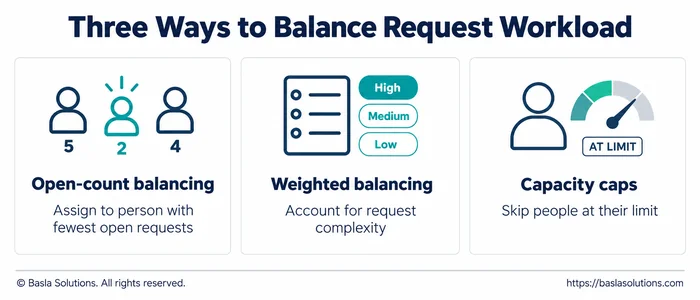
Workload balancing in Onit legal request assignment spreads new requests across a team based on how much work each member already holds. It keeps one lawyer from holding 40 open requests while a colleague holds eight.
- Open count balancing. Each new request goes to the team member with the fewest open items. It is simple to configure and easy to explain.
- Weighted balancing. Requests carry a weight by type, so a complex advice request counts as three NDAs. The weights need review every few months.
- Capacity caps. Each person has a ceiling, such as 25 open requests, after which new work skips them while they carry a long matter.
Start with open count balancing, then add weights for the two or three request types that distort the count most.
How should reassignment be handled in Onit?
Reassignment in Onit should be quick to do and visible afterward, with a reason recorded every time a request changes owner. Requests that bounce between owners lose days, and without reasons you cannot see why.
- Reason codes. A short list, such as wrong practice area, conflict, capacity, or absence, chosen on every reassignment. Free-text reasons are impossible to report on.
- Handoff comment. The outgoing owner adds a line on where the work stands, so the new owner does not start from zero or re-ask the requester.
- Requester notification. Tick the notify option so the requester sees the new owner’s name. A silent reassignment is the fastest way to generate “who has my request?” emails.
Watch the number of hops. A request reassigned more than twice usually points to a rule that sends that request type to the wrong place.
How do you cover absences in Onit request assignment?
Absences in Onit request assignment are covered by naming a backup for every assignee and every rule, so new work and open work both have somewhere to go when someone is out.
New requests need a rule-level fallback, so a rule that points to an absent person sends work to their backup. Open requests need a process for planned absences longer than three or four days, where the lawyer reassigns active items with handoff comments before leaving. Unity LSR also lets you add a backup assignee as a participant on the request, which keeps a second person in the loop without changing the owner.
Every rule that names a leaver has to change on their last day, because a rule pointing at an inactive user can hide requests for weeks.
How does assignment affect what users can see in Onit?
Assignment in Onit often controls visibility as well as ownership, because role permissions commonly grant access to a request based on who is assigned to it. Changing the assignee can therefore change who can open the record.
Map visibility by role before you finalize the assignment design. A typical setup lets requesters see their own requests, assignees see assigned work, Intake Admins see the whole queue, and confidential request types, such as workplace investigations, stay visible only to named counsel. Every reassignment path then needs a check that the new owner can actually open the request.
Test this by logging in as each role and walking a request through every assignment path. Skipping role-based security testing leads to chaotic go-lives, and assignment is where a missing permission shows up first.
What happens to the assignment when an Onit request becomes a matter?
When an Onit request becomes a matter, the assignment needs a clear rule for who leads the matter. Without one, the person who happened to triage the request can end up named as matter lead.
Decide this per request type. For most advice and dispute requests, the request assignee becomes the matter lead. For contract work, ownership may move to a contract manager while the lawyer stays on as reviewer. Record the original assignee on the matter as well, so you can report how many requests turn into matters for each lawyer. The Onit LSR to matter workflow sets default owners by matter type, and that default should match your assignment matrix.
How do you measure Onit legal request assignment quality?
Assignment quality is measured by how often requests reach the right owner first time, how many times they change hands, and how evenly work spreads across the team. These three measures show whether your rules match how your department actually works.
- First-assignment accuracy. The share of requests that never need reassignment. Aim for 85 percent or higher once the rules have run for 90 days.
- Hops per request. The average number of reassignments. Anything above 1.3 across a request type means that type’s rule needs work.
- Workload spread. Open requests per person compared with the team average. A gap of more than double between the busiest and quietest member points to balancing rules that need adjusting.
Review these monthly, segmented by request type, and change one rule at a time so you can see what each change did.
Conclusion
Request assignment is where a submitted request becomes someone’s job, and its quality shows up in every turnaround figure your department reports. Agree the matrix with Legal, use individuals where ownership is obvious and team queues where it is shared, and balance by open count first. Record a reason on every reassignment, name a backup for every rule, and measure first-assignment accuracy from launch.
How Basla can help
Basla provides delivery teams for Onit implementation, covering business analysis, assignment matrix and routing design, workload balancing configuration, role-based security testing, documentation, and hypercare after go-live. Basla’s business analysts agree with Legal who owns each request type in each region, then configure, document, and test those rules, and Basla delivers legal technology services through staff augmentation or a Basla-managed delivery unit.
On a global Legal Service Request implementation, Basla built eight Front Doors to handle language and country variations, and Basla teams have delivered matter management and eBilling across more than ten global jurisdictions.
Frequently asked questions
How does Onit legal request assignment work?
Onit legal request assignment gives each submitted request a named owner, either through an Intake Admin using the Assign/Reassign action or through routing rules based on request type, region, or value. Attorneys can also use Start Work to assign a request to themselves.
Can Onit assign legal requests automatically?
Onit can assign legal requests automatically when the build includes routing rules that read the request type, region, value, or other fields. Most departments automate predictable request types and leave complex or sensitive requests for manual assignment.
What is an assignment matrix for legal requests?
An assignment matrix for legal requests is a table of rules mapping each combination of request type, region, and risk level to an owner or team. It is agreed with Legal before configuration and reviewed each quarter.
How do you balance attorney workload in Onit?
Attorney workload in Onit is balanced by sending each new request to the team member with the fewest open items, or by weighting requests by complexity. Capacity caps stop anyone from receiving new work above a set number of open requests.
What should happen when a request is reassigned in Onit?
A reassigned request in Onit should carry a reason code, a handoff comment from the previous owner, and a notification to the requester naming the new owner. Tracking reasons shows which assignment rules send work to the wrong place.
How do you measure whether request assignment is working?
Request assignment is working when most requests reach the right owner first time, change hands rarely, and spread evenly across the team. First-assignment accuracy, hops per request, and workload spread are the three measures to track monthly.
*This article is provided for general information only and does not constitute legal advice. Basla Solutions provides legal technology implementation and support services and does not practice law.*