

LEDES XML is the structured, hierarchical version of the legal billing standard, built to carry tax, currency, and multi-matter detail that the older pipe-delimited LEDES 1998B file cannot hold. Both formats move a law firm invoice into an eBilling system as data. The difference is how much information each file carries and how strictly it can be checked. If you need the basics of the standard first, start with what the LEDES billing format is and how it works. This page covers the choice between the two formats, one of the decisions that shapes any enterprise legal management rollout.
What is the difference between LEDES XML and LEDES 1998B?
LEDES XML is a nested file with separate segments for the client, invoice, matter, fees, expenses, taxes, and timekeepers, while LEDES 1998B is a flat text file with the same 24 fields repeated on every line. That structural difference decides what each format can express.
In a 1998B file, every line item repeats the invoice number, invoice date, client ID, and matter ID, followed by line details such as task code, timekeeper, units, and unit cost. The file is plain ASCII text, with pipe characters separating the values. It is easy to read and easy to generate, and it has no natural place for data the original 24 fields did not anticipate.
An XML file nests data in levels. The invoice sits inside the client, matters sit inside the invoice, and fee and expense lines sit inside each matter. Current releases of XML 2.1 define 205 data elements across 16 segments, so each piece of information has a defined home.
| Feature | 1998B | XML 2.x |
|---|---|---|
| File structure | Flat, pipe-delimited text | Nested XML segments |
| Data fields | 24 fields per line | 205 data elements in version 2.1.4 and later |
| Matters per invoice | One, in practice | Several, each in its own segment |
| Tax and VAT | No dedicated fields | Tax segments and client tax ID |
| Currency | Assumed by the client | ISO 4217 currency code per invoice |
| Timekeeper summary | Repeated on each line | Separate timekeeper summary segment |
| Jurisdiction rules | Not supported | Extensible regulatory statement segment |
| Readability | Opens in any text editor | Needs a validator or viewer |
What does LEDES XML 2.x add?
Version 2.x of the XML format adds structured support for taxes, multiple currencies, multiple matters per invoice, and jurisdiction-specific invoice requirements. These are the gaps that make 1998B hard to use outside a single country.
- Tax detail. Tax segments carry VAT and other taxes at the line and invoice level. That matters because UK guidance says VAT invoices must include the supplier’s VAT number and show the VAT separately.
- Currency codes. Every invoice states its currency as an ISO 4217 code, so a reviewer never has to guess whether a total is in dollars, euros, or pounds.
- Multi-matter invoices. One invoice can roll up charges from several matters, each kept in its own matter segment with its own totals.
- Timekeeper summaries. A separate segment lists each timekeeper’s name, classification, and rate once, which makes rate checks cleaner.
- Regulatory statements. An extensible segment holds wording or data that a jurisdiction requires on an invoice.
- Firm and client details. Addresses, a vendor identifier such as a tax or VAT registration number, and billing period dates are standard fields.
A middle option also exists. LEDES 98BI keeps the pipe-delimited layout and the first 24 fields of 1998B, then extends the record to 52 fields with tax, currency, and address data.
Which LEDES format should a corporate client require?
A corporate client should require the XML format when it receives invoices in more than one currency, pays VAT or other invoice taxes, or wants firms to bill several matters on one invoice. A client that pays in one currency with no invoice tax can keep requiring 1998B.
- Global departments. Require XML 2.1 from firms in VAT jurisdictions, and accept 1998B from domestic firms that bill in one currency.
- Domestic departments. Keep 1998B as the standard, and confirm the eBilling system can accept XML if the panel grows abroad.
- Mixed panels. Set the format per vendor and record it on the vendor profile, so the system applies the right validation to each file.
- Version control. Name the exact version in the billing guidelines, such as XML 2.1, and set a date for moving firms off older versions.
Write the requirement into your outside counsel billing guidelines, with a 60 to 90 day notice period before it takes effect, so firms have time to update their billing software.

How do firms produce LEDES XML?
Firms produce XML invoices from their time and billing system, which exports the invoice in the format each client requires. Most firms already generate LEDES files, so producing XML is usually a matter of switching on the right export and mapping the client’s codes.
- Billing system export. Most law firm billing systems include a LEDES export with a choice of format and version for each client.
- Client setup. The firm records the client ID, matter IDs, tax registration numbers, and currency for each client so the export fills every required field.
- Code mapping. Task, activity, and expense codes are mapped to the UTBMS codes the client requires, which work the same way in both formats.
- Test submission. The firm sends a test file before the go-live date, and the client’s eBilling system reports any field it rejects.
How do eBilling systems validate each format?
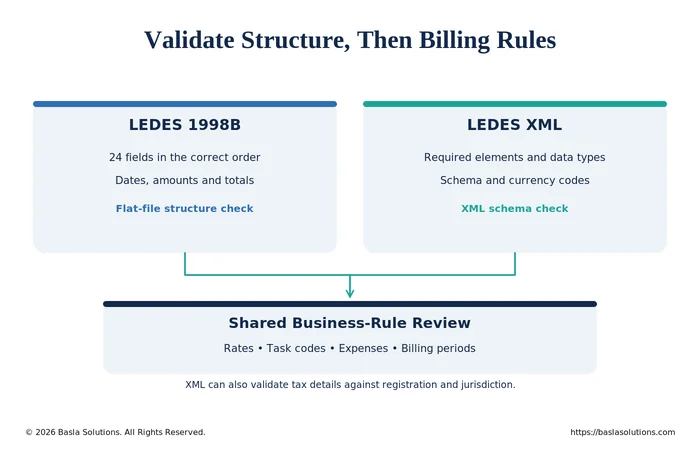
eBilling systems validate both formats in two stages: a structure check that confirms the file can be read, and a business rule check that compares each line with the client’s billing guidelines and rates. XML gives the first stage much more to check.
- 1998B structure check. The system confirms each line has 24 fields in the right order, that dates and amounts are well formed, and that line totals add up to the invoice total.
- XML schema check. The file is checked against the published schema, so a missing required element, a wrong data type, or an invalid currency code fails at once.
- Business rules. Both formats then run through the same rules for rates, task codes, expenses, and billing periods, as set out in the validation rules that catch bad LEDES invoices.
- Tax checks. With XML, the system can check tax rates and tax totals against the jurisdiction and the vendor’s registration number.
Return each error with the field name and reason so the firm can fix it in one pass.
When is 1998B still the right choice?
LEDES 1998B is still the right choice for a client that pays every invoice in one currency, with no invoice tax and one matter per invoice. In that setting, its 24 fields carry everything the review needs.
- Single-country panels. A domestic panel billing in one currency gains little from tax and currency segments.
- Small firms. Firms with basic billing software can almost always produce 1998B, and some cannot produce XML.
- Simple review. Reviewers can open a 1998B file in a text editor or spreadsheet when a dispute needs a quick look.
Conclusion
LEDES XML is the better format whenever invoices cross borders, carry tax, or cover several matters. LEDES 1998B remains a sound default for single-currency domestic billing. Decide the format per vendor, name the version in your billing guidelines, and give firms a test window before the requirement takes effect.
How Basla can help
Basla provides delivery teams for enterprise legal management and eBilling software implementation, covering business analysis, LEDES format and version setup, vendor profiles, invoice validation rules, tax and currency configuration, testing, documentation, and post-go-live support. Basla offers legal technology consulting and hands-on configuration through staff augmentation or a Basla-managed delivery unit, so law firm onboarding to new LEDES requirements runs on schedule.
Basla teams have delivered matter management and eBilling across 10 or more global jurisdictions.
Frequently asked questions
What is LEDES 2000?
LEDES 2000 is an early XML version of the LEDES standard that came before the XML 2.x releases. Few clients request it today, and most that use XML require version 2.1.
Does LEDES XML support VAT?
Yes. The XML format supports VAT through dedicated tax segments at the line and invoice level. It also carries the client tax ID and the firm’s VAT registration number.
Can one invoice cover multiple matters in LEDES XML?
One XML invoice can cover multiple matters, with each matter in its own segment and its own totals. In practice, a LEDES 1998B invoice covers one matter.
Do all eBilling systems accept LEDES XML?
Most enterprise eBilling systems accept XML files alongside 1998B, but supported versions vary. Confirm which XML version your system validates before you require it from firms.
*This article is provided for general information only and does not constitute legal advice. Basla Solutions provides legal technology implementation and support services and does not practice law.*