

Contract migration into Onit CLM is the process of loading legacy executed contracts and their metadata so they can be managed for renewals, obligations and reporting alongside new agreements. It runs in four stages: scope which contracts to load, extract their metadata, validate that data in a test environment, and cut over into production.
Migration has a poor track record in general, and one research study found only 16% of data migrations are delivered on time and on budget. Below is how we run each stage in our Onit implementations.
How do you migrate legacy contracts into a CLM system?
You migrate legacy contracts into a CLM system either in bulk through staging spreadsheets that are cleaned and then imported, or one at a time through a legacy contract action. In Onit, both routes create executed contract records that land in the reconciliation phase, ready for renewal and obligation dates.
- Executed status. Records skip drafting and approval and go straight to reconciliation.
- Paper type. Paper type defaults to third-party paper, and AI contract review for negotiation is hidden.
- Entity defaults. Choosing the legal entity fills jurisdiction and governing law.
- Owner defaults. Contract owner and business owner default to the person loading the record.
Bulk loads use a two-stage workflow: clean and link the data in staging tables, then run a test import before the production load. In our builds each staging row carried 12 to 13 core fields. The single-record route suits contracts that surface after go-live. Where these records end up is explained in the Onit contract repository.
Which contracts should be migrated and which archived?
Active executed contracts that still need post-signature management should be migrated, while expired and inactive agreements should stay archived unless they carry a live renewal or obligation. The table sets out the decision by contract class.
| Contract class | Decision | Why |
|---|---|---|
| Active supplier and customer contracts | Migrate | They drive renewals, payments and obligations |
| Expired contracts with surviving obligations | Migrate | Confidentiality or audit duties still apply |
| Evergreen or auto-renewing contracts | Migrate | They renew without action unless tracked |
| Expired contracts with no live terms | Archive | No action left for the business |
| Drafts that were never signed | Archive | They are not agreements |
- Readiness rule. Every staging record needs a validated legal entity and expiry date before import.
- Clear cutoff. A firm rule, such as active within the last 12 to 24 months, settles what is in scope.
- On-demand loading. Lower-priority contracts load through the legacy action as they are needed.
Including expired agreements in our first staging files slowed cleaning and testing, so we filtered to contracts with active or future end dates. Historical records missing an expiry date or legal entity also failed validation at import, which is why the readiness rule above runs before any file reaches the import tool. Agree the scope rule with legal leadership in writing, because requests to “just add” another set of old contracts arrive in every project.
How is contract metadata extracted (manual, outsourced, AI)?
Contract metadata is extracted by AI that reads each uploaded contract and fills key fields, or by people who complete the staging template by hand, whether an in-house team or an outsourced reviewer. In our builds we combine AI extraction with in-house work on the staging templates.
- AI extraction. Onit’s ExtractAI uses AI to turn unstructured contracts into structured data, pulling value, dates, renewal terms, parties and governing law.
- People for structure. People map parent and child links, such as a master agreement and its statements of work.
- Human check. Extracted dates are verified in reconciliation before activation, so an extraction error never drives an alarm.
Scanned contracts need optical character recognition first, because image-only PDFs return blank fields. Open each file and confirm its text can be selected, then run recognition across the whole scanned set as part of cleaning. An outsourced provider works from the same staging template, so import and validation stay the same whichever route you choose.

How do you validate migrated data before cutover?
You validate migrated data by loading a sample batch into a test environment and auditing every imported record before production is approved. Testers confirm field mappings, parent and child links, document attachments and post-signature dates.
- Every required field. Each required field on each sample record is checked.
- Date audit. Testers check effective date, end date, renewal alarms and notice alarms using grid views.
- Document check. A query confirms every migrated contract has its PDF attached.
- One currency. Conversion rules turn migrated values into one reporting currency on import.
Legacy records at first created metadata without showing the PDF, until we fixed the document rule and template keys. A full dry run on a sample batch is the cheapest insurance against a failed load.
How does the cutover into Onit CLM run?
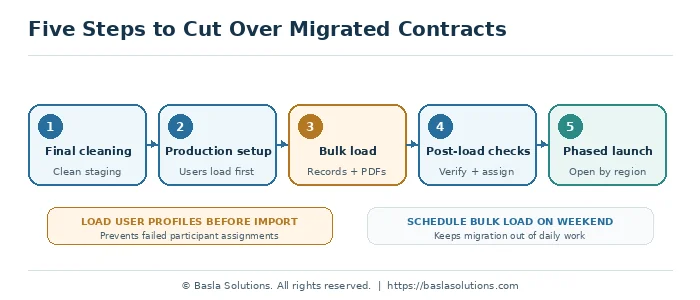
The cutover into Onit CLM runs in five steps: final cleaning, production setup, the bulk load, post-load checks and a phased soft launch. We schedule the load for a weekend maintenance window so it never disrupts daily work.
1. Final cleaning. Staging templates are cleaned and formatted.
2. Production setup. Configuration, admin lists, contract types, legal entities, fiscal calendars, user profiles and security groups are deployed.
3. Bulk load. Validated staging tables and executed PDFs are imported.
4. Post-load checks. Verification scripts run, and records are assigned to their owners.
5. Soft launch. Access opens region by region as each team completes training.
Missing user profiles once caused imported contracts to fail participant assignments, so every user now loads first. Contracts dated before the active fiscal year also failed until prior fiscal years were configured. A soft launch helps because contract managers check their own migrated contracts and spot a wrong end date faster than any central reviewer.
How long does contract migration take?
Contract migration time depends on the number of in-scope contracts, the condition of the source files and how much metadata must be extracted, so it should be planned per project with contingency built in. Plan three to four weeks of hypercare after cutover.
- Narrow scope. Limiting the load to active contracts shortens every later stage.
- Recognition first. Running text recognition before extraction avoids a second extraction pass.
- A dry run. A test load surfaces data problems while they are still cheap to fix.
The same research found overruns averaged more than 40% of the time budget, which argues for a generous buffer. We keep migration off the go-live date on every build, as set out in Onit CLM implementation, and the wider platform is explained in how contract management works in Onit CLM.
Conclusion
A successful contract migration limits scope to active contracts, uses AI for extraction with people checking the output, tests a sample batch before cutover, and prepares production fully before the bulk load. Run the load in a quiet window with a phased soft launch, and migrated contracts start driving renewal alarms and reporting from day one.
How Basla can help
Basla provides delivery teams for Onit implementation, covering business analysis, migration scoping, staging templates, AI and manual metadata extraction, test loads, production cutover, post-load verification, documentation, and post-go-live support. Basla delivers legal technology consulting through staff augmentation or a Basla-managed delivery unit, so legacy contracts land in Onit clean and ready to manage.
Frequently asked questions
Should you migrate every contract or only active ones?
You should migrate active contracts and expired contracts that still carry live obligations. Agreements with no remaining terms can stay in the legacy archive.
How is metadata extracted from scanned contracts?
Scanned contracts first go through optical character recognition so the text can be read. AI extraction or a reviewer then fills the staging fields from the readable file.
Can AI extract contract data for migration?
AI can extract contract data such as value, dates, renewal terms, parties and governing law. People should verify the extracted dates in reconciliation before any contract is activated.
How do you validate migrated data?
You validate migrated data by loading a sample batch into a test environment and checking every required field, date and attachment. Production is approved only after that audit passes.
How long does contract migration take?
Contract migration time depends on contract volume, file quality and extraction method, so plan it per project. Build in contingency and three to four weeks of hypercare after cutover.
*This article is provided for general information only and does not constitute legal advice. Basla Solutions provides legal technology implementation and support services and does not practice law.*