

An Onit CLM implementation takes a department from scattered templates and email approvals to a configured contract platform with intake, drafting, review, approval, signature and post-signature tracking. It runs in a set order, and each step carries decisions that shape the rest of the build.
Scope reaches beyond legal: one study found 70% of organizations acknowledge a disconnect between contracts and financial oversight, so finance, reporting and integrations belong in the plan from day one. Below is the sequence we follow on our Onit builds.
How do you implement Onit CLM?
You implement Onit CLM in a fixed order: gather requirements, rationalize templates, build the clause library and approval matrix, decide on legacy migration, connect integrations, then train users and go live. The table shows each phase with its deliverable and the mistake we see most.
| Phase | Deliverable | Common mistake |
|---|---|---|
| Requirements | Contract taxonomy and intake field map | Capturing every regional variant in wave one |
| Templates | Five to eight master templates | Digitizing dozens of near-duplicate variants |
| Clause library and approvals | Owned clauses and a value-and-risk matrix | Routing approvals to named people only |
| Migration | A plan for active legacy contracts | Putting a large migration on the go-live date |
| Integrations | Single sign-on, eSignature, finance export | Building finance links before signing works |
| Training and go-live | Role guides, drop-in clinics, hypercare | Long manuals nobody reads |
Two principles run through every phase. We keep Onit’s standard high phases to limit custom code, and every contract starts from an intake request, so its data exists before drafting. How the finished platform works is explained in how contract management works in Onit CLM, and the stages it models in the stages of the contract lifecycle.
How do you gather CLM requirements and rationalize templates?
You gather CLM requirements in design workshops that map the contract taxonomy, covering category, contract type, paper type, template type and language, and you rationalize templates by merging regional variants into a few master templates with dynamic fields. Start with high-volume, standard contract types and add negotiated agreements in later waves.
- Core fields only. Limit required metadata to 8 to 10 reportable fields, such as parties, value and dates.
- Language as taxonomy. One build supported five languages, so language was a field from the first workshop.
- Change control. New requests during the build go to a post-go-live backlog.
- One template per type. A one-to-one link between contract type and master template keeps selection simple.
Trying to capture every regional variant at once bloated scope on an early project. Phasing the workshops, starting with self-service NDAs, kept sign-off on schedule.
Map intake fields in the same workshops. Requester, department, business unit and deal value captured at intake are the fields that later select templates, set approval tiers and feed dashboards, so agreeing them early saves rework in every later phase. We record each decision in a live configuration workbook, which becomes the build specification, the test reference and the handover document for whoever administers the platform after go-live.
How do you build the clause library and approval matrix?
You build the clause library in Onit’s template library with each clause tagged by language and contract type, and you build the approval matrix around contract value and risk. Standard low-risk agreements under regional value limits skip approval, while over-limit or high-risk contracts route through a chain of up to 10 tiers.
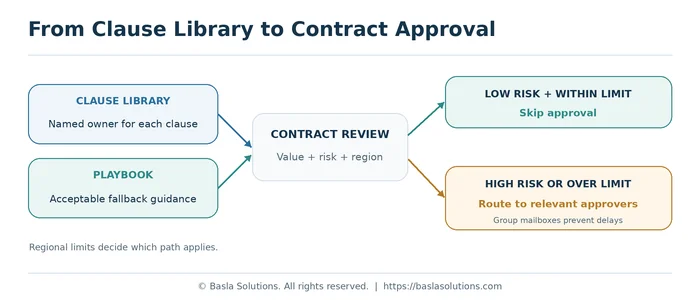
Owner per clause.
One legal owner per clause stops conflicting fallbacks being published.- Playbook alongside. Review checklists tell reviewers which fallbacks are acceptable.
- Value limits. One build used $50,000 in the US, £30,000 in the UK and €30,000 in Europe.
- Group approvers. Approval requests go to group mailboxes tied to security groups.
Approvals sent to named people stalled during leave, which is why we moved to group mailboxes. Approval emails also carry a link to the contract and a summary PDF listing every risk and its mitigation, so approvers can decide without opening the full draft. Every approver’s comment is stored on the approval chain, which gives a complete record before signature. Clause records get plain, searchable names, because automated naming produced titles nobody could find. Clause and playbook design is covered in building an Onit clause library and playbook, the redlining that uses them in Onit contract negotiation, and tier design in designing a contract approval workflow.
Should you migrate legacy contracts before go-live?
You should not run a large legacy migration before go-live, because it puts the launch at risk for little early benefit. Go-live should focus on new intake and workflow, and active legacy agreements can load afterwards through bulk templates or a legacy contract action.
- Active contracts only. Expired agreements stay archived unless they carry a live renewal or obligation.
- Readiness check. Every staging row needs a valid legal entity and expiry date.
- Profiles first. All users load into production before any import, so participants assign cleanly.
One research study found only 16% of data migrations are delivered on time and on budget, which is why we keep migration off the critical path. Legacy records enter Onit as executed third-party paper in the reconciliation phase, where legal operations sets end dates and renewal alarms before activating them. A standard staging template of 12 to 13 core fields keeps each load consistent, and a short test load of a few hundred contracts surfaces data problems before the full run. The steps are set out in contract migration into Onit CLM, and the records it fills in the Onit contract repository.
How are integrations sequenced in a CLM implementation?
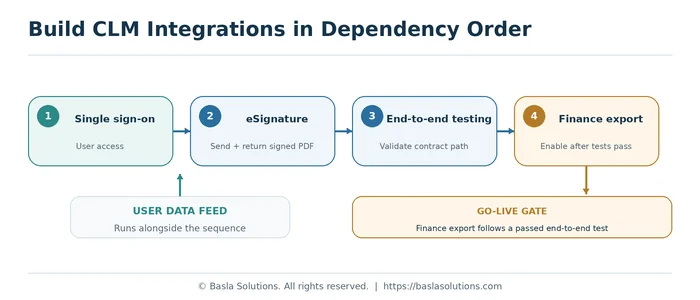
Integrations in a CLM implementation should follow a fixed order: single sign-on first, eSignature second, the finance or ERP export third, with the user data feed running alongside. Sign-on and eSignature come first so the full drafting, review and signing path can be tested before money moves.
- Single sign-on. An identity provider app authenticates users from their first login.
- eSignature. Envelope preparation, signer order and automatic return of the executed PDF.
- Finance export. A scheduled export sends approved payment data and cost codes to finance.
- User data feed. Department, title and manager hierarchy sync into user profiles for routing.
Signed certificates failed to attach in one build until every regional subdomain was listed in the identity provider settings. Leaving the finance export until last is deliberate: it moves real money, so it should only go live once intake, drafting, approval and signing have passed testing end to end. Book enterprise IT time for each integration early, because identity and finance changes often follow their own release calendars. The full picture is in connecting Onit’s CLM to other systems.
How do you train users and drive CLM adoption?
You train users with short role-based guides, a sandbox to practice in, and daily drop-in sessions during hypercare, organized under a change management plan. Onboard legal users first, then roll out to the business in a phased soft launch.
- One guide, one task. One- or two-page guides with numbered steps replaced long manuals.
- Drop-in clinics. Daily one-hour online sessions gave users screen-shared help.
- Champions. A champion in each department gathers feedback and helps peers.
One rollout onboarded 63 legal team members across seven locations, then more than 2,000 business users. Our change plans follow a simple sequence of awareness, desire, knowledge, ability and reinforcement, so communication starts weeks before training and continues after go-live. Legal users who trained first became the people business users asked for help, which cut support tickets in the first month. Adoption is measured after go-live with the reports described in Onit reporting and dashboards.
How long does a CLM implementation take and what does a partner do?
A CLM implementation on Onit usually takes several months per phase, depending on template count, integrations and how fast the department supplies user lists and sample templates, and every go-live is followed by three to four weeks of hypercare. A partner runs the design, configuration, testing and training, and keeps the decisions on schedule.
- Client-side data. Late user lists and sample templates are the most common cause of delay.
- Soft launch. Switching features on as validated data arrives protects the go-live date.
- Handover. After hypercare, the build moves to managed administration or an internal team.
A common structure is two phases: the first launches intake and the core contract workflow, and the second adds review playbooks, eSignature for negotiated agreements and reconciliation once the platform is stable. Splitting the work this way gives the business early value and gives the project team real usage data before the more complex pieces are built. What to look for in a delivery team is covered in choosing an Onit implementation partner.
Conclusion
A successful Onit CLM implementation follows a disciplined order: lean requirements, a small set of master templates, an owned clause library, a value-and-risk approval matrix, migration kept off the go-live date, integrations led by sign-on and eSignature, and practical training. Make each decision deliberately, and go-live becomes the start of adoption.
How Basla Solutions can help
Basla Solutions provides delivery teams for Onit implementation, covering business analysis, design workshops, template rationalization, clause libraries, approval matrices, legacy migration, integrations, user acceptance testing, training, documentation, and post-go-live support. Basla delivers legal technology consulting through staff augmentation or a Basla-managed delivery unit, for departments planning a new rollout or rescuing one that has stalled.
Frequently asked questions
How long does a CLM implementation take?
A CLM implementation usually takes several months per phase, depending on templates, integrations and how quickly user lists and sample templates arrive. Plan three to four weeks of hypercare after each go-live.
How many contract templates should you start with?
Start with five to eight master templates for your highest-volume agreements, such as NDAs, master services agreements and statements of work. Handle regional variants through dynamic fields and the clause library.
Should you migrate legacy contracts before go-live?
We recommend loading active legacy contracts after go-live, so migration stays off the critical path. They enter Onit in reconciliation for date and alarm setup.
Who approves contracts in the approval matrix?
Contract managers, supervisors, business owners and specialist risk groups approve through a chain of up to 10 tiers. Contract value and risk rating decide which tiers apply.
What does a CLM implementation partner do?
A CLM implementation partner runs design workshops, configuration, integrations, testing and training, and keeps decisions on schedule. A good partner also hands over a documented build your team can maintain.
This article is for general information only and is not legal, business, financial or tax advice. For questions about your specific situation, please consult a qualified professional.