

The SimpleLegal API is a REST interface into Onit’s mid-market platform that lets other systems create, read, and update SimpleLegal records such as matters, vendors, invoices, users, and payments. IT teams use it to keep law firm vendors in step with the ERP, send approved invoices to accounts payable, and copy matter and spend data into a reporting warehouse. Our guide to the Onit API covers the Unity and OnitX side, and the Onit integrations hub maps the wider set.
What can you do with the SimpleLegal API?
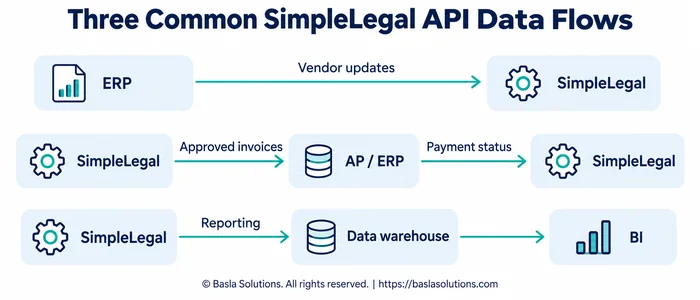
You can use the SimpleLegal API to create vendors, users, matters, and payments, to retrieve matters, invoices, and cost codes, and to update matters and vendors. Those operations support three common integrations: vendor sync from an ERP, invoice export to accounts payable, and matter data feeds to a BI tool.
A 2025 survey of more than 1,050 IT leaders found that the average enterprise runs 897 applications and only 29 percent of them are integrated.
The integrations that remove that rekeying are:
- Vendor sync. Law firms are created and updated in SimpleLegal from the ERP supplier master, so each firm exists once with the right supplier ID.
- Invoice export. Approved invoices leave SimpleLegal for the AP or ERP system, and payment details come back.
- Matter and spend feed. Matter, invoice, and cost code data is copied on a schedule into a data warehouse for finance and legal reporting.
What objects does the SimpleLegal API expose (matters, vendors, invoices, users)?
The SimpleLegal API exposes matters, vendors, invoices, users, payments, and cost codes as resource-oriented endpoints that return JSON. Matters and vendors can be created and updated, users and payments can be created, and invoices and cost codes can be retrieved.
Every integration follows the same API conventions:
- Authentication. Requests use HTTP authentication with a secret API key, which belongs in a server-side integration and never in browser code.
- Updates. Records are updated with PATCH, and POST can be used for systems that cannot send PATCH.
- Paging. SimpleLegal API lists return 25 records per page by default, and a page size parameter raises that.
- Filtering. Filters support exact matches, lists of values, and date ranges, where a range includes its start date and excludes its end date.
How do you sync vendors from an ERP into SimpleLegal?
You sync vendors from an ERP into SimpleLegal by treating the ERP supplier master as the source of truth and using the API to create new law firms and update existing ones on a schedule. The ERP supplier ID is stored on each SimpleLegal vendor, so later invoice exports can match payments to the right supplier.
A sound vendor sync makes four decisions up front:
- Which suppliers qualify. Only suppliers flagged as legal vendors in the ERP should flow across, or SimpleLegal fills with office cleaners and couriers.
- Which fields SimpleLegal owns. Supplier ID, legal name, and remittance details come from the ERP, while billing contacts and rates are maintained in SimpleLegal.
- How offices map. A law firm with several offices may be one supplier or several in the ERP, and the rules on mapping vendor IDs across multiple ERPs apply here.
- What happens on deactivation. A supplier blocked in the ERP should be updated in SimpleLegal so new invoices are stopped.
Run the sync daily, and send a short exception report to legal operations listing any supplier that failed to create or update.
How do you export approved invoices from SimpleLegal to accounts payable?
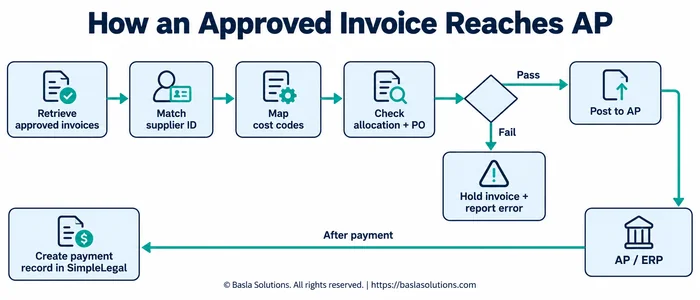
You export approved invoices from SimpleLegal to accounts payable by retrieving invoices approved since the last run, mapping each one to the AP format, posting it to the AP or ERP system, and creating the payment record back in SimpleLegal once it is paid. SimpleLegal is built to route approved invoices to an AP or ERP system for payment.
A worked example. A department pays law firms through its ERP and wants approved SimpleLegal invoices there the next morning. Each night, the integration retrieves invoices approved in the previous day, using a date range filter so no invoice is picked up twice. For each invoice it looks up the vendor’s ERP supplier ID and translates each cost code into the matching general ledger account and cost center. It then checks that the full invoice amount is allocated, that the supplier ID exists, and that a purchase order number is present where the ERP requires one. Invoices that pass are posted to the AP system. Invoices that fail are held back and listed in an email to legal operations with the reason. When the ERP pays an invoice, a second job creates the payment in SimpleLegal, so legal users can see the invoice is paid without asking finance.
The validation step is where these builds succeed or fail. On Onit’s enterprise platform, we have seen AP exports fail on missing vendor IDs and invalid task or activity codes, and the fix was an automated check that flags the failure, alerts the matter owner, and lets the invoice be resubmitted once corrected. The same pattern belongs in any SimpleLegal export, and the guide to AP validation rules for legal invoices lists the checks worth running.
How do you feed SimpleLegal matter data to a data warehouse or BI tool?
You feed SimpleLegal matter data to a data warehouse by retrieving matters, invoices, and cost codes on a schedule and loading them into warehouse tables that a BI tool reads. Most departments run the extract nightly, which keeps finance and legal reporting within a day of the live system.
- Load full, then load changes. The first run copies every record, and later runs pull only records changed in the period, which keeps each run short.
- Keep the keys. Store SimpleLegal’s own record IDs alongside ERP supplier IDs, so matters, invoices, and vendors can be joined in the warehouse.
- Reconcile monthly. Compare warehouse totals with SimpleLegal’s own spend reports each month, and investigate any difference over one percent.
Decide early which questions the warehouse must answer. Spend by business unit and spend against budget are the usual starting points, and the guide to legal analytics software covers what dashboards built on this data should track.
When do you need a partner to build a SimpleLegal integration?
You need a partner to build a SimpleLegal integration when the work spans several systems, involves payment data, or has to meet audit requirements that your internal team has not built for before. A single read-only extract to a warehouse is often within reach of an in-house IT team.
- Several ERPs or entities. Mapping vendors and cost codes across more than one finance system multiplies the edge cases.
- Payment and audit exposure. An invoice export moves money, so it needs reconciliation, error handling, and a clear audit trail.
- Security review. Broken object-level authorization is the top risk in the 2023 OWASP API Security Top 10, so any integration that writes data should keep its API key server-side and grant the least access it needs.
- No spare capacity. Internal IT teams often have the skills and no time, and a stalled integration leaves legal and finance rekeying data for months.
The SimpleLegal overview shows how the platform fits together.
Conclusion
The SimpleLegal API covers the records that matter for integration: matters, vendors, invoices, users, payments, and cost codes. Start with vendor sync, because invoice export depends on clean supplier IDs, then build the AP export with strong validation, and add the warehouse feed once finance trusts the numbers.
How Basla can help
Basla provides delivery teams for Onit implementation, covering SimpleLegal configuration, integration design, vendor and cost code mapping, accounts payable and ERP integration, data feeds for reporting, testing, documentation, and post-go-live support. Basla delivers legal technology services through staff augmentation or a Basla-managed delivery unit, so integration work can move without waiting for internal IT capacity.
Frequently asked questions
Does SimpleLegal have a REST API?
SimpleLegal has a REST API with resource-oriented URLs, JSON responses, and authentication by secret API key. It supports matters, vendors, invoices, users, payments, and cost codes.
Can SimpleLegal push approved invoices to an AP system?
SimpleLegal can route approved invoices to an AP or ERP system for payment through its API. The integration retrieves approved invoices, maps vendors and cost codes, posts them to AP, and creates the payment back in SimpleLegal.
Can you sync vendors from an ERP into SimpleLegal?
You can sync vendors from an ERP into SimpleLegal, because the API can create and update vendors. Store the ERP supplier ID on each vendor so invoice exports match the right supplier.
Do you need Onit professional services to use the API?
You do not need Onit professional services to use the SimpleLegal API, because it is documented for customers and partners to build against. Integrations that move payments or span several ERPs usually benefit from an experienced implementation team.
*This article is provided for general information only and does not constitute legal advice. Basla Solutions provides legal technology implementation and support services and does not practice law.*