

The Onit API lets your systems read and write legal data in Onit, most often to send approved invoices to finance, keep vendors and users in sync, and create matters from other systems. There are two APIs to know: the Unity REST API, which grew from the SimpleLegal API, and the OnitX RESTful API on the Apptitude platform, which works alongside outbound REST actions and middleware.
This overview is written for IT teams scoping an integration, and our Onit integrations hub maps the wider set. It describes the patterns in plain language and leaves code to the documentation.
What can you do with the Onit API?
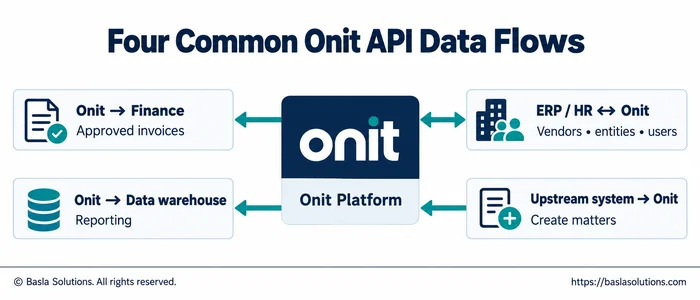
You can use Onit’s APIs to list and update invoices, create and update matters, vendors, users and legal entities, and pull data into finance, HR or reporting systems. Most real projects use it for three jobs: paying invoices, syncing master data, and creating records from upstream systems.
- Finance handoff. Pull approved invoices, mark them sent to AP, posted and paid, and record payments.
- Master data sync. Keep vendors, legal entities, cost codes and users aligned with your ERP and HR systems.
- Record creation. Create matters from another system, such as a claims platform or a CRM.
- Reporting. Extract matter, invoice and accrual data into a data warehouse for analytics.
APIs are now standard plumbing for this kind of work, but full connection is rare. A 2025 benchmark of more than 1,050 IT leaders found 99 percent of organizations use APIs to automate processes, yet only 2 percent have more than half their applications connected. Scope your Onit integrations one flow at a time.
How is the Onit API authenticated?
The Onit API on Unity is authenticated with an API token tied to a dedicated API user, usually holding an administrative role, which Onit generates and provides with your base URL. Keep that token on the server side and never in browser or client code.
For OnitX, the API credentials and setup come through Onit and its customer documentation, so confirm the method for your environment during design. OnitX also makes outbound calls to other systems through configured REST actions. Onit’s own NetDocuments setup, for example, stores the OAuth refresh token in fields on a dedicated App and renews access through a REST action.
Good practice for both:
- One integration user per system. A separate API user for each connected system makes logs readable and lets you revoke one connection without breaking the rest.
- Least privilege. Give the API user only the roles its flow needs.
- Rotation and monitoring. Track token expiry dates and alert before a silent failure stops a nightly sync.
What objects does the Onit API expose?
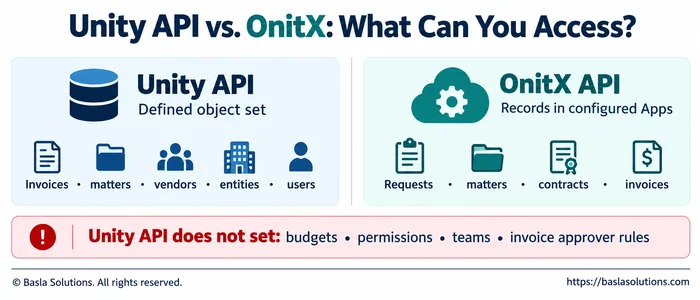
The Unity API exposes invoices, matters, vendors, legal entities, cost codes, custom attributes and list values, users, audit logs and accruals. Some objects are not available through it, so check your flow against the list before you design.
Onit’s Unity API Toolkit lists timekeepers, budgets, CounselGO users, permissions and teams, and invoice approver rules as objects the API cannot set. Those stay as configuration inside the platform. Requests are also absent from the toolkit’s object list.
OnitX is different, because it is built from configurable Apps on Onit’s Apptitude low-code platform. The records available through its API follow the Apps your department has built, such as legal service requests, matters, contracts and invoices. Document your App and field names in an integration register, because they are what the integration actually reads and writes.
How do you read matters and push invoices through the API?
You read matters and invoices by listing them with filters, such as status or date, and paging through the results, and you push invoices to finance by pulling approved ones and updating their status as AP processes them. The invoice status moves from sent to AP, to posted, to paid.
On Unity, the API returns JSON for every response, including errors, and supports retrieving summary or detail PDFs of each invoice for the AP record. Results come back 25 at a time by default, and page sizes above 100 risk timeouts, so keep batches modest.
On OnitX, the pattern is similar with one rule worth knowing: Onit’s AP guidance says integration jobs should read from the Invoice Payment child App and never directly from the Invoices App. In our implementations, the finance side was usually handled by middleware such as Workato or scheduled ETL jobs, which transform the data before it reaches the ERP. Where the ERP’s API was not ready, a flat file over SFTP or a structured email did the same job while the API work finished. The same thinking applies to AP payment file formats for legal invoices.
- Pull, then confirm. Mark each invoice as sent only after the ERP accepts it.
- Write back payment. Record payment details so legal sees paid status without asking finance.
- Log failures. Keep a queue of rejected records with the reason, and review it daily.
How do you create a request or matter through the API?
You create a matter through the API by sending the required matter attributes, such as name, type, legal entity and responsible lawyer, to the matter endpoint, then updating attributes as the source system changes. On Unity, matters can be created and updated through the API.
Requests are a different case. Unity’s toolkit does not list them, and on OnitX they are records in your intake App. In our implementations, most requests came in through the legal front door or by email, and the API and middleware were reserved for system-to-system flows such as AP and HR data.
- Map required fields first. A create call fails if a mandatory attribute or list value is missing.
- Use your own identifiers. Store the source system’s ID on the Onit record so updates find the right matter.
- Validate list values. Matter types, entities and custom list values must already exist in Onit.
Where is the Onit API documentation and what are the limits?
The Unity API is documented in Onit’s Unity API Toolkit, in interactive API reference docs and at developer.simplelegal.com, with a Postman export for sample requests. OnitX API documentation sits in the App Builder API section of Onit’s documentation site.
Onit does not publish rate limits for the Unity API, but pagination limits are clear: 25 records per page by default and no more than 100 per page to avoid timeouts. Treat that as a practical ceiling, and design nightly syncs in batches with retries. The unsupported objects listed earlier are the other real limit, so check them before promising a fully automated flow. For integrations with identity systems, single sign-on is configured separately, as covered in our guide to SSO integration for Onit and SimpleLegal.
Conclusion
The Onit API covers the integrations most departments need: invoices to finance, vendor and user sync, matter creation and reporting. Use a dedicated, least-privilege API user, check the object list before designing, page results in small batches, and lean on middleware or flat files where the other system is not ready. Start with the invoice-to-AP flow, prove it end to end, then add the next one.
How Basla can help
Basla provides delivery teams for Onit implementation, covering business analysis, integration design, API and REST action configuration, middleware and flat-file specifications, data mapping, testing, documentation, and post-go-live support. We bring legal technology services through staff augmentation or a Basla-managed delivery unit, so IT and legal operations agree on each flow before build starts.
Basla teams have delivered Onit integrations with AP systems across UK, US and European entities, with validation gates that stop bad data before it leaves the platform.
Frequently asked questions
Does Onit have a REST API?
Yes, Onit offers a REST API on Unity, which returns JSON for every response, and a RESTful API on OnitX. Both support integrations with finance, HR and other systems.
How is the Onit API authenticated?
On Unity, the API uses an API token tied to a dedicated API user with an administrative role, provided by Onit with your base URL. OnitX credentials come through Onit’s customer documentation.
Can you create a matter through the API?
Yes, Unity’s API supports creating and updating matters. Send the required attributes and store the source system’s ID on the matter so later updates find it.
Where is the Onit API documentation?
Documentation for the Unity API is in the Unity API Toolkit, interactive API docs and developer.simplelegal.com. OnitX documentation is in the App Builder API section of Onit’s documentation site.
Are there rate limits?
Onit does not publish rate limits for the Unity API. Pages default to 25 records, and pages above 100 risk timeouts, so sync in small batches with retries.
*This article is provided for general information only and does not constitute legal advice. Basla Solutions provides legal technology implementation and support services and does not practice law.*